

Expression Trees in C#: Holding a Lambda as Data, and the Bridge to EF Core
The difference between Func and Expression<Func>, looking at the tree's nodes and Compile, building a dynamic filter with Expression factory methods, a small SQL translator with ExpressionVisitor, IQueryable and EF Core 6's ToQueryString output, a captured variable turning into a parameter, the untranslatable method error, limits such as CS0834, CS8072 and CS8110, and the 70-microsecond cost of Compile measured with BenchmarkDotNet.
Version note: The code in this post uses C# 10 and the .NET 6 APIs; it was built and run with the .NET 10 SDK.
Guess First
We assign the very same lambda to two different types: one is Func<Book, bool>, the other Expression<Func<Book, bool>>. Then we print both with Console.WriteLine. Will the two lines be the same?
using System.Linq.Expressions;

Func<Book, bool> asFunc = b => b.Price > 50m;
Expression<Func<Book, bool>> asExpression = b => b.Price > 50m;

Console.WriteLine(asFunc);
Console.WriteLine(asExpression);

public record Book(string Title, decimal Price, int Stock);
In the first post we saw that a delegate's ToString() only gives the type name. Do you have a guess for the second line?
Not Code, but Data
System.Func`2[Book,System.Boolean]
b => (b.Price > 50)
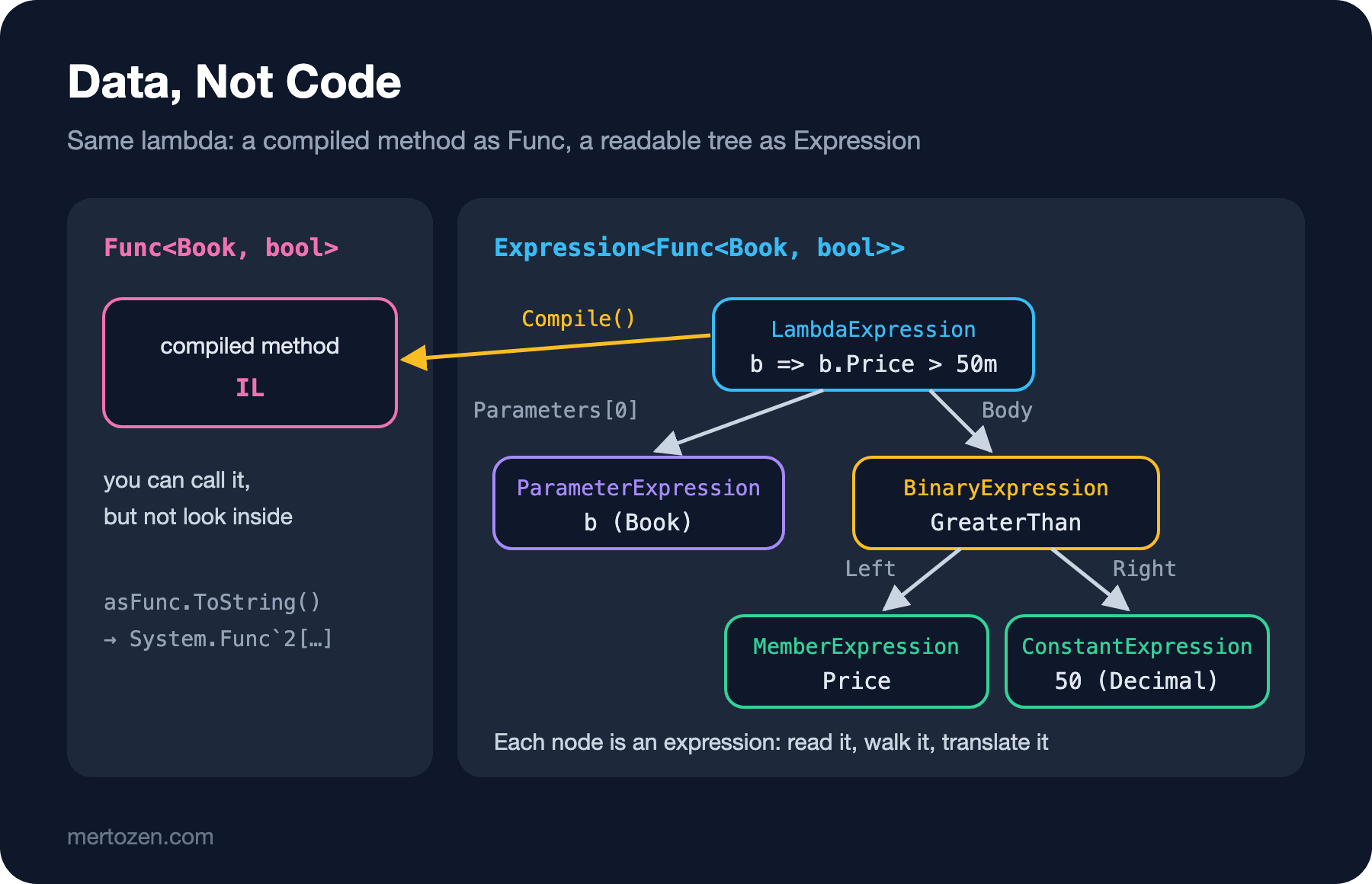
The first line is a delegate: the address of a compiled method, ready to run. There's no way to ask what's written inside it; you can only call it. The second line gave back the lambda itself, in readable form. That's because when a lambda is assigned to an Expression<TDelegate>, the compiler doesn't compile it to IL; instead it generates code that builds a tree describing the lambda. Each node of the tree is an expression: a parameter, a property access, a constant, a comparison. You can look inside this tree:
using System.Linq.Expressions;

Expression<Func<Book, bool>> isExpensive = b => b.Price > 50m;

BinaryExpression body = (BinaryExpression)isExpensive.Body;
MemberExpression left = (MemberExpression)body.Left;
ConstantExpression right = (ConstantExpression)body.Right;

Console.WriteLine($"parameter: {isExpensive.Parameters[0].Name} ({isExpensive.Parameters[0].Type.Name})");
Console.WriteLine($"body: {body.NodeType}");
Console.WriteLine($"left: {left.NodeType} -> {left.Member.Name}");
Console.WriteLine($"right: {right.NodeType} -> {right.Value} ({right.Type.Name})");

Func<Book, bool> compiled = isExpensive.Compile();
Console.WriteLine(compiled(new Book("Dune", 45.90m, 3)));
Console.WriteLine(compiled(new Book("TAOCP Box Set", 249.00m, 2)));

public record Book(string Title, decimal Price, int Stock);
parameter: b (Book)
body: GreaterThan
left: MemberAccess -> Price
right: Constant -> 50 (Decimal)
False
TrueThe root of the tree is a LambdaExpression: a parameter list and a body. The body is a BinaryExpression of type GreaterThan; on its left is a MemberExpression accessing the Price property, on its right a ConstantExpression holding the value 50 of type decimal. Think of a recipe: the delegate is the cooked dish, the expression tree is the recipe. You can eat the dish but you can't read its ingredients; the recipe you can read, change, translate into another kitchen's language, or finally cook with Compile().
Building the Tree by Hand: A Dynamic Filter
You can do what the compiler does. With the static factory methods of the Expression class you build the tree piece by piece. The real-life counterpart is turning a filter the user picked on a screen into a query at runtime. The property name and value arrive as text; you can't know at compile time which combination will be chosen:
using System.Globalization;
using System.Linq.Expressions;

CultureInfo.CurrentCulture = CultureInfo.InvariantCulture;

List<Book> books = new List<Book>
{
    new Book("Dune", 45.90m, 3),
    new Book("Clean Code", 62.00m, 0),
    new Book("Refactoring", 58.50m, 12)
};

// the filter the user picked: property name, operator and value arrive as text
(string Property, string Operator, string Value)[] filters =
{
    ("Price", ">", "50"),
    ("Stock", "==", "0")
};

foreach ((string property, string op, string value) in filters)
{
    Expression<Func<Book, bool>> filter = BuildFilter<Book>(property, op, value);
    Func<Book, bool> predicate = filter.Compile();
    Console.WriteLine($"{filter}: {string.Join(", ", books.Where(predicate).Select(b => b.Title))}");
}

static Expression<Func<T, bool>> BuildFilter<T>(string propertyName, string op, string value)
{
    ParameterExpression item = Expression.Parameter(typeof(T), "item");
    MemberExpression property = Expression.Property(item, propertyName);
    object typedValue = Convert.ChangeType(value, property.Type, CultureInfo.InvariantCulture);
    ConstantExpression constant = Expression.Constant(typedValue, property.Type);

    Expression body = op switch
    {
        ">" => Expression.GreaterThan(property, constant),
        "<" => Expression.LessThan(property, constant),
        "==" => Expression.Equal(property, constant),
        _ => throw new NotSupportedException($"Operator '{op}' is not supported.")
    };

    return Expression.Lambda<Func<T, bool>>(body, item);
}

public record Book(string Title, decimal Price, int Stock);
item => (item.Price > 50): Clean Code, Refactoring
item => (item.Stock == 0): Clean CodeThe reflection from the previous post is here too: Expression.Property finds the property by name, and with property.Type we learn its type and convert the text to decimal or int. The difference is that with reflection we did a GetValue on every call, while here we compile the tree once and get an ordinary delegate. More importantly, you can also hand the same Expression<Func<Book, bool>> to a database query without compiling it. We'll do that with EF Core shortly.
Walking the Tree with ExpressionVisitor
What a LINQ provider such as EF Core does is, at its core, this: walk the expression tree node by node and translate each node into the target language. .NET provides the ExpressionVisitor base class for this walk; it has a VisitXxx method you can override for each node type. Let's write a very small SQL translator:
using System.Globalization;
using System.Linq.Expressions;
using System.Text;

decimal maxPrice = 30m;

Console.WriteLine(WhereTranslator.Translate(b => b.Price > 50m && b.Stock > 0));
Console.WriteLine(WhereTranslator.Translate(b => b.Author == "Frank Herbert" || b.Price < maxPrice));

try
{
    Console.WriteLine(WhereTranslator.Translate(b => b.Title.StartsWith("D")));
}
catch (NotSupportedException ex)
{
    Console.WriteLine($"not supported: {ex.Message}");
}

public record Book(string Title, string Author, decimal Price, int Stock);

public class WhereTranslator : ExpressionVisitor
{
    private readonly StringBuilder _sql = new StringBuilder();

    public static string Translate(Expression<Func<Book, bool>> predicate)
    {
        WhereTranslator translator = new WhereTranslator();
        translator.Visit(predicate.Body);
        return "WHERE " + translator._sql;
    }

    protected override Expression VisitBinary(BinaryExpression node)
    {
        _sql.Append('(');
        Visit(node.Left);
        _sql.Append(node.NodeType switch
        {
            ExpressionType.AndAlso => " AND ",
            ExpressionType.OrElse => " OR ",
            ExpressionType.Equal => " = ",
            ExpressionType.NotEqual => " <> ",
            ExpressionType.GreaterThan => " > ",
            ExpressionType.LessThan => " < ",
            _ => throw new NotSupportedException($"Operator {node.NodeType} is not supported.")
        });
        Visit(node.Right);
        _sql.Append(')');
        return node;
    }

    protected override Expression VisitMember(MemberExpression node)
    {
        // a property of the parameter: a column name
        if (node.Expression is ParameterExpression)
        {
            _sql.Append(node.Member.Name);
            return node;
        }

        // a captured variable: compute its value
        object? value = Expression.Lambda(node).Compile().DynamicInvoke();
        AppendValue(value);
        return node;
    }

    protected override Expression VisitConstant(ConstantExpression node)
    {
        AppendValue(node.Value);
        return node;
    }

    protected override Expression VisitMethodCall(MethodCallExpression node)
    {
        throw new NotSupportedException($"Method {node.Method.Name} is not supported.");
    }

    private void AppendValue(object? value)
    {
        _sql.Append(value switch
        {
            null => "NULL",
            string text => $"'{text.Replace("'", "''")}'",
            IFormattable number => number.ToString(null, CultureInfo.InvariantCulture),
            _ => value.ToString()
        });
    }
}
WHERE ((Price > 50) AND (Stock > 0))
WHERE ((Author = 'Frank Herbert') OR (Price < 30))
not supported: Method StartsWith is not supported.A small class translated C# lambdas into SQL. && became an AndAlso node, == became Equal, and properties turned into column names. maxPrice in the second query is interesting: because the lambda captured it, it doesn't sit in the tree as a constant but as an access to a field of the display class we saw in the second post. The translator saw that this node belongs not to the parameter but to some other object, and computed its value. StartsWith, on the other hand, it doesn't recognize, and it says so clearly; that's exactly what a real provider does when it meets a method it doesn't know.
This translator embeds values in the SQL text and does no protection beyond escaping quotes; it's enough for learning, not for production. Real providers send values as parameters. We'll see that now.
IQueryable and EF Core: Same Lambda, Two Paths
The two faces of LINQ meet here. Enumerable.Where takes a Func<T, bool> and walks an in-memory collection item by item. Queryable.Where takes an Expression<Func<T, bool>> and doesn't run it; it adds a node to the query's tree. When you write the lambda, it isn't you who decides which one gets picked but the type of the source: on an IQueryable<T>, the compiler turns your lambda into an expression tree. Let's see it with EF Core. ToQueryString() produces the SQL but doesn't connect to the database; that's why the example runs without needing a SQL Server:
using System.ComponentModel.DataAnnotations;
using Microsoft.EntityFrameworkCore;

using BookstoreContext db = new BookstoreContext();

decimal minPrice = 50m;
IQueryable<Book> query = db.Books
    .Where(b => b.Price > minPrice && b.Stock > 0)
    .OrderBy(b => b.Title);

Console.WriteLine(query.Expression);
Console.WriteLine();
Console.WriteLine(query.ToQueryString());
Console.WriteLine();

try
{
    Console.WriteLine(db.Books.Where(b => BookRules.IsBestseller(b)).ToQueryString());
}
catch (InvalidOperationException ex)
{
    Console.WriteLine(ex.Message);
}

public class Book
{
    public int Id { get; set; }
    public string Title { get; set; } = "";

    [Precision(10, 2)]
    public decimal Price { get; set; }

    public int Stock { get; set; }
}

public static class BookRules
{
    public static bool IsBestseller(Book book) => book.Stock > 100;
}

public class BookstoreContext : DbContext
{
    public DbSet<Book> Books => Set<Book>();

    protected override void OnConfiguring(DbContextOptionsBuilder options)
    {
        options.UseSqlServer("Server=localhost;Database=Bookstore;Trusted_Connection=True");
    }
}
[Microsoft.EntityFrameworkCore.Query.QueryRootExpression].Where(b => ((b.Price > value(Program+<>c__DisplayClass0_0).minPrice) AndAlso (b.Stock > 0))).OrderBy(b => b.Title)
DECLARE @__minPrice_0 decimal(10,2)(10) = 50.0;
SELECT [b].[Id], [b].[Price], [b].[Stock], [b].[Title]
FROM [Books] AS [b]
WHERE ([b].[Price] > @__minPrice_0) AND ([b].[Stock] > 0)
ORDER BY [b].[Title]
The LINQ expression 'DbSet<Book>()
.Where(b => BookRules.IsBestseller(b))' could not be translated. Either rewrite the query in a form that can be translated, or switch to client evaluation explicitly by inserting a call to 'AsEnumerable', 'AsAsyncEnumerable', 'ToList', or 'ToListAsync'. See https://go.microsoft.com/fwlink/?linkid=2101038 for more information.We used EF Core 6.0.36 in this net6.0 project. The first output is query.Expression: the Where and OrderBy calls piled up in a single tree without running anything. value(Program+<>c__DisplayClass0_0).minPrice is, once more, the captured variable's field in the display class. Like our translator, EF Core recognized this node, but instead of embedding the value in the SQL it turned it into a parameter named @__minPrice_0. Besides protecting against SQL injection, this lets the database reuse the query plan when the same query runs with a different minPrice. The way the type is written on the DECLARE line is a quirk of EF Core 6's ToQueryString output; the actual query is sent with a parameter.
The second query couldn't be translated. IsBestseller is a C# method; EF Core can't see its body, the tree only has a MethodCallExpression saying "call this method", and there's no equivalent in SQL. The fix is either to write the condition directly in the query (b.Stock > 100), or to define the rule as an Expression<Func<Book, bool>> and give that to Where. We covered this distinction and client evaluation in detail in the LINQ queries post of the EF Core series.
The Limits of Expression Trees
Not every lambda can become an expression tree. The tree represents an older, limited subset of the language:
using System.Linq.Expressions;

Expression<Func<Book, bool>> withBody = b =>
{
    return b.Price > 50m;
};

public record Book(string Title, decimal Price, int Stock);
Program.cs(3,41): error CS0834: A lambda expression with a statement body cannot be converted to an expression treeA statement lambda with braces isn't allowed; it has to be a single expression. Other restrictions I tried: error CS8072: An expression tree lambda may not contain a null propagating operator. for b.Subtitle?.Length, error CS8122: An expression tree may not contain an 'is' pattern-matching operator. for b.Price is > 50m and < 100m, CS8514 for a switch expression, and CS8143 for a tuple literal like (b.Title, b.Stock). In my first attempt at the EF Core example I had written IsBestseller as a local function in the top-level code; it was rejected too, with error CS8110: An expression tree may not contain a reference to a local function, so I moved it to a static class. The set of language features the compiler can turn into an expression tree hasn't grown for a long time; later arrivals such as ?. and pattern matching didn't make the list. That's why in an EF Core query you have to write b.Subtitle != null ? ... : ... instead of ?..
The Cost of Compile
Compile() turns the tree into IL at runtime and runs it through the JIT; that's not cheap. With BenchmarkDotNet I compared an ordinary lambda, a tree compiled once and kept, and a tree recompiled on every call:
[MemoryDiagnoser]
[InProcess]
public class CompileBenchmarks
{
    private readonly Book _book = new Book("Dune", 45.90m, 3);
    private readonly Func<Book, bool> _lambda = b => b.Price > 50m && b.Stock > 0;
    private readonly Expression<Func<Book, bool>> _expression = b => b.Price > 50m && b.Stock > 0;
    private readonly Func<Book, bool> _compiled;

    public CompileBenchmarks()
    {
        _compiled = _expression.Compile();
    }

    [Benchmark(Baseline = true)]
    public bool Lambda() => _lambda(_book);

    [Benchmark]
    public bool CachedCompiled() => _compiled(_book);

    [Benchmark]
    public bool CompileEveryTime() => _expression.Compile()(_book);
}
BenchmarkDotNet v0.15.8, macOS 27.0.1 (26A434) [Darwin 27.0.0]
Apple M5, 1 CPU, 10 logical and 10 physical cores
.NET SDK 10.0.402
[Host] : .NET 8.0.25 (8.0.25, 8.0.2526.11203), Arm64 RyuJIT armv8.0-a
| Method | Mean | Error | StdDev | Ratio | RatioSD | Gen0 | Gen1 | Allocated | Alloc Ratio |
|----------------- |--------------:|--------------:|--------------:|----------:|---------:|-------:|-------:|----------:|------------:|
| Lambda | 2.099 ns | 0.0038 ns | 0.0033 ns | 1.00 | 0.00 | - | - | - | NA |
| CachedCompiled | 1.863 ns | 0.0025 ns | 0.0021 ns | 0.89 | 0.00 | - | - | - | NA |
| CompileEveryTime | 70,188.028 ns | 1,386.5887 ns | 2,984.7786 ns | 33,432.53 | 1,410.81 | 0.4883 | 0.2441 | 4836 B | NA |As in the previous post, the project targets net6.0 and ran in-process in Release mode on .NET 8.0.25 via roll-forward. A tree compiled once is as fast as an ordinary lambda, even slightly faster in the measurement; a sub-nanosecond difference like this doesn't matter in practice. Compiling on every call, on the other hand, costs about 70 microseconds and 4.8 KB of allocation; more than thirty thousand times the ordinary call. The rule is the same as with reflection: build the tree, compile it once, keep the delegate. That's also why EF Core caches the queries it translates.
Common Pitfalls
Accidentally turning an IQueryable into an IEnumerable. If a repository method returns IEnumerable<Book>, the Where the caller adds becomes Enumerable.Where: the whole table is pulled into memory and the filter runs in C#. The code compiles, the tests pass, and it only gets slow in production.
Calling an untranslatable method in a query. As in the IsBestseller example, a perfectly valid C# method may not translate to SQL. The error comes not at compile time but when the query runs.
Compiling on every request. Rebuilding and compiling a dynamic filter on every request adds the 70 microseconds we measured to each one. If the same filter repeats, keep the compiled delegate under a key.
Using expression trees when you don't need them. If you're not writing a LINQ provider, building a dynamic query or inspecting an expression, a plain Func is enough. Expression trees give flexibility and take back readability and speed.
A Small Experiment
★☆☆ Add the ">=" and "!=" operators to BuildFilter (Expression.GreaterThanOrEqual, Expression.NotEqual), and write a Combine method that joins two filters with Expression.AndAlso.
★★☆ Add StartsWith support to WhereTranslator: in VisitMethodCall, if the method name is StartsWith, produce Title LIKE 'D%'. Think about how you should handle a % character in the argument.
★★★ In the EF Core example, redefine IsBestseller as public static Expression<Func<Book, bool>> IsBestseller => b => b.Stock > 100;, use it with db.Books.Where(BookRules.IsBestseller), and see the WHERE line appear in the ToQueryString() output.
With this post we've reached the end of the road that started in the first one: from carrying a method around as a value, to holding the same lambda as data to inspect. In the next post we turn toward memory: working on strings and byte arrays without allocations using Span<T> and Memory<T>.