

Events in C#: EventHandler, Safe Raising and Subscription Leaks
How the event keyword protects a delegate and CS0070, the private field and add/remove methods the compiler generates, the EventHandler convention and records as event data, safe raising with ?.Invoke, custom add/remove accessors and CS0079, a 50 MB subscription leak measured with WeakReference, and a Subscribe method that returns IDisposable.
Version note: The code in this post uses C# 10 and the .NET 6 APIs; it was built and run with the .NET 10 SDK.
Guess First
Catalog sends notifications in two ways: one is an ordinary public delegate field, the other is an event of the same type. Outside code subscribes to both, then tries to reset both and raise them on its own. Which of lines A, B, C and D compile?
Catalog catalog = new Catalog();
catalog.PriceChangedField += title => Console.WriteLine($"field: {title}");
catalog.PriceChangedEvent += title => Console.WriteLine($"event: {title}");

catalog.PriceChangedField = null; // A
catalog.PriceChangedField?.Invoke("Fake"); // B
catalog.PriceChangedEvent = null; // C
catalog.PriceChangedEvent?.Invoke("Fake"); // D

public class Catalog
{
    public Action<string>? PriceChangedField;
    public event Action<string>? PriceChangedEvent;
}
The only difference between the two declarations is the word event. What that word changes is the first topic of this post.
What the event Keyword Protects
A and B compile, C and D don't:
Program.cs(7,9): error CS0070: The event 'Catalog.PriceChangedEvent' can only appear on the left hand side of += or -= (except when used from within the type 'Catalog')
Program.cs(8,9): error CS0070: The event 'Catalog.PriceChangedEvent' can only appear on the left hand side of += or -= (except when used from within the type 'Catalog')
With the field version, any outside code can wipe out every subscriber in one line with = null, or raise the notification itself when the price never changed and mislead everyone. There's a more innocent but equally harmful mistake too: typing = instead of += silently removes every subscriber added so far. The event keyword builds a wall around the delegate: outsiders can only subscribe (+=) and unsubscribe (-=); changing the list and raising the event are left to the type itself.
How does the compiler do this? Let's look with reflection:
using System.Reflection;

Type type = typeof(Catalog);

EventInfo info = type.GetEvent("PriceChanged")!;
Console.WriteLine(info.AddMethod!.Name);
Console.WriteLine(info.RemoveMethod!.Name);

FieldInfo field = type.GetField("PriceChanged", BindingFlags.NonPublic | BindingFlags.Instance)!;
Console.WriteLine($"{field.Name}: {field.FieldType.Name}, private: {field.IsPrivate}");

public class Catalog
{
    public event EventHandler? PriceChanged;

    public void Raise() => PriceChanged?.Invoke(this, EventArgs.Empty);
}
add_PriceChanged
remove_PriceChanged
PriceChanged: EventHandler, private: TrueThe one-line event declaration turned into three things: a private delegate field with the same name, an add_PriceChanged method and a remove_PriceChanged method. An outside += really calls the add_ method, and -= calls the remove_ method. Just as a property wraps a field with get/set, an event wraps a delegate with add/remove. Events written like this, without a body, are called field-like events. The add/remove the compiler generates are thread-safe; when two threads subscribe at the same moment, no subscriber gets lost.
The EventHandler Convention
In the guess example the event's type was Action<string>. It compiles, but it's not the shape the .NET world expects. Let's take the convention we saw in the design patterns post one step further:
using System.Globalization;

CultureInfo.CurrentCulture = CultureInfo.InvariantCulture;

Catalog catalog = new Catalog();
catalog.PriceChanged += PrintChange;
catalog.Cleared += (sender, e) => Console.WriteLine($"cleared by {sender?.GetType().Name}, empty args: {e == EventArgs.Empty}");

catalog.SetPrice("Dune", 45.90m);
catalog.SetPrice("Dune", 39.90m);
catalog.SetPrice("Dune", 39.90m);
catalog.Clear();

static void PrintChange(object? sender, PriceChange e)
{
    Console.WriteLine($"{e.Title}: {e.OldPrice} -> {e.NewPrice}");
}

// doesn't have to derive from EventArgs
public record PriceChange(string Title, decimal OldPrice, decimal NewPrice);

public class Catalog
{
    private readonly Dictionary<string, decimal> _prices = new Dictionary<string, decimal>();

    public event EventHandler<PriceChange>? PriceChanged;
    public event EventHandler? Cleared;

    public void SetPrice(string title, decimal price)
    {
        _prices.TryGetValue(title, out decimal oldPrice);
        if (oldPrice == price)
        {
            return;
        }

        _prices[title] = price;
        OnPriceChanged(new PriceChange(title, oldPrice, price));
    }

    public void Clear()
    {
        _prices.Clear();
        OnCleared();
    }

    protected virtual void OnPriceChanged(PriceChange e) => PriceChanged?.Invoke(this, e);

    protected virtual void OnCleared() => Cleared?.Invoke(this, EventArgs.Empty);
}
Dune: 0 -> 45.90
Dune: 45.90 -> 39.90
cleared by Catalog, empty args: TrueThe parts of the convention: the delegate type is EventHandler or EventHandler<T>; the first parameter is the object raising the event (sender), the second is the event data. When there's no data to carry, you use EventHandler and EventArgs.Empty; there's no need to create a new empty object each time. The code that raises the event lives in a protected virtual method named OnXxx, so a derived class can step into the raising behavior with override. The event's name also tells that something happened: PriceChanged, Cleared. For events raised just before something happens, a name like PriceChanging is used.
Event data used to be required to derive from EventArgs; .NET Framework 4.5 removed that constraint from EventHandler<TEventArgs>. The PriceChange above is a plain record and compiles fine. An immutable record with value equality is a good choice for event data: one subscriber can't change the data and surprise the next. Also notice that the third SetPrice call produced no output; if the price didn't change, saying "it changed" would be wrong.
Raising an Event Safely
An event with no subscribers is null; that's why we always used ?.Invoke to raise it. In older code you'll see this pattern instead:
EventHandler<PriceChange>? handler = PriceChanged;
if (handler != null)
{
    handler(this, e);
}
Why copy it to a local first? In a multithreaded application, if you write if (PriceChanged != null) PriceChanged(this, e);, another thread can remove the last subscriber between the null check and the call, and you end up calling a null delegate. The local copy reads the field once; since delegates are immutable, no other thread can change that copy. ?.Invoke does exactly this in one line: it reads the field once and, if it's not null, calls the value it read. This has a consequence too: a subscriber that just unsubscribed may still be called by a raise that had already started. Write your handlers to tolerate that.
Don't forget that events run synchronously. SetPrice doesn't return until every subscriber is done, and an exception thrown by one subscriber stops the later ones from being called and travels up to the code that called SetPrice. It's the same behavior we saw with multicast delegates in the first post; if subscribers need to be isolated from each other, you call them one by one via GetInvocationList().
Writing add and remove Yourself
Just as you can write get/set yourself on properties, you can write add/remove yourself on events. People do this to log subscriptions, forward subscribers to another object, or store hundreds of events in a single dictionary:
using System.Globalization;

CultureInfo.CurrentCulture = CultureInfo.InvariantCulture;

Catalog catalog = new Catalog();
CartView view = new CartView();

catalog.PriceChanged += view.OnPriceChanged;
catalog.PriceChanged += view.OnPriceChanged;
Console.WriteLine($"subscribers: {catalog.SubscriberCount}");

catalog.SetPrice("Dune", 39.90m);

catalog.PriceChanged -= view.OnPriceChanged;
catalog.PriceChanged -= view.OnPriceChanged;
Console.WriteLine($"subscribers: {catalog.SubscriberCount}");

public record PriceChange(string Title, decimal NewPrice);

public class CartView
{
    public void OnPriceChanged(object? sender, PriceChange e)
    {
        Console.WriteLine($"cart refreshed: {e.Title} {e.NewPrice}");
    }
}

public class Catalog
{
    private EventHandler<PriceChange>? _priceChanged;

    public int SubscriberCount => _priceChanged?.GetInvocationList().Length ?? 0;

    public event EventHandler<PriceChange>? PriceChanged
    {
        add
        {
            Console.WriteLine($"add: {value?.Method.Name}");
            _priceChanged += value;
        }
        remove
        {
            Console.WriteLine($"remove: {value?.Method.Name}");
            _priceChanged -= value;
        }
    }

    public void SetPrice(string title, decimal price)
    {
        // the field behind the event is raised, not the event itself
        _priceChanged?.Invoke(this, new PriceChange(title, price));
    }
}
add: OnPriceChanged
add: OnPriceChanged
subscribers: 2
cart refreshed: Dune 39.90
cart refreshed: Dune 39.90
remove: OnPriceChanged
remove: OnPriceChanged
subscribers: 0value is the delegate being added or removed. When you write the accessors yourself, the compiler doesn't generate a field behind them; storing the delegate is your job. That's also why you can't raise the event from inside the class: write PriceChanged?.Invoke(...) in SetPrice and the compiler says error CS0079: The event 'Catalog.PriceChanged' can only appear on the left hand side of += or -=. You also lose something: the simple add/remove above isn't thread-safe the way the compiler-generated ones are. If you need that, protect them with a lock.
The output also shows a trap: when the same handler subscribed twice, it was called twice. Events don't block duplicate subscribers. Subscribing in a screen's constructor and resubscribing to the same publisher every time the screen opens is the most common source of this double call.
Seeing the Leak
In the first post we saw that a delegate holds a reference to an object through Target, and in the second that a lambda can capture this. With events, this means the publisher keeps its subscriber alive. Let's measure it with a price feed that lives for the whole application and screens that get closed:
using System.Globalization;
using System.Runtime.CompilerServices;

CultureInfo.CurrentCulture = CultureInfo.InvariantCulture;

PriceFeed feed = new PriceFeed();

WeakReference leaked = OpenAndCloseView(feed, dispose: false);
WeakReference cleaned = OpenAndCloseView(feed, dispose: true);

GC.Collect();
GC.WaitForPendingFinalizers();
GC.Collect();

Console.WriteLine($"closed without Dispose, alive: {leaked.IsAlive}");
Console.WriteLine($"closed with Dispose, alive: {cleaned.IsAlive}");
Console.WriteLine($"subscribers: {feed.SubscriberCount}");

feed.Publish("Dune", 39.90m);

long before = GC.GetTotalMemory(forceFullCollection: true);
for (int i = 0; i < 50; i++)
{
    OpenAndCloseView(feed, dispose: false);
}
long after = GC.GetTotalMemory(forceFullCollection: true);
Console.WriteLine($"50 more views closed without Dispose: +{(after - before) / 1_000_000} MB, subscribers: {feed.SubscriberCount}");

[MethodImpl(MethodImplOptions.NoInlining)]
static WeakReference OpenAndCloseView(PriceFeed feed, bool dispose)
{
    CartView view = new CartView(feed);
    if (dispose)
    {
        view.Dispose();
    }
    return new WeakReference(view);
}

public record PriceChange(string Title, decimal NewPrice);

public class PriceFeed
{
    public event EventHandler<PriceChange>? PriceChanged;

    public int SubscriberCount => PriceChanged?.GetInvocationList().Length ?? 0;

    public void Publish(string title, decimal price) => PriceChanged?.Invoke(this, new PriceChange(title, price));
}

public sealed class CartView : IDisposable
{
    private static int _nextId;

    private readonly PriceFeed _feed;
    private readonly int _id = ++_nextId;
    private readonly byte[] _renderCache = new byte[1_000_000];

    public CartView(PriceFeed feed)
    {
        _feed = feed;
        _feed.PriceChanged += OnPriceChanged;
    }

    private void OnPriceChanged(object? sender, PriceChange e)
    {
        Console.WriteLine($"view {_id} refreshed: {e.Title} {e.NewPrice}");
    }

    public void Dispose()
    {
        _feed.PriceChanged -= OnPriceChanged;
    }
}
closed without Dispose, alive: True
closed with Dispose, alive: False
subscribers: 1
view 1 refreshed: Dune 39.90
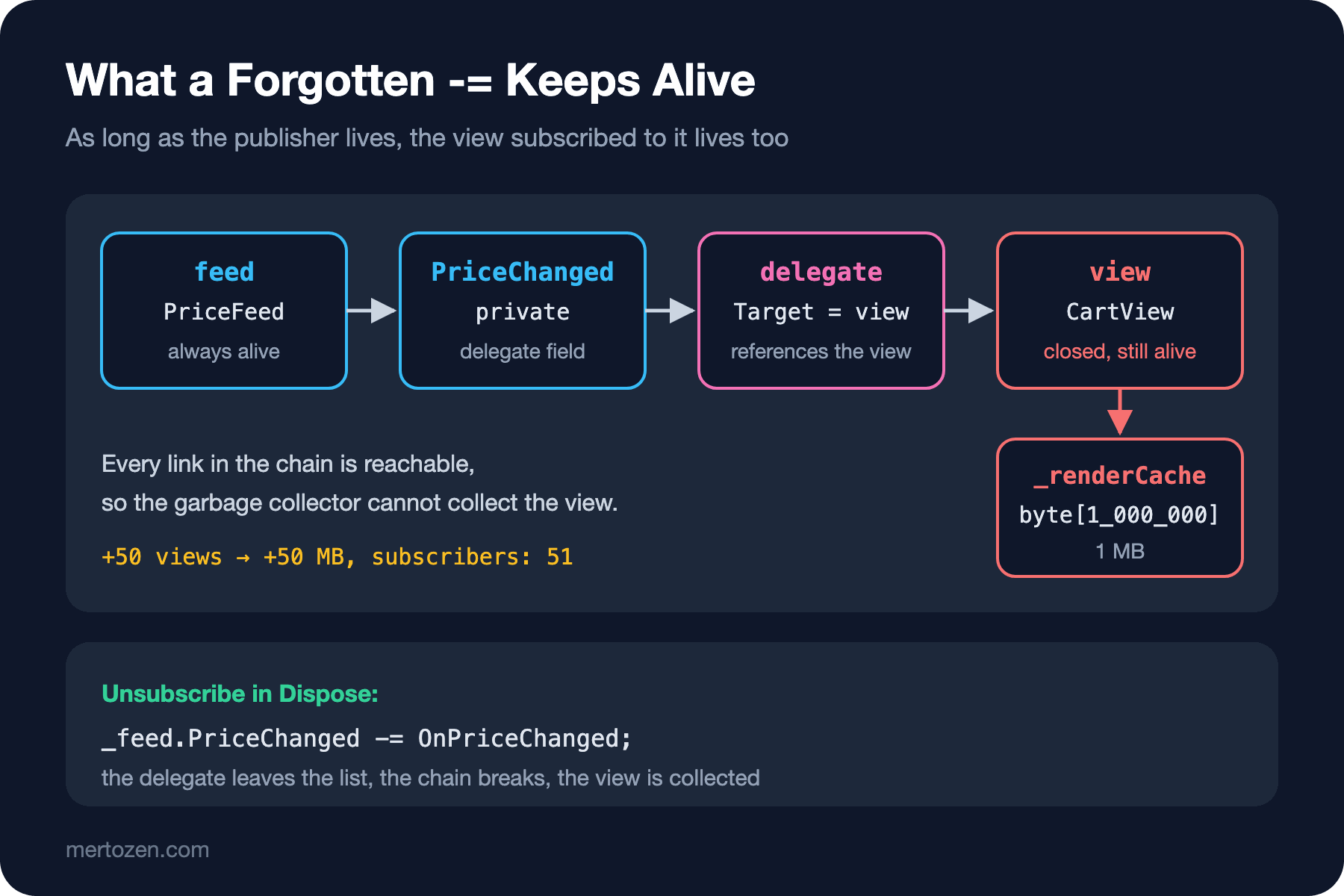
50 more views closed without Dispose: +50 MB, subscribers: 51WeakReference lets us look at an object without keeping it alive; IsAlive tells whether the garbage collector has collected it. We made OpenAndCloseView a separate, non-inlined method so that no local reference to the screen object remains in our code. After a full GC, the screen that was disposed got collected and the one that wasn't is still alive. And it's not just alive, it's working: closed screen number 1 refreshed itself when the price changed. In a real application this means a closed screen hitting the database or writing to the log.
The chain goes like this: feed is alive, its private delegate field is alive, the delegate's Target points at the screen, and the screen at its 1 MB cache. Opening and closing fifty more screens grew memory by 50 MB and brought the subscriber count to 51. The garbage collector isn't making a mistake here; it must not collect a reachable object. The leak is a forgotten -=.
Managing Subscriptions
The rule is simple: if the subscriber lives shorter than the publisher, it must unsubscribe when it's done. Instead of leaving that to memory, you can turn the subscription into an object. Subscribe returns an IDisposable, and disposing it means unsubscribing:
using System.Globalization;

CultureInfo.CurrentCulture = CultureInfo.InvariantCulture;

PriceFeed feed = new PriceFeed();

using (IDisposable subscription = feed.Subscribe((_, e) => Console.WriteLine($"badge: {e.Title} {e.NewPrice}")))
{
    feed.Publish("Dune", 39.90m);
    Console.WriteLine($"inside using: {feed.SubscriberCount}");
}

feed.Publish("Dune", 35.00m);
Console.WriteLine($"after using: {feed.SubscriberCount}");

public record PriceChange(string Title, decimal NewPrice);

public class PriceFeed
{
    public event EventHandler<PriceChange>? PriceChanged;

    public int SubscriberCount => PriceChanged?.GetInvocationList().Length ?? 0;

    public void Publish(string title, decimal price) => PriceChanged?.Invoke(this, new PriceChange(title, price));

    public IDisposable Subscribe(EventHandler<PriceChange> handler)
    {
        PriceChanged += handler;
        return new Subscription(() => PriceChanged -= handler);
    }

    private sealed class Subscription : IDisposable
    {
        private Action? _unsubscribe;

        public Subscription(Action unsubscribe)
        {
            _unsubscribe = unsubscribe;
        }

        public void Dispose()
        {
            // a second Dispose should do nothing
            _unsubscribe?.Invoke();
            _unsubscribe = null;
        }
    }
}
badge: Dune 39.90
inside using: 1
after using: 0We subscribed with a lambda and had no trouble, because we use the same delegate when unsubscribing: the handler variable is kept inside Subscription through a closure. IObservable<T>.Subscribe in the BCL has the same shape, and System.Reactive is built on that interface. A screen or a background service can collect its subscriptions in a list and dispose them all in its own Dispose. Some UI frameworks, WPF for example, also offer weak event solutions to this problem; but the most readable solution is still an explicit unsubscribe.
Common Pitfalls
Subscribing to a static event with a short-lived object. The publisher of a static event lives until the application shuts down, and so does every object subscribed to it. When you see a static event, the first thing to look for is where the unsubscribe happens.
Subscribing more than once. Remember the double call above. Know how many times the subscribing code runs; if needed, doing a -= once before subscribing is harmless, since nothing happens if the handler isn't in the list.
async void in an event handler. Event handlers are the one place where async void is accepted, but an unhandled exception inside one can crash the process, and the publisher can't know when the handler finished. We'll go through it in detail in the async void post of the Asynchronous Programming series.
Imitating an event with a public delegate field. Lines A and B of the guess example compiled; any outside code can wipe your subscriber list. If you're publishing notifications, don't forget the event keyword.
A Small Experiment
★☆☆ Add a PriceChanging event to Catalog that's raised before the price changes, and see the order of the two events in the output.
★★☆ Add a bool Cancel property to the PriceChanging data. Let one of the subscribers block a price drop of more than half with Cancel = true, and have SetPrice leave the price unchanged in that case. Why did you need a mutable class instead of a record here?
★★★ In the leak example, replace the += in CartView's constructor with feed.Subscribe(...), keep the returned IDisposable in a field, and dispose it in Dispose. Then run the 50-screen loop with dispose: true and measure that the memory growth is gone.
In this post we carried event data with records. The most powerful tool C# has for making decisions by looking inside records, and types in general, is pattern matching. In the next post we open up pattern matching in depth: property, positional and tuple patterns, switch expressions combined with relational and logical patterns, and exhaustiveness warnings.