

Equality and Comparison in C#: Equals, GetHashCode, IEquatable and IComparable

Reference and value equality, the Equals and GetHashCode contract, IEquatable<T> and the == operator, equality in structs, sorting with IComparable<T>, and comparers that decide from the outside.
Version note: The code in this post uses C# 10 and the .NET 6 APIs; it was built and run with the .NET 10 SDK.
Guess First
We add two books with the same ISBN to a HashSet<Book>. The whole job of a HashSet is to prevent duplicates. So what is Count, and what does Contains return?
var books = new HashSet<Book>
{
    new Book("978-0441013593", "Dune"),
    new Book("978-0441013593", "Dune")
};

Console.WriteLine(books.Count);
Console.WriteLine(books.Contains(new Book("978-0441013593", "Dune")));

public class Book
{
    public Book(string isbn, string title)
    {
        Isbn = isbn;
        Title = title;
    }

    public string Isbn { get; }
    public string Title { get; }
}
Two Kinds of Equality
Output:
2
False
The HashSet accepted both books, and searching with a third Book found neither. That is because Book is a class, and on classes the default meaning of equality is reference equality: two variables are equal if they point to the same object in memory. Three separate new calls mean three separate objects; having the same values changes nothing.
On the other side is value equality: two things are equal if their contents are the same. In the previous post we saw that a record gives us this out of the box. string uses value equality too, even though it is a reference type; "Dune" == "Du" + "ne" is true because .NET overrides Equals and == for string.
Which equality is right is a business decision. What makes two books "the same" for a bookstore? In this post our answer is the ISBN: the same ISBN means the same book, and a spelling difference in the title or a price change does not change the book's identity. Let's put that into code.
Equals and GetHashCode Come Together
The first thing that comes to mind is overriding Equals(object?):
var a = new Book("978-0441013593", "Dune");
var b = new Book("978-0441013593", "Dune");
Console.WriteLine(a.Equals(b));

public class Book
{
    public Book(string isbn, string title)
    {
        Isbn = isbn;
        Title = title;
    }

    public string Isbn { get; }
    public string Title { get; }

    public override bool Equals(object? obj) => obj is Book other && Isbn == other.Isbn;
}
Program.cs(5,14): warning CS0659: 'Book' overrides Object.Equals(object o) but does not override Object.GetHashCode()The program prints True, but the compiler is right to warn. When HashSet and Dictionary look for an object, they first use GetHashCode() to find which "bucket" to look in, and then call Equals only for the items in that bucket. Think of it as a shelf number in a library: first you check which shelf the book is on, then you compare the books on that shelf one by one. If two equal objects produce different hash codes, they go to different shelves and Equals is never called.
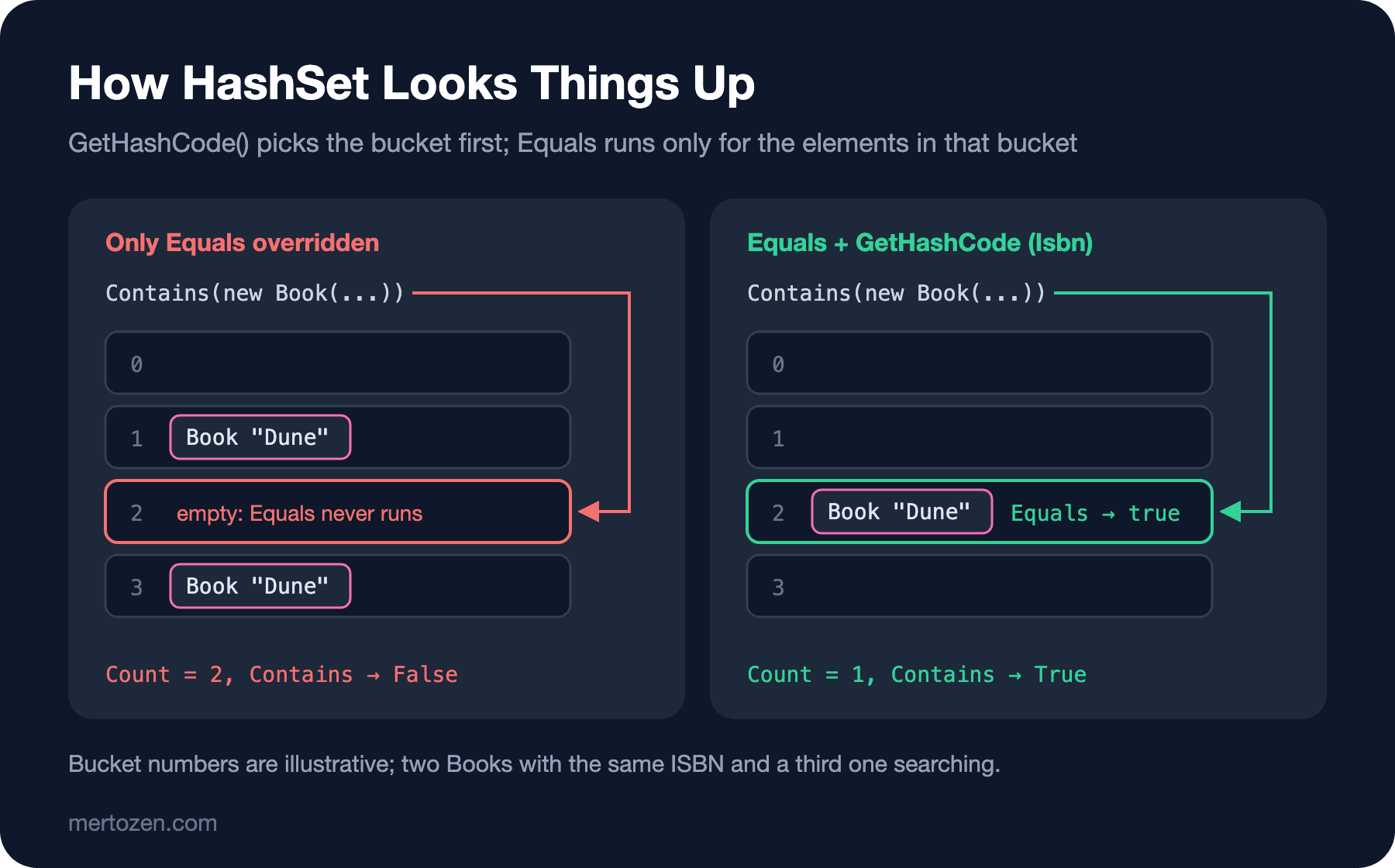
This gives us the most important rule of the contract: two objects that are equal according to Equals must return the same GetHashCode() value. The reverse is not required; unequal objects may share a hash code, it only costs a little performance. That is why you always build the hash code from the fields you use for equality, and from no others. Equals has its own rules too: x.Equals(x) is always true, x.Equals(y) and y.Equals(x) give the same result, and x.Equals(null) is always false and never throws.
IEquatable<T> and the == Operator
Here is a complete version:
using System.Globalization;

CultureInfo.CurrentCulture = CultureInfo.InvariantCulture;

var books = new HashSet<Book>
{
    new Book("978-0441013593", "Dune", 12.99m),
    new Book("978-0441013593", "Dune", 12.99m),
    new Book("978-0141439518", "Emma", 7.50m)
};

Console.WriteLine(books.Count);
Console.WriteLine(books.Contains(new Book("978-0441013593", "Dune (Deluxe)", 30m)));

var a = new Book("978-0441013593", "Dune", 12.99m);
var b = new Book("978-0441013593", "Dune", 12.99m);
Console.WriteLine(a == b);
Console.WriteLine(ReferenceEquals(a, b));

public sealed class Book : IEquatable<Book>
{
    public Book(string isbn, string title, decimal price)
    {
        Isbn = isbn;
        Title = title;
        Price = price;
    }

    public string Isbn { get; }
    public string Title { get; }
    public decimal Price { get; }

    public bool Equals(Book? other) => other is not null && Isbn == other.Isbn;

    public override bool Equals(object? obj) => Equals(obj as Book);

    public override int GetHashCode() => Isbn.GetHashCode();

    public static bool operator ==(Book? left, Book? right) =>
        left is null ? right is null : left.Equals(right);

    public static bool operator !=(Book? left, Book? right) => !(left == right);
}
2
True
True
FalseNow the HashSet holds two books, and even a search titled "Dune (Deluxe)" at 30 returned True, because we tied equality to the ISBN alone. This is not a bug; it is exactly the decision we made. But you need to know its consequences.
Let's go through the parts. IEquatable<Book> provides a type-safe Equals(Book?). HashSet, Dictionary and List.Contains compare through EqualityComparer<T>.Default, which uses this method if the type implements IEquatable<T> and falls back to Equals(object?) otherwise. Writing the real logic in one place and forwarding Equals(object?) to it keeps the two methods from drifting apart.
== is a separate matter. Overriding Equals does not change ==; if you do not define the operator yourself, == on a class keeps comparing references. When you define it, you must define == and != together. The rules for defining operators are the subject of the next post. The thing to watch here is doing the null check with is null rather than left == null; otherwise the operator calls itself and ends up in infinite recursion. When you really need to know whether it is the same object, ReferenceEquals is always there.
We made the class sealed because inheritance makes equality harder. If an EBook : Book adds its own fields to equality, book.Equals(ebook) and ebook.Equals(book) can give different results. Records solved this with EqualityContract; when writing it by hand, the cleanest path is a sealed class.
Equality in Structs
Structs use value equality by default, but it has a cost:
var a = new Money(10m, "EUR");
var b = new Money(10m, "EUR");
Console.WriteLine(a.Equals(b));
Console.WriteLine(a == b);

public struct Money
{
    public Money(decimal amount, string currency)
    {
        Amount = amount;
        Currency = currency;
    }

    public decimal Amount { get; }
    public string Currency { get; }
}
Program.cs(4,19): error CS0019: Operator '==' cannot be applied to operands of type 'Money' and 'Money'Structs do not get == for free, so this line does not compile. Equals works and returns True, but the work is done by ValueType.Equals. According to the documentation, when one of the fields is a reference type this method compares through reflection; on top of that, the argument gets boxed because of the Equals(object) signature. For structs that are compared often or used as Dictionary keys, writing equality yourself is a good habit:
var a = new Money(10m, "EUR");
var b = new Money(10m, "EUR");
var c = new Money(10m, "USD");

Console.WriteLine(a == b);
Console.WriteLine(a == c);
Console.WriteLine(a.GetHashCode() == b.GetHashCode());

public readonly struct Money : IEquatable<Money>
{
    public Money(decimal amount, string currency)
    {
        Amount = amount;
        Currency = currency;
    }

    public decimal Amount { get; }
    public string Currency { get; }

    public bool Equals(Money other) => Amount == other.Amount && Currency == other.Currency;

    public override bool Equals(object? obj) => obj is Money other && Equals(other);

    public override int GetHashCode() => HashCode.Combine(Amount, Currency);

    public static bool operator ==(Money left, Money right) => left.Equals(right);

    public static bool operator !=(Money left, Money right) => !left.Equals(right);
}
True
False
TrueHashCode.Combine is the easy way to mix several fields into a hash. XOR-ing them by hand with ^ has weaknesses, such as producing zero when two fields have the same value. One warning: string.GetHashCode() produces a different value in every process (hash randomization). Do not write hash codes to a file or store them in a database; they are only for in-memory collections.
Sorting: IComparable<T>
Equality answers "are they the same?", comparison answers "which one comes first?". If you try to sort a List<Book> without any preparation:
var books = new List<Book> { new Book("Dune"), new Book("Emma") };
books.Sort();

public class Book
{
    public Book(string title) => Title = title;

    public string Title { get; }
}
Unhandled exception. System.InvalidOperationException: Failed to compare two elements in the array.
---> System.ArgumentException: At least one object must implement IComparable.I removed the stack trace; the remaining two lines tell the story. If you call Sort() without arguments, the type itself has to know its "natural order". You say this with IComparable<T>. If CompareTo returns a negative number, this object comes first; zero means the two are equal in the ordering; positive means it comes after:
using System.Globalization;

CultureInfo.CurrentCulture = CultureInfo.InvariantCulture;

var books = new List<Book>
{
    new Book("978-0441013593", "Dune", 12.99m),
    new Book("978-0547928227", "The Hobbit", 7.50m),
    new Book("978-0141439518", "Emma", 7.50m)
};

books.Sort();
foreach (var book in books)
    Console.WriteLine($"{book.Price} {book.Title}");

public sealed class Book : IComparable<Book>
{
    public Book(string isbn, string title, decimal price)
    {
        Isbn = isbn;
        Title = title;
        Price = price;
    }

    public string Isbn { get; }
    public string Title { get; }
    public decimal Price { get; }

    public int CompareTo(Book? other)
    {
        if (other is null)
            return 1;

        int byPrice = Price.CompareTo(other.Price);
        return byPrice != 0 ? byPrice : string.CompareOrdinal(Title, other.Title);
    }
}
7.50 Emma
7.50 The Hobbit
12.99 DuneWe look at the price first, and at the title when prices are equal. Leaving each comparison to the field's own CompareTo is the safest approach. null is considered smaller than everything; this is a general .NET rule, which is why we return 1 when null comes in. For the title we used string.CompareOrdinal, because culture-sensitive comparison can give different results on different machines. We saw string comparison and the Turkish "I" trap in the fundamentals series.
Deciding from the Outside: IComparer<T> and IEqualityComparer<T>
A type has one natural order, but on screen you sometimes want to sort by title and sometimes by stock. The same goes for equality: ISBN-based equality is right in most places, but a report may need to deduplicate books by title. Comparers are how you move these decisions out of the type:
var books = new List<Book>
{
    new Book("978-0441013593", "Dune"),
    new Book("978-0141439518", "emma"),
    new Book("978-0000000001", "Emma")
};

var byTitle = Comparer<Book>.Create((x, y) => string.Compare(x.Title, y.Title, StringComparison.OrdinalIgnoreCase));
books.Sort(byTitle);
Console.WriteLine(string.Join(", ", books.Select(b => b.Title)));

var uniqueTitles = new HashSet<Book>(books, new TitleComparer());
Console.WriteLine(uniqueTitles.Count);

var tags = new HashSet<string>(StringComparer.OrdinalIgnoreCase) { "sci-fi", "SCI-FI", "classic" };
Console.WriteLine(tags.Count);

public sealed class Book
{
    public Book(string isbn, string title)
    {
        Isbn = isbn;
        Title = title;
    }

    public string Isbn { get; }
    public string Title { get; }
}

public sealed class TitleComparer : IEqualityComparer<Book>
{
    public bool Equals(Book? x, Book? y) =>
        string.Equals(x?.Title, y?.Title, StringComparison.OrdinalIgnoreCase);

    public int GetHashCode(Book obj) => StringComparer.OrdinalIgnoreCase.GetHashCode(obj.Title);
}
Dune, emma, Emma
2
2Comparer<T>.Create builds an IComparer<T> from a lambda; places like List.Sort, Array.Sort and SortedSet accept it. You pass an IEqualityComparer<T> to the constructor of HashSet or Dictionary. The hash rule applies here too: if you do case-insensitive equality, the hash code must be case-insensitive as well, which is why we used StringComparer.OrdinalIgnoreCase.GetHashCode. For string keys you do not need to write anything; the ready-made StringComparer instances implement both interfaces. We will use these comparers again in the collections series with Dictionary and the sorted collections.
Common Pitfalls
Building the hash code from a field that can change. If an object's hash code changes after it goes into a HashSet, it gets lost in its own bucket:
var book = new MutableBook { Isbn = "978-0441013593" };
var set = new HashSet<MutableBook> { book };

book.Isbn = "978-0141439518";

Console.WriteLine(set.Contains(book));
Console.WriteLine(set.Remove(book));
Console.WriteLine(set.Count);

public sealed class MutableBook : IEquatable<MutableBook>
{
    public string Isbn { get; set; } = "";

    public bool Equals(MutableBook? other) => other is not null && Isbn == other.Isbn;

    public override bool Equals(object? obj) => Equals(obj as MutableBook);

    public override int GetHashCode() => Isbn.GetHashCode();
}
False
False
1The object is still inside the set, but it can no longer be found or removed. Make the fields you use for equality immutable; if you cannot, do not use that object as a key.
Writing CompareTo with subtraction. return Stock - other.Stock; looks short, but it overflows with large values:
int x = 2_000_000_000;
int y = -2_000_000_000;

Console.WriteLine(x - y);
Console.WriteLine(x.CompareTo(y));
-294967296
1Even though x is larger, the difference came out negative, so the order flips. Use CompareTo.
Letting equality and ordering drift apart. SortedSet decides duplicates with CompareTo, not Equals. With the Book above, which sorts by price and title but uses the ISBN for equality, adding a book with the same price and title but a different ISBN left the SortedSet at 3 while the HashSet went up to 4. When CompareTo returns zero, Equals should ideally return true as well; the easy way to stay consistent is to compare the equality field (the ISBN here) as the last step.
Overriding Equals and forgetting ==. They are separate mechanisms; if you do not define == on a class, a.Equals(b) can be true while a == b stays false. If not everyone on the team knows which one does what, this difference produces sneaky bugs.
A Small Experiment
★☆☆ Write a sealed class named Author with Name and BirthYear properties. Implement IEquatable<Author> and GetHashCode using both fields, and see that a HashSet<Author> prevents duplicates.
★★☆ Add an ISBN comparison as a third step to the CompareTo of the Book above and repeat the SortedSet experiment. What is the count now?
★★★ Add an int Stock property to Book, then write an IComparer<Book> class that sorts by stock descending and, when stock is equal, by title ascending. Then build the same ordering in a single line with Comparer<Book>.Create and check that both give the same result.
In this post we defined the == and != operators but did not get into their rules. In the next post we open up operator overloading in detail, write operators such as + and > and conversion operators for Money, and then move on to indexers, which let us use a class like an array.