

Upgrading C# and .NET: Moving an Old Project to .NET 10
Moving a .NET 6 project to .NET 10: the support calendar, how LangVersion relates to the TFM and the latest trap, pinning the SDK with global.json, reading the real CS8981 and CS9258 warnings, the silent behavior change of the field keyword and reading breaking-change pages; C# 15 gets its own post.
Version note: This post covers moving a project written with C# 10 / .NET 6 to C# 14 / .NET 10; the examples were tried with the .NET 10 SDK (10.0.402) and the .NET 8 SDK (8.0.419).
Guess First
You have a small Bookstore project left over from the .NET 6 era. The project file is this:
<Project Sdk="Microsoft.NET.Sdk">

  <PropertyGroup>
    <OutputType>Exe</OutputType>
    <TargetFramework>net6.0</TargetFramework>
    <LangVersion>10</LangVersion>
    <ImplicitUsings>enable</ImplicitUsings>
    <Nullable>enable</Nullable>
  </PropertyGroup>

</Project>
And the code is this:
using System.Globalization;

CultureInfo.CurrentCulture = CultureInfo.InvariantCulture;

string[] titles = { "Clean Code", "Refactoring", "Domain-Driven Design" };
foreach (string title in titles.Reverse())
    Console.WriteLine(title);

var line = new orderline { Title = "Clean Code", Quantity = 2 };
var shelf = new Shelf();
shelf.Label = "A1";
Console.WriteLine($"{line.Title} x{line.Quantity} on {shelf.Label}");

public class orderline
{
    public string Title { get; set; } = "";
    public int Quantity { get; set; }
}

public class Shelf
{
    private string field = "";

    public string Label
    {
        get { return field; }
        set { field = value; }
    }
}
On .NET 6 it compiles without a single warning. If you set TargetFramework to net10.0 and delete the LangVersion line, how many warnings do you get? On which lines? Does the program print the same output?
Read the Current State First
Without touching anything, building with the .NET 10 SDK on the machine gives the first signal:
warning NETSDK1138: The target framework 'net6.0' is out of support and will not receive security updates in the future. Please refer to https://aka.ms/dotnet-core-support for more information about the support policy.The build succeeds, because the SDK can target older frameworks. Running it is another matter. My machine has no .NET 6 runtime, only 8 and 10 (I shortened long file paths in the outputs in this post):
You must install or update .NET to run this application.

App: …/Bookstore/bin/Debug/net6.0/Bookstore
Architecture: arm64
Framework: 'Microsoft.NETCore.App', version '6.0.0' (arm64)
.NET location: /usr/local/share/dotnet

The following frameworks were found:
  8.0.25 at [/usr/local/share/dotnet/shared/Microsoft.NETCore.App]
  10.0.3 at [/usr/local/share/dotnet/shared/Microsoft.NETCore.App]
  10.0.13 at [/usr/local/share/dotnet/shared/Microsoft.NETCore.App]
We saw in the first post of the C# Fundamentals series that the SDK and the runtime are separate things; here is what that difference means in practice. I ran the experiments in this series with DOTNET_ROLL_FORWARD=Major; this setting tells the app "run on the next major runtime you find", and the net6.0 app started on .NET 8.0.25. It's useful for an experiment, but it isn't a solution: you're running the app on a runtime it was never tested on, and you're still on a target whose support has ended. In the rest of this post we actually move the project. First, Bookstore's own output, to compare against after the upgrade:
Domain-Driven Design
Refactoring
Clean Code
Clean Code x2 on A1
The Support Calendar
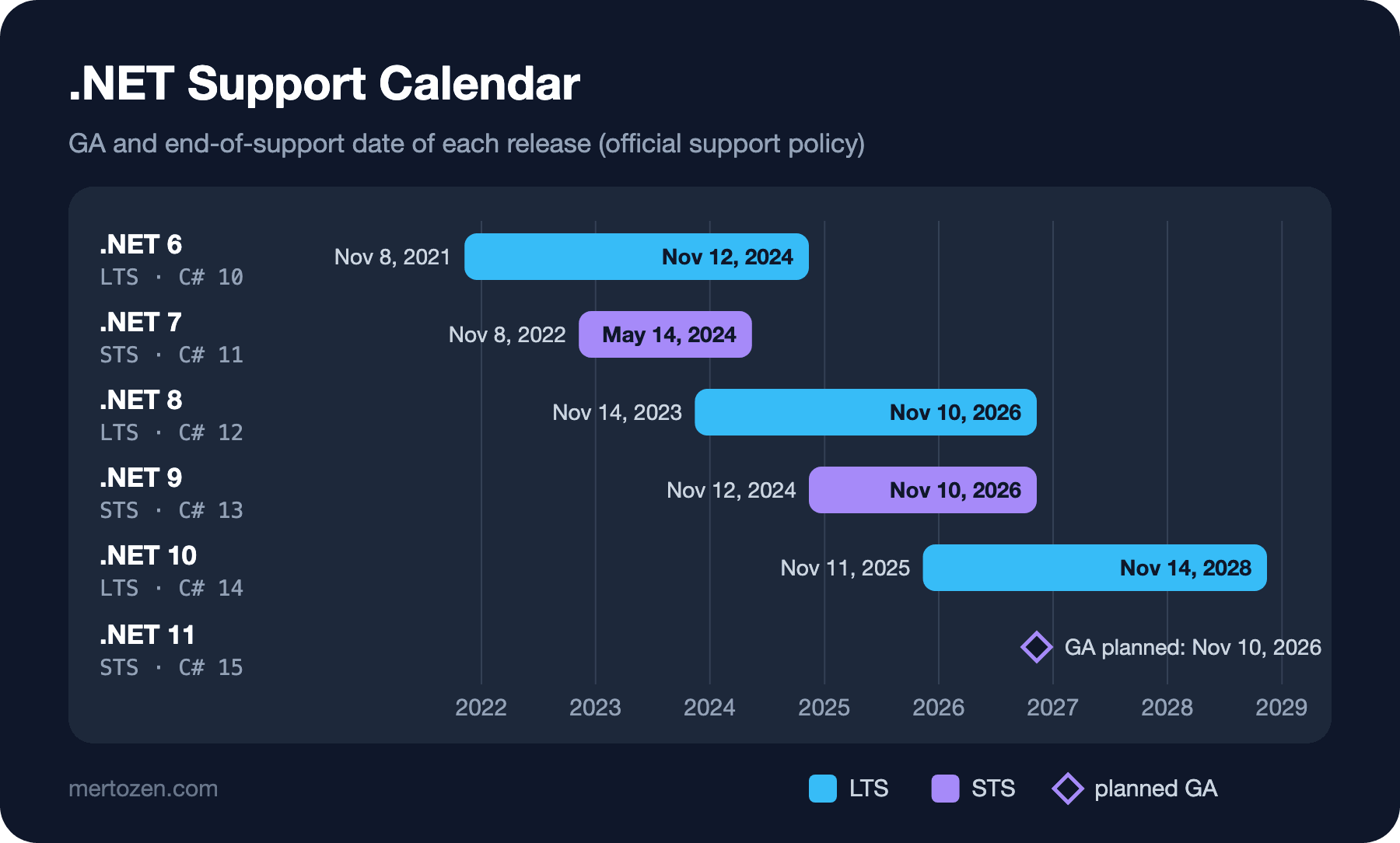
Why move now? According to Microsoft's official support table, this is the situation today (November 7, 2026). .NET 6 was an LTS release and its support ended on November 12, 2024. .NET 7 was an STS release and ended even earlier, on May 14, 2024. .NET 8 (LTS) and .NET 9 (STS) go out of support on the same day, November 10, 2026, three days from now. They land on the same day because STS support is 24 months under the current policy. .NET 10, released on November 11, 2025, is an LTS release supported until November 14, 2028.
In practice this means that in a few days .NET 10 will be the only supported LTS release. We pick it as the migration target. There's also a new release at the door: .NET 11, which comes with C# 15, is planned to reach GA on November 10, 2026. .NET 11 is an STS release; we'll cover C# 15 in a separate post once it's out.
LangVersion and the TFM Change Together
Remember the rule from the first post of this series: if you don't set LangVersion, TargetFramework decides the language version. C# 10 for net6.0, C# 14 for net10.0. In old projects LangVersion is often either pinned to the version of the day or set to latest. Both cause trouble during an upgrade. If it stays pinned, you move to the new framework but stay on the old language. latest, on the other hand, ties the language to the SDK and makes it independent of the framework.
I saw why the second case is dangerous. I stopped the project halfway, moved it to net9.0 and set LangVersion to latest. On the .NET 10 SDK, latest means C# 14; so I combined the .NET 9 libraries with the C# 14 rules. The result is a build error:
Program.cs(6,26): error CS1579: foreach statement cannot operate on variables of type 'void' because 'void' does not contain a public instance or extension definition for 'GetEnumerator'Line six is titles.Reverse(), which we never touched. Thanks to C# 14's new span conversions, the compiler can now convert the array to a Span<T> and pick span's Reverse method, which reverses in place and returns void. .NET 10 solved this by adding an Enumerable.Reverse(T[]) overload; the .NET 9 library doesn't have that overload. Microsoft doesn't support using a language version newer than the framework's default, and this error is that warning made concrete. The rule is simple: when you upgrade, delete the LangVersion line and leave the language version to the framework.
Upgrading Step by Step
The first step is pinning which SDK you work with. To make sure everyone on the team and the CI machine use the same SDK, you put a global.json in the root folder. You're likely to find a file like this in an old project; I created this one with dotnet new globaljson --sdk-version 8.0.419 --roll-forward latestFeature:
{
  "sdk": {
    "rollForward": "latestFeature",
    "version": "8.0.419"
  }
}
In this folder dotnet --version now says 8.0.419. Moving the project to net10.0 and trying to build with this SDK gives:
error NETSDK1045: The current .NET SDK does not support targeting .NET 10.0. Either target .NET 8.0 or lower, or use a version of the .NET SDK that supports .NET 10.0. Download the .NET SDK from https://aka.ms/dotnet/downloadSo before raising the TFM you also need to update the version in global.json, the SDK installation in CI and the base image tags in your Dockerfile.
The second step is the project file. Set TargetFramework to net10.0 and delete the LangVersion line:
<Project Sdk="Microsoft.NET.Sdk">

  <PropertyGroup>
    <OutputType>Exe</OutputType>
    <TargetFramework>net10.0</TargetFramework>
    <ImplicitUsings>enable</ImplicitUsings>
    <Nullable>enable</Nullable>
  </PropertyGroup>

</Project>
The third step is packages. In a real project, Microsoft.Extensions.*, EF Core or ASP.NET Core packages move together with the framework version. In the .NET 10 SDK, the dotnet package list --outdated command (in its older form dotnet list package --outdated) lists the packages that aren't up to date. Our example has no packages, so the answer is short: The given project `Bookstore` has no updates given the current sources. The fourth step is building and reading the warnings; that's where the real work is.
Reading the New Warnings
The answer to the opening question is five warnings:
Program.cs(14,14): warning CS8981: The type name 'orderline' only contains lower-cased ascii characters. Such names may become reserved for the language.
Program.cs(26,22): warning CS9258: In language version 14.0, the 'field' keyword binds to a synthesized backing field for the property. To avoid generating a synthesized backing field, and to refer to the existing member, use 'this.field' or '@field' instead.
Program.cs(27,15): warning CS9258: In language version 14.0, the 'field' keyword binds to a synthesized backing field for the property. To avoid generating a synthesized backing field, and to refer to the existing member, use 'this.field' or '@field' instead.
Program.cs(24,19): warning CS9264: Non-nullable property 'Label' must contain a non-null value when exiting constructor. Consider adding the 'required' modifier, or declaring the property as nullable, or safely handling the case where 'field' is null in the 'get' accessor.
Program.cs(22,20): warning CS0414: The field 'Shelf.field' is assigned but its value is never used
CS8981 is a warning from warning wave 7, which came with C# 11 (it shows up with -p:WarningLevel=7 and not with 6): type names made only of lowercase letters may become language keywords in the future. The interesting part is that the framework turns this warning on, not the language version. dotnet msbuild -getProperty:WarningLevel returned 6 in the net6.0 project and 10 in the net10.0 project. In a separate test, even when I lowered LangVersion to 10 on a net10.0 target, CS8981 still appeared; passing -p:WarningLevel=6 made it go away. So new warning waves come with the TFM.
The other four warnings point to the same problem, and it's the sneakiest part of the upgrade. In C# 10, field was an ordinary name and referred to the private field in Shelf. In C# 14, field inside a property accessor is a keyword and stands for the backing field the compiler generates. The code compiles and the output is still the same:
Domain-Driven Design
Refactoring
Clean Code
Clean Code x2 on A1
But Label now writes to and reads from a different field. CS0414 says so: the field you declared is never read anymore. In this example you don't see a difference, because no other member of the class uses that field. What if a method in the same class read field directly? I tried that separately:
var shelf = new Shelf();
shelf.Label = "A1";
Console.WriteLine($"[{shelf.Label}] [{shelf.Describe()}]");

public class Shelf
{
    private string field = "";

    public string Label
    {
        get { return field; }
        set { field = value; }
    }

    public string Describe() => $"shelf {field}";
}
With C# 13 it printed [A1] [shelf A1], with C# 14 [A1] [shelf ]. The field inside the method still means the private field, while the one in the accessors means the compiler-generated backing field. The two drifted apart and no build error caught it; only the warnings told us. The warning suggests two fixes: write this.field or @field to keep the old meaning, or rename the field. I chose to simplify the code:
public class OrderLine
{
    public string Title { get; set; } = "";
    public int Quantity { get; set; }
}

public class Shelf
{
    public string Label { get; set; } = "";
}
I renamed orderline to OrderLine and updated the line that uses it. The project now builds without warnings and prints the same four lines. titles.Reverse() caused no trouble on net10.0; .NET 10's new overload kicked in.
Reading Breaking Changes
These are the problems that came up in a small console app. A real project will have more, and you won't see all of them as build warnings; some show up only as behavior changes at run time. Microsoft publishes a separate "Breaking changes in .NET N" page for each release, and the Roslyn team documents the breaking changes on the compiler side separately. If you're jumping from .NET 6 to 10, you need to read the pages for every release in between, 7, 8, 9 and 10, because each one only describes what changed compared with the previous release.
While reading these pages, ask yourself three questions: does this change touch an API I use, does it show up at compile time or at run time, and what is the recommended fix? The Reverse example in this post is one of the items described in the .NET 10 compiler breaking changes document. For run-time changes your best safeguard is your tests; make sure they're green before the upgrade, and run the same tests after it.
In a large code base, instead of switching the target all at once, moving projects one at a time is also an option. You move the library projects with the fewest dependencies first, then the application. If you keep build warnings and tests clean at each step, the last step stays small.
Common Pitfalls
Leaving LangVersion at latest. The Reverse error above is exactly the product of this setting. Leave the language version to the framework.
Skipping new warnings with "I'll look later". A warning like CS9258 may be the only sign of code that compiles but behaves differently. If TreatWarningsAsErrors is on in your project, these warnings stop the build anyway; if it's off, aim to bring the warning list to zero during the upgrade.
Updating only the project file. global.json, the SDK installation in CI, the base image tags in the Dockerfile and the runtime on the server are all part of the same upgrade. The NETSDK1045 and "You must install or update .NET" messages show that one of them was forgotten.
Treating roll-forward as a permanent fix. DOTNET_ROLL_FORWARD=Major starts an old app on a new runtime, but it's neither a tested combination nor does it rescue a target whose support has ended.
Not tracking the end-of-support date. STS releases get 24 months of support; as you saw with .NET 9, that can land on the same day as the previous LTS. Whichever release you move to, put its end-of-support date in your calendar.
A Small Experiment
★☆☆ Move the project from the opening question to net10.0 on your own machine and confirm you see the five warnings in the same order.
★★☆ In the Describe() example above, write @field instead of field in the accessors. Does the output go back to [A1] [shelf A1] in C# 14, and do the CS9258 warnings disappear?
★★★ Move a .NET 6 or .NET 8 project from your own work to net10.0 on a branch. How many warnings come up, and which come from a new warning wave and which from a language change?
This is the last post of the C# Versions series for now. We saw how the language grew from C# 1.0 to C# 14, what came in each version and why, and how to move an old project. The series will continue with new releases: .NET 11 and C# 15 are planned to ship on November 10, 2026; once the release is out, we'll cover additions like union types and collection expression arguments in their own post, with the same method and real compiler output.