

Dates and Times in C#: DateTime, DateTimeOffset, DateOnly, TimeOnly and UTC
Why do a UTC and a local DateTime with the same numbers compare equal? The Kind problem, DateTimeOffset for pinning down a moment, TimeZoneInfo and daylight saving time, DateOnly and TimeOnly from .NET 6, Days versus TotalDays in TimeSpan, culture-aware formatting and parsing, and the store-in-UTC rule.
Version note: The code in this post uses C# 10 and the .NET 6 APIs; it was built and run with the .NET 10 SDK.
Guess First
I am running this code on a machine set to Istanbul time (UTC+3). Two DateTime values are built from the same numbers, but one is marked as UTC and the other as local time. There are three hours between 9 a.m. in Istanbul and 9 a.m. in London. What does the comparison print?
DateTime utc = new DateTime(2026, 11, 7, 9, 0, 0, DateTimeKind.Utc);
DateTime local = new DateTime(2026, 11, 7, 9, 0, 0, DateTimeKind.Local);

Console.WriteLine(utc == local);
The Kind Problem of DateTime
The output is True. The two values are three hours apart in time, yet DateTime considers them equal. The reason is that a DateTime holds two separate pieces of information: the tick count of the date and time, and a Kind that says what that value means. The comparison operators look only at the ticks and ignore Kind completely.
Kind has three values: Utc, Local and Unspecified. The round-trip format "o" shows the difference best. CultureInfo is not among the implicit usings, so you need to add using System.Globalization; at the very top of the examples in this post:
CultureInfo inv = CultureInfo.InvariantCulture;
DateTime unspecified = new DateTime(2026, 11, 7, 9, 0, 0);

Console.WriteLine(utc.ToString("o", inv));         // 2026-11-07T09:00:00.0000000Z
Console.WriteLine(local.ToString("o", inv));       // 2026-11-07T09:00:00.0000000+03:00
Console.WriteLine(unspecified.ToString("o", inv)); // 2026-11-07T09:00:00.0000000
Console.WriteLine(unspecified.Kind);               // Unspecified

Console.WriteLine(local.ToUniversalTime().ToString("o", inv));       // 2026-11-07T06:00:00.0000000Z
Console.WriteLine(unspecified.ToUniversalTime().ToString("o", inv)); // 2026-11-07T06:00:00.0000000Z
Console.WriteLine(utc == local.ToUniversalTime());                   // False
The trailing Z means "this is UTC", and +03:00 shows the offset of local time. The line with nothing at the end is Unspecified: "this is a date and time, but I do not know where it belongs". Every DateTime you build without a kind is of this sort, and it is the sneakiest one. When you call ToUniversalTime(), an Unspecified value is treated as local time; the same code gives one result on a server in Frankfurt and another on your machine.
To compare correctly, you first have to bring both values to the same kind. On the last line, converting the local value to UTC revealed the three hours between them, and the result became False. In short, a DateTime on its own does not reliably answer "which moment?"; you have to provide that answer by keeping Kind right.
DateTimeOffset: Pinning Down the Moment
DateTimeOffset carries the offset from UTC alongside the date and time. That way the value on its own points to a single moment on the timeline:
DateTimeOffset istanbul = new DateTimeOffset(2026, 11, 7, 12, 0, 0, TimeSpan.FromHours(3));
DateTimeOffset london = new DateTimeOffset(2026, 11, 7, 9, 0, 0, TimeSpan.Zero);

Console.WriteLine(istanbul == london);           // True: the same moment
Console.WriteLine(istanbul.EqualsExact(london)); // False: the offsets differ
Console.WriteLine(istanbul.UtcDateTime.ToString("o", inv)); // 2026-11-07T09:00:00.0000000Z
Console.WriteLine(istanbul.ToString("o", inv));  // 2026-11-07T12:00:00.0000000+03:00
This time equality asks the right question: noon in Istanbul and 9 a.m. in London are the same moment. If you keep an order time, a log line or a timestamp in an API response as a DateTimeOffset, the value keeps its meaning whichever machine it travels to. It is also the safest choice for timestamps a Web API returns as JSON.
An offset and a time zone are not the same thing. +03:00 describes the offset of one moment, while "Istanbul" is a region with rules. In a city that observes daylight saving time, the offset changes during the year. When you want to show a moment in a particular city's time, you use TimeZoneInfo:
DateTime orderedUtc = new DateTime(2026, 11, 7, 9, 0, 0, DateTimeKind.Utc);
DateTime summerUtc = new DateTime(2026, 7, 7, 9, 0, 0, DateTimeKind.Utc);
TimeZoneInfo istanbulZone = TimeZoneInfo.FindSystemTimeZoneById("Europe/Istanbul");
TimeZoneInfo newYorkZone = TimeZoneInfo.FindSystemTimeZoneById("America/New_York");

Console.WriteLine(TimeZoneInfo.ConvertTimeFromUtc(orderedUtc, istanbulZone).ToString("yyyy-MM-dd HH:mm", inv)); // 2026-11-07 12:00
Console.WriteLine(TimeZoneInfo.ConvertTimeFromUtc(orderedUtc, newYorkZone).ToString("yyyy-MM-dd HH:mm", inv));  // 2026-11-07 04:00
Console.WriteLine(TimeZoneInfo.ConvertTimeFromUtc(summerUtc, newYorkZone).ToString("yyyy-MM-dd HH:mm", inv));   // 2026-07-07 05:00
Console.WriteLine(newYorkZone.GetUtcOffset(orderedUtc) + " " + newYorkZone.GetUtcOffset(summerUtc));           // -05:00:00 -04:00:00
New York's offset is -5 hours in November and -4 in July; TimeZoneInfo took daylight saving time into account for you. "Europe/Istanbul" is an IANA ID; macOS and Linux recognize these directly. Starting with .NET 6, Windows accepts IANA IDs as well, but in older projects you will also come across Windows IDs such as "Turkey Standard Time".
DateOnly and TimeOnly
Not every date is a moment. A book's publication date, a customer's birthday, the last day for a return: these have neither a time of day nor a time zone. We used to store them as a DateTime set to midnight, and were surprised when a time zone conversion moved the date back by a day. .NET 6 closed this gap with two new types:
CultureInfo.CurrentCulture = CultureInfo.InvariantCulture;

DateOnly published = new DateOnly(1949, 6, 8);
Console.WriteLine(published);                       // 06/08/1949
Console.WriteLine(published.DayOfWeek);             // Wednesday
Console.WriteLine(published.ToString("yyyy-MM-dd")); // 1949-06-08

TimeOnly opens = new TimeOnly(9, 30);
TimeOnly closes = new TimeOnly(21, 0);
TimeOnly lateVisit = new TimeOnly(22, 15);

Console.WriteLine(lateVisit.IsBetween(opens, closes));                            // False
Console.WriteLine(lateVisit.IsBetween(new TimeOnly(22, 0), new TimeOnly(6, 0))); // True
Console.WriteLine(new TimeOnly(23, 30).AddHours(2));                              // 01:30

DateTime placedAt = new DateTime(2026, 11, 7, 14, 45, 0);
Console.WriteLine(DateOnly.FromDateTime(placedAt));        // 11/07/2026
Console.WriteLine(TimeOnly.FromDateTime(placedAt));        // 14:45
Console.WriteLine(new DateOnly(2026, 1, 31).AddMonths(1)); // 02/28/2026
On the first line I set the current culture to invariant so that the output does not depend on culture; we will get to culture shortly. DateOnly holds only the day, month and year. TimeOnly holds the time of day and wraps around 24 hours: adding two hours to 23:30 gives 01:30. IsBetween also understands ranges that cross midnight; you can check the night shift between 22:00 and 06:00 with a single call. The start is inclusive and the end is exclusive.
AddMonths needs care on the last day of a month: adding one month to January 31 gives February 28, because there is no February 31. DateTime.AddMonths behaves the same way. If you are computing something like a monthly subscription, add the months to the start date instead of adding one month to the previous result; otherwise a day that slipped to the 28th never returns to the 31st.
One note: System.Text.Json in .NET 6 does not serialize DateOnly and TimeOnly out of the box; that support arrived in .NET 7. If you use these types in an API that targets .NET 6, you need to write your own converter.
TimeSpan and Date Arithmetic
The difference between two moments is a TimeSpan. Let's calculate how long an order took to be delivered:
CultureInfo.CurrentCulture = CultureInfo.InvariantCulture;

DateTime ordered = new DateTime(2026, 10, 30, 18, 0, 0, DateTimeKind.Utc);
DateTime delivered = new DateTime(2026, 11, 2, 10, 30, 0, DateTimeKind.Utc);

TimeSpan took = delivered - ordered;
Console.WriteLine(took);            // 2.16:30:00
Console.WriteLine(took.Days);       // 2
Console.WriteLine(took.Hours);      // 16
Console.WriteLine(took.TotalDays);  // 2.6875
Console.WriteLine(took.TotalHours); // 64.5

DateOnly returnDeadline = DateOnly.FromDateTime(delivered).AddDays(14);
Console.WriteLine(returnDeadline.ToString("yyyy-MM-dd")); // 2026-11-16

Console.WriteLine(TimeSpan.FromMinutes(90)); // 01:30:00
Console.WriteLine(new DateOnly(2026, 12, 25).DayNumber - new DateOnly(2026, 11, 7).DayNumber); // 48
The difference between Days and TotalDays burns a lot of people. Days is the day component in "2 days 16 hours 30 minutes", and Hours is the hour component. TotalDays is the whole duration expressed in days. If you write "did the delivery take more than 48 hours?" as took.Hours > 48, it is never true, because Hours is at most 23. The right way is took.TotalHours > 48 or took > TimeSpan.FromHours(48).
There is no subtraction operator between two DateOnly values. For the difference in days, you subtract their DayNumber properties; that is how we found that 48 days are left until the December 25 campaign.
Formatting and Culture
How a date is written on screen depends on culture. The rule we saw for numbers in the posts on strings and type conversions applies here as well: always pass the culture explicitly.
CultureInfo tr = CultureInfo.GetCultureInfo("tr-TR");
CultureInfo us = CultureInfo.GetCultureInfo("en-US");
CultureInfo inv = CultureInfo.InvariantCulture;

DateTime when = new DateTime(2026, 11, 7, 14, 5, 0);

Console.WriteLine(when.ToString("D", tr)); // 7 Kasım 2026 Cumartesi
Console.WriteLine(when.ToString("D", us)); // Saturday, November 7, 2026
Console.WriteLine(when.ToString("g", tr)); // 7.11.2026 14:05
Console.WriteLine(when.ToString("g", us)); // 11/7/2026 2:05 PM
Console.WriteLine(when.ToString("dd.MM.yyyy HH:mm", inv)); // 07.11.2026 14:05
Console.WriteLine(when.ToString("dd.mm.yyyy HH:mm", inv)); // 07.05.2026 14:05
Console.WriteLine(when.ToString("yyyy-MM-dd", inv));       // 2026-11-07
The single-letter formats ("D", "d", "g") use the culture's own pattern; they are the right choice for dates you show to users. In custom formats, letter case matters: MM is the month, mm the minute, HH the 24-hour clock, hh the 12-hour clock. A small typo on the sixth line turned November into May, because the minute of 14:05 is 05.
An interesting detail: in the en-US output, the character between "2:05" and "PM" is not a regular space. On this machine it came out as U+202F, a narrow no-break space. This data comes from the operating system's culture library (ICU), and it can change from version to version. That is why tests that compare a formatted date with a fixed string can break one day for no apparent reason.
Culture is even more critical when parsing:
Console.WriteLine(DateTime.Parse("03/04/2026", tr).ToString("yyyy-MM-dd", inv)); // 2026-04-03
Console.WriteLine(DateTime.Parse("03/04/2026", us).ToString("yyyy-MM-dd", inv)); // 2026-03-04

bool ok = DateTime.TryParseExact("07.11.2026", "dd.MM.yyyy", inv, DateTimeStyles.None, out DateTime parsed);
Console.WriteLine($"{ok} {parsed:yyyy-MM-dd}"); // True 2026-11-07
bool bad = DateTime.TryParseExact("2026-13-01", "yyyy-MM-dd", inv, DateTimeStyles.None, out _);
Console.WriteLine(bad);                         // False
The same text became April 3 in Turkey and March 4 in the US. No exception, no warning, just a wrong date. Read input whose format you know with ParseExact or TryParseExact. For data that travels between machines (files, JSON, logs), use the ISO 8601 format ("yyyy-MM-dd" or "o") with the invariant culture; you can read that text back the same way anywhere in the world.
Store in UTC, Show in Local Time
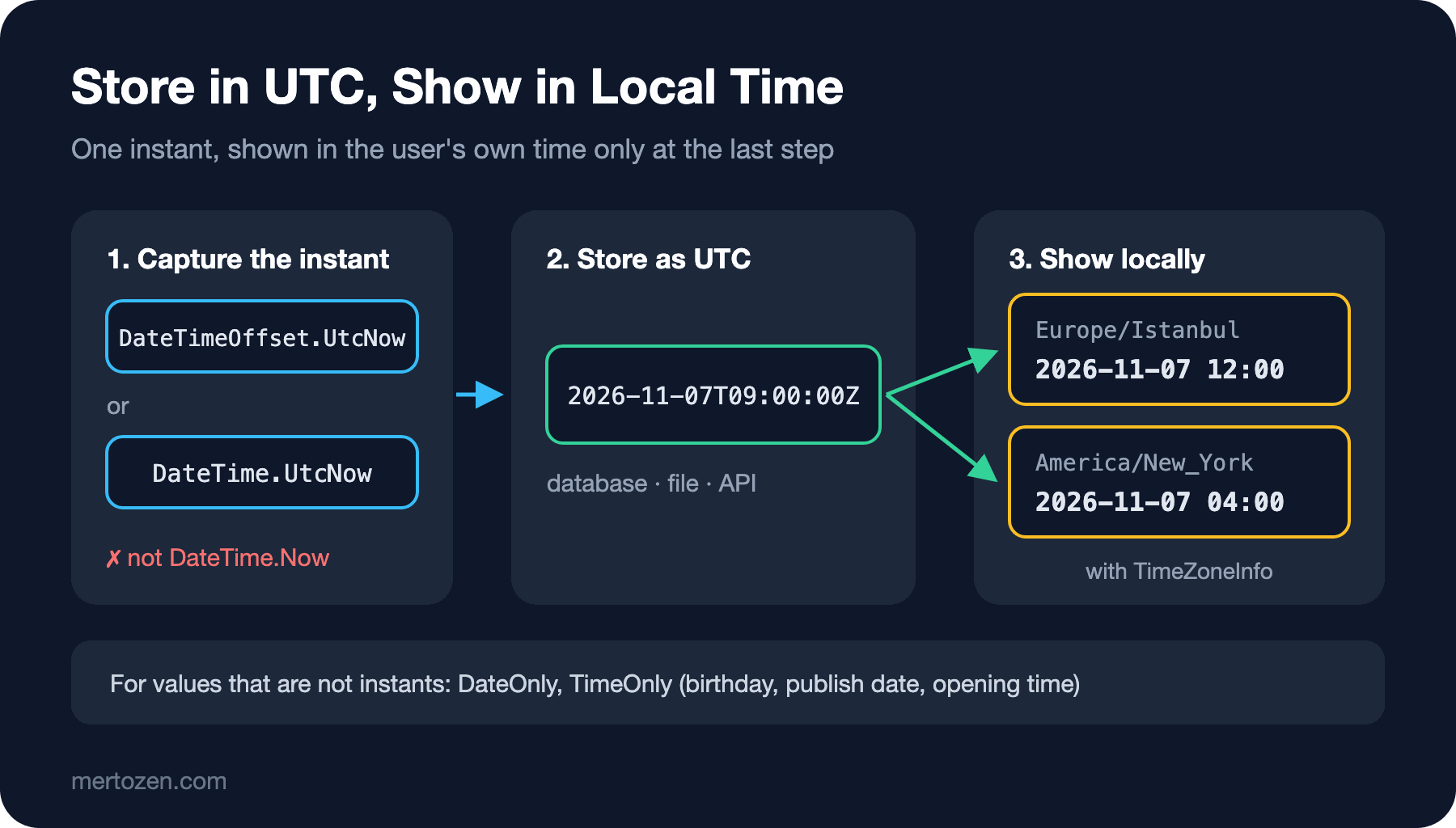
The rule that ties all these pieces together is simple. When you record a moment, use UTC: DateTime.UtcNow or DateTimeOffset.UtcNow. What goes to the database, to a file or to another service should be UTC or a value with an offset. When you show it to the user, convert it to their time zone and culture at the very last step. For values without a time of day or a time zone (birthdays, publication dates, opening hours), use DateOnly and TimeOnly.
Avoid DateTime.Now in two places as well. The first is storage: when the server's time zone changes or the application moves to another region, old records silently change meaning. The second is measuring durations: to measure how long an operation takes there is System.Diagnostics.Stopwatch, which is not affected by clock adjustments or daylight saving changes.
Making time testable is a separate topic. Code that calls DateTime.UtcNow directly is hard to test for "tomorrow". .NET 8 brought TimeProvider for this; we will see it in the .NET 8 post of the Asynchronous Programming series.
Common Pitfalls
Thinking that DateTime equality looks at Kind. It does not. Before comparing values of different kinds, convert both to UTC, or use DateTimeOffset from the start.
Building a DateTime without a kind and calling ToUniversalTime(). An Unspecified value is treated as local time, and the result depends on the machine the code runs on. Dates read from a database often come back as Unspecified too; if you know the value is UTC, state it explicitly with DateTime.SpecifyKind(value, DateTimeKind.Utc) as soon as you read it.
Taking the Days, Hours and Minutes properties for the total duration. For totals use TotalDays, TotalHours or compare TimeSpan values directly.
Mixing up mm and MM in a format string. The compiler cannot catch it; the output is a date that looks valid but is wrong.
Calling DateTime.Parse without a culture. The code works on your machine and swaps the day and month on a server with the en-US culture.
Storing a date without a time as a DateTime set to midnight. A time zone conversion can push it to the previous day. A birthday is a DateOnly.
A Small Experiment
★☆☆ Define the bookstore's opening and closing times as TimeOnly and print whether it is open right now using TimeOnly.FromDateTime(DateTime.Now).
★★☆ Write a function that takes an order time (DateTimeOffset) and prints it in Istanbul, New York and Tokyo time in the "yyyy-MM-dd HH:mm" format. Tokyo's IANA ID is "Asia/Tokyo".
★★★ Calculate the last day of a 14-day return period from the delivery date; if that day falls on a Saturday or Sunday, move it to the following Monday. Write it with DateOnly and DayOfWeek, and check the result for a delivery on 2026-11-02.
We now keep dates and times correctly, but everything disappears when the program closes. In the next post we read input from the console, write to files with File, Path and Directory, take a first look at using and streams, and see why encoding matters.