

C# Collection Interfaces: IEnumerable, ICollection, IList and yield return
What IEnumerable, ICollection, IList and the IReadOnly* interfaces promise and what they don't; why an array throws on Add, exposing an internal list safely, choosing parameter types and writing lazy iterators with yield return.
Version note: The code in this post uses C# 10 and the .NET 6 APIs; it was built and run with the .NET 10 SDK.
Guess First
In the program below, LoadBooks is a local function with yield return in its body. Then we call LINQ's Count() method twice. Which lines appear on the screen, and in what order? How many times is "Loading books..." printed?
IEnumerable<Book> LoadBooks()
{
    Console.WriteLine("Loading books...");
    yield return new Book("978-0135957059", "The Pragmatic Programmer", 3);
    yield return new Book("978-0132350884", "Clean Code", 0);
}

IEnumerable<Book> books = LoadBooks();
Console.WriteLine("Query is ready");
Console.WriteLine(books.Count());
Console.WriteLine(books.Count());

record Book(string Isbn, string Title, int Stock);
The Contracts of a Collection
Here is the output:
Query is ready
Loading books...
2
Loading books...
2
"Query is ready" comes before "Loading books...", and the books are loaded twice. The reason is that calling LoadBooks() does not run the method body at all. The call only hands you an IEnumerable<Book>; the body runs when someone starts walking that sequence. Every Count() starts a new walk, so the body runs from the top again. We will see how this works in the second half of the post. First, let's look at the contracts our collections follow.
In the earlier posts we worked with concrete classes such as List<T>, Dictionary<TKey, TValue> and Queue<T>. All of them implement a few interfaces from the System.Collections.Generic namespace. We asked List<string> about this with reflection:
static string Name(Type type) =>
    type.IsGenericType
        ? $"{type.Name[..type.Name.IndexOf('`')]}<{string.Join(", ", type.GetGenericArguments().Select(Name))}>"
        : type.Name;

foreach (Type contract in typeof(List<string>).GetInterfaces())
{
    Console.WriteLine(Name(contract));
}
IList<String>
ICollection<String>
IEnumerable<String>
IEnumerable
IList
ICollection
IReadOnlyList<String>
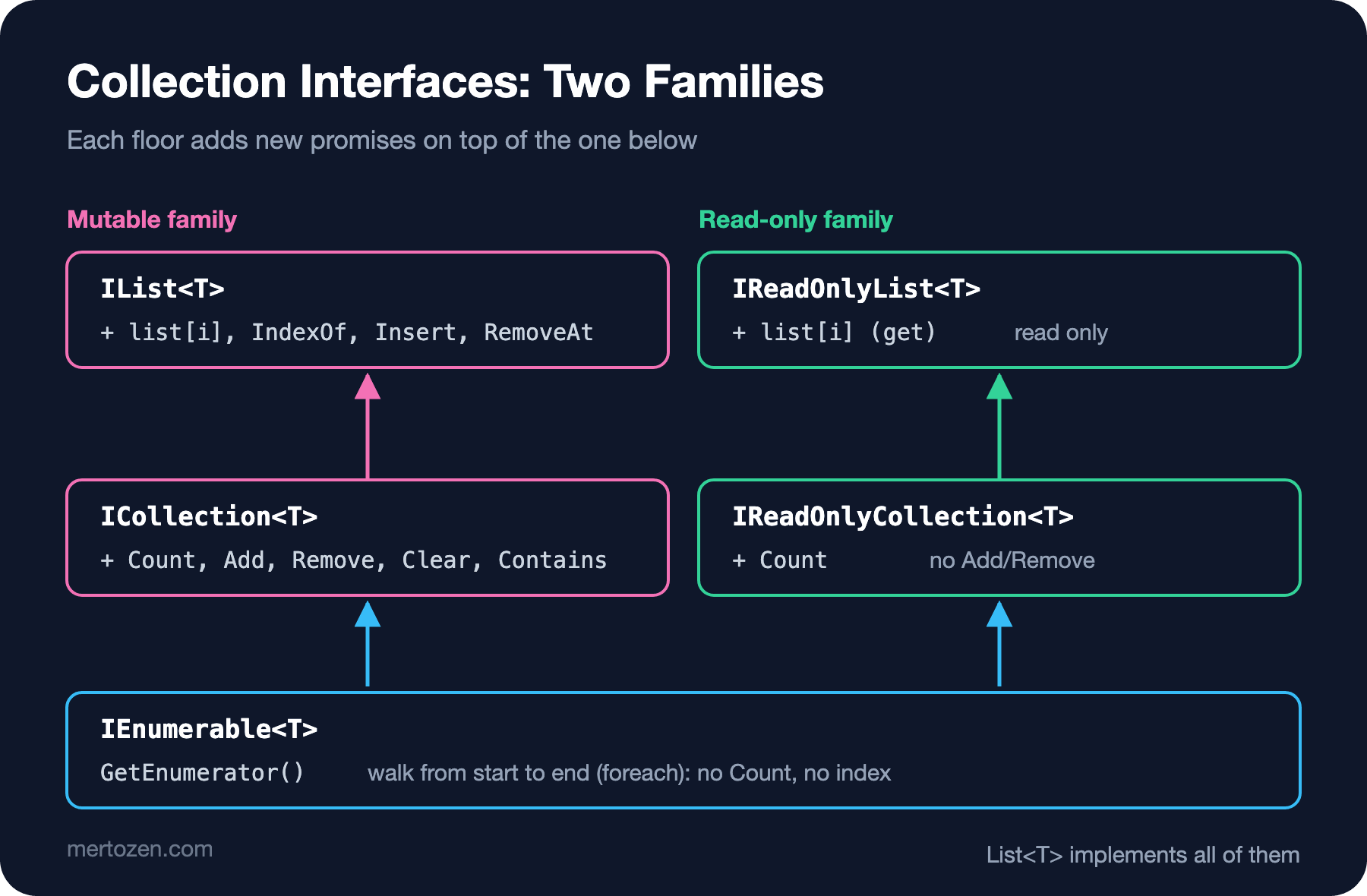
IReadOnlyCollection<String>The non-generic IEnumerable, IList and ICollection date from before generics; they are there for backward compatibility, and new code does not need them. The generic ones form two families. The first is the mutable family: IEnumerable<T> → ICollection<T> → IList<T>. The second is the read-only family: IEnumerable<T> → IReadOnlyCollection<T> → IReadOnlyList<T>. On the dictionary side there are IDictionary<TKey, TValue> and IReadOnlyDictionary<TKey, TValue>.
Think of the floors of a building. The ground floor sign says only "you can walk from start to end". One floor up, it says "I can tell you how many people are here, and you can add or remove them". The top floor says "you can enter any room by its number". Whichever floor's key you hand over, that is all the other side can do.
IEnumerable<T>: Just Walking Through
IEnumerable<T> has a single method: GetEnumerator(). The IEnumerator<T> it returns works like a cursor. MoveNext() moves to the next element and returns true if it could, Current gives you the current element, and Dispose() releases resources when you are done. foreach is shorthand for these three. The code below is very close to what the compiler generates when it expands a foreach:
var titles = new List<string> { "Clean Code", "Refactoring", "Domain-Driven Design" };

using (IEnumerator<string> enumerator = ((IEnumerable<string>)titles).GetEnumerator())
{
    while (enumerator.MoveNext())
    {
        string title = enumerator.Current;
        Console.WriteLine(title);
    }
}
Clean Code
Refactoring
Domain-Driven DesignHere we deliberately converted the list to IEnumerable<string> and got the enumerator through the interface. When you write foreach directly over a List<T>, the compiler uses the struct called List<T>.Enumerator, and no enumerator object is created on the heap. In a method that takes the same list as IEnumerable<T>, the enumerator comes through the interface and the struct gets boxed. In most code the difference is not worth measuring, but it explains why walking the concrete type is a little cheaper in hot loops.
What IEnumerable<T> does not promise matters as much as what it does. It does not know how many elements there are, it offers no index access, and it does not guarantee the same result if you walk it twice. The two "Loading books..." lines in the guessing question come from that last point.
ICollection<T> and IList<T>
ICollection<T> adds Count, Add, Remove, Clear, Contains, CopyTo and IsReadOnly on top of walking. IList<T> brings order and indexes: the indexer (list[0]), IndexOf, Insert and RemoveAt. List<T> implements both completely. Arrays are the surprising part:
IList<string> shelf = new[] { "Clean Code", "Refactoring" };

Console.WriteLine(shelf.IsReadOnly);
shelf[0] = "Clean Architecture";
Console.WriteLine(shelf[0]);

try
{
    shelf.Add("Design Patterns");
}
catch (NotSupportedException ex)
{
    Console.WriteLine($"{ex.GetType().Name}: {ex.Message}");
}
True
Clean Architecture
NotSupportedException: Collection was of a fixed size.An array implements IList<T>, but its size is fixed. That is why IsReadOnly returns true; changing a value through the indexer works, while Add compiles but throws NotSupportedException at run time. The interface does not say "I can do this operation"; it says "this operation has a name here". ReadOnlyCollection<T> also implements IList<T> and throws the same exception on every mutating call. If you take an IList<T> parameter and call Add on it, expect someone to pass you an array.
Controlled Sharing with IReadOnly*
The main use of the read-only interfaces is exposing a class's internal state. You want to show an order's items, but you don't want anyone to bypass the rule in AddItem and play with the list:
var order = new Order(1001);
order.AddItem(new OrderItem("978-0132350884", 2));
order.AddItem(new OrderItem("978-0135957059", 1));

IReadOnlyList<OrderItem> items = order.Items;
Console.WriteLine($"Items: {items.Count}, first: {items[0].Isbn}");

if (items is List<OrderItem> backdoor)
{
    backdoor.Clear();
}
Console.WriteLine($"Items after the cast: {order.Items.Count}");

class Order
{
    private readonly List<OrderItem> _items = new();

    public Order(int id) => Id = id;

    public int Id { get; }
    public IReadOnlyList<OrderItem> Items => _items;

    public void AddItem(OrderItem item)
    {
        if (item.Quantity <= 0)
            throw new ArgumentOutOfRangeException(nameof(item), "Quantity must be positive.");
        _items.Add(item);
    }
}

record OrderItem(string Isbn, int Quantity);
Items: 2, first: 978-0132350884
Items after the cast: 0The Items property returns the list as IReadOnlyList<OrderItem>; as far as the compiler is concerned, the caller cannot see Add or Clear. But the returned object is still the same List<OrderItem>, and a simple type pattern turns it back and clears it. An interface is a sign, not a wall. When the code is written by your own team, a sign is usually enough. If you are writing a library, or if corrupting this data is expensive, hand out the list inside a wrapper:
public IReadOnlyList<OrderItem> Items => _items.AsReadOnly();The rest of the program stayed the same, and I added the line Console.WriteLine(order.Items.GetType().Name); at the end. This time the output is:
Items: 2, first: 978-0132350884
Items after the cast: 2
ReadOnlyCollection`1
AsReadOnly() returns a ReadOnlyCollection<T> that wraps the list without copying it. The type pattern no longer matches, and a forced cast gives you an InvalidCastException. Keep one thing in mind, though: the wrapper is a window, not a photograph. If Order adds a new item internally, everyone holding Items sees it. If you want a collection that never changes, what you are looking for is an immutable collection, the topic of the next post.
Choosing Parameter and Return Types
The practical rule is this: ask for the least you need in parameters, and return the most useful thing you have. If you only walk with foreach, ask for IEnumerable<T>, so the caller can pass an array, a list, a HashSet<T> or an iterator. If you need the element count or an index, put that in the type:
using System.Globalization;

var items = new List<OrderItem>
{
    new("978-0132350884", 2, 37.90m),
    new("978-0135957059", 1, 42.50m),
};

Console.WriteLine(Total(items).ToString(CultureInfo.InvariantCulture));
Console.WriteLine(Describe(items));

static decimal Total(IEnumerable<OrderItem> items)
{
    decimal total = 0;
    foreach (OrderItem item in items)
        total += item.Quantity * item.UnitPrice;
    return total;
}

static string Describe(IReadOnlyList<OrderItem> items) =>
    items.Count == 0 ? "Empty order" : $"{items.Count} lines, first: {items[0].Isbn}";

record OrderItem(string Isbn, int Quantity, decimal UnitPrice);
118.30
2 lines, first: 978-0132350884Total only walks, so it asks for IEnumerable<OrderItem>. Describe uses Count and an index; because its parameter is IReadOnlyList<OrderItem>, its signature says "give me something with a known count that can be walked again and again". If the same method took IEnumerable<T>, it would have to walk the source one extra time or copy it just to learn the count.
On the return side, when you already have a list, narrowing it down to IEnumerable<T> makes the caller poorer: to learn the count, they have to walk it or copy it with ToList(). If you expose internal state, return IReadOnlyList<T>; if you return a result you just built, List<T> or an array is an honest choice. Save the IEnumerable<T> return type for places where you really produce a lazy sequence. That brings us to yield return.
Producing Your Own Sequence with yield return
If a method returns IEnumerable<T> or IEnumerator<T> and has yield return in its body, the compiler turns it into an iterator. Behind the scenes it generates a hidden class that implements MoveNext() and Current. The method's local variables move into fields of that class, and every yield return becomes a "stop here and remember where you were" point. Like a bookmark: each MoveNext() continues reading from the bookmark, and when it reaches the next yield return, it puts the bookmark there and stops.
var books = new List<Book>
{
    new("978-0135957059", "The Pragmatic Programmer", 3),
    new("978-0132350884", "Clean Code", 0),
    new("978-0321125217", "Domain-Driven Design", 5),
};

foreach (Book book in InStock(books))
{
    Console.WriteLine($"  got: {book.Title}");
}

foreach (int number in OrderNumbers(1001))
{
    if (number > 1003)
        break;
    Console.WriteLine($"Order #{number}");
}

static IEnumerable<Book> InStock(IEnumerable<Book> books)
{
    foreach (Book book in books)
    {
        Console.WriteLine($"checking: {book.Title}");
        if (book.Stock > 0)
            yield return book;
    }
}

static IEnumerable<int> OrderNumbers(int start)
{
    int current = start;
    while (true)
        yield return current++;
}

record Book(string Isbn, string Title, int Stock);
checking: The Pragmatic Programmer
got: The Pragmatic Programmer
checking: Clean Code
checking: Domain-Driven Design
got: Domain-Driven Design
Order #1001
Order #1002
Order #1003The order of the output tells the whole story. The iterator does not check every book first and then return a list. One book is checked, handed to the consumer right away if it qualifies, and then the next one is checked. Since InStock creates no intermediate list, it runs in constant memory even over a source with millions of books. OrderNumbers is a sequence that never ends. The while (true) inside it does not hang the program, because each number is produced only when it is requested, and production stops when the consumer leaves with break. If you want to end the sequence early from inside the body, you write yield break.
Leaving early has one more consequence. When the foreach finishes, or is cut short with break, the enumerator's Dispose() is called and the finally blocks in the iterator run:
foreach (string line in ReadCatalog())
{
    Console.WriteLine(line);
    if (line == "Clean Code")
        break;
}

static IEnumerable<string> ReadCatalog()
{
    Console.WriteLine("catalog opened");
    try
    {
        yield return "The Pragmatic Programmer";
        yield return "Clean Code";
        yield return "Domain-Driven Design";
    }
    finally
    {
        Console.WriteLine("catalog closed");
    }
}
catalog opened
The Pragmatic Programmer
Clean Code
catalog closedThe third book was never read, yet "catalog closed" was still printed. That is how iterators that open a file or a database connection avoid leaking resources, as long as you consume them with foreach or inside a using.
The Bill for Laziness
Laziness sometimes moves an error to the wrong place. The iterator below rejects an invalid limit. But when?
var books = new List<Book> { new("978-0132350884", "Clean Code", 37.90m) };

IEnumerable<Book> query = CheaperThan(books, -5);
Console.WriteLine("Query created");

try
{
    foreach (Book book in query)
        Console.WriteLine(book.Title);
}
catch (ArgumentOutOfRangeException ex)
{
    Console.WriteLine($"Thrown during foreach: {ex.ParamName}");
}

static IEnumerable<Book> CheaperThan(IEnumerable<Book> books, decimal limit)
{
    if (limit <= 0)
        throw new ArgumentOutOfRangeException(nameof(limit));

    foreach (Book book in books)
    {
        if (book.Price < limit)
            yield return book;
    }
}

record Book(string Isbn, string Title, decimal Price);
Query created
Thrown during foreach: limitThe check is part of the body too, so it ran at the first MoveNext(), not when the method was called. In a real project a query is built in one layer and walked in another; the exception's stack trace takes you to the line where it was walked, not the line where the mistake was made. The fix is to split the method in two. The outer, ordinary method checks the arguments immediately, and the inner local function becomes the iterator:
var books = new List<Book> { new("978-0132350884", "Clean Code", 37.90m) };

try
{
    IEnumerable<Book> query = CheaperThan(books, -5);
    Console.WriteLine("Query created");
}
catch (ArgumentOutOfRangeException ex)
{
    Console.WriteLine($"Thrown immediately: {ex.ParamName}");
}

static IEnumerable<Book> CheaperThan(IEnumerable<Book> books, decimal limit)
{
    if (limit <= 0)
        throw new ArgumentOutOfRangeException(nameof(limit));

    return Iterate();

    IEnumerable<Book> Iterate()
    {
        foreach (Book book in books)
        {
            if (book.Price < limit)
                yield return book;
        }
    }
}

record Book(string Isbn, string Title, decimal Price);
Thrown immediately: limitThe outer method has no yield, so the compiler does not turn it into an iterator, and the throw runs at call time. .NET's own LINQ operators check their arguments immediately in the same way.
Iterators also have rules set by the compiler. yield return cannot appear inside a try that has a catch block; finally is fine. An iterator cannot have ref, in or out parameters (CS1623). If you write this to skip broken stock values:
foreach (int stock in ParseStocks(new[] { "3", "x", "5" }))
    Console.WriteLine(stock);

static IEnumerable<int> ParseStocks(string[] parts)
{
    foreach (string part in parts)
    {
        try
        {
            yield return int.Parse(part);
        }
        catch (FormatException)
        {
        }
    }
}
the compiler stops you:
Program.cs(10,13): error CS1626: Cannot yield a value in the body of a try block with a catch clauseThe cleanest fix is to avoid the exception entirely: write yield return stock; inside an if (int.TryParse(part, out int stock)) condition, and the program prints 3 and 5. If the conversion can only be done with an exception, move the try/catch into a helper method that has no yield.
Common Pitfalls
Walking the same IEnumerable<T> several times. If the source is an iterator, every walk redoes the work: it reads the file again, it computes again. If you will use it more than once, materialize it once with ToList() or make the parameter type IReadOnlyCollection<T>. We will come back to this in the LINQ series when we cover deferred execution.
Changing a collection while walking it. Calling Remove on the same list inside a foreach ends with an exception at the next step:
var cart = new List<string> { "978-0132350884", "978-0135957059", "978-0321125217" };

try
{
    foreach (string isbn in cart)
    {
        if (isbn.EndsWith("4"))
            cart.Remove(isbn);
    }
}
catch (InvalidOperationException ex)
{
    Console.WriteLine(ex.Message);
}

cart.RemoveAll(isbn => isbn.EndsWith("9"));
Console.WriteLine(string.Join(", ", cart));
Collection was modified; enumeration operation may not execute.
978-0321125217The list bumps an internal version number on every change, and the enumerator checks that number at every step. To delete the items that match a condition, use RemoveAll, or walk backwards by index.
Thinking IReadOnlyList<T> is immutable. A read-only interface only limits what your reference can do. The real owner can keep changing the list, and a careless caller can come in through the back door with a cast.
Assuming every method on the interface works. ICollection<T>.Add throws NotSupportedException on an array and on a ReadOnlyCollection<T>. If you are not sure, check IsReadOnly; better yet, ask for a narrower interface.
Thinking a check inside an iterator runs immediately. Work you expect to happen "right away", such as argument checks or logging, is postponed until the first MoveNext() if it lives in the iterator body.
A Small Experiment
★☆☆ In the guessing program, create books with LoadBooks().ToList(). How many times is "Loading books..." printed, and does it come before or after "Query is ready"?
★★☆ Write an iterator named IEnumerable<OrderItem> ExpensiveItems(IEnumerable<OrderItem> items, decimal minPrice). It should reject a negative minPrice at call time and return the items whose unit price is above the threshold.
★★★ Without using yield, write an OrderNumberSequence class that implements IEnumerable<int> and IEnumerator<int> by hand; fill in MoveNext, Current, Reset and Dispose. Then put it next to an iterator that does the same job and see how much code the compiler writes for you.
In this post we saw that a read-only view does not mean immutability. In the next post we move on to System.Collections.Immutable: how collections that really never change work, when they pay off, and which complexity questions to ask when choosing the right collection for a job.