

Immutable Collections in C# and Choosing the Right Collection
The difference between a read-only view and real immutability, structural sharing in ImmutableList, builders, ImmutableArray versus ImmutableList measured with BenchmarkDotNet, and choosing the right collection with a complexity map.
Version note: The code in this post uses C# 10 and the .NET 6 APIs; it was built and run with the .NET 10 SDK.
Guess First
We put one book in the cart and then call Add twice. The program compiles without a warning. Which two numbers are printed?
using System.Collections.Immutable;

ImmutableList<string> cart = ImmutableList.Create("978-0132350884");
cart.Add("978-0135957059");
ImmutableList<string> updated = cart.Add("978-0321125217");

Console.WriteLine(cart.Count);
Console.WriteLine(updated.Count);
Read-Only and Immutable Are Not the Same
Output:
1
2
cart still holds one book. ImmutableList<T>.Add does not change the list; it returns the version with the item added as a new list. We never assigned the result of the first Add to a variable, so that new list went to the garbage on the line where it was born. We kept the result of the second call in updated, and that is the one with two elements. Every method on an immutable collection that looks like it changes something actually gives you "the changed copy", and using the return value is your job.
In the previous post we handed out a read-only view with AsReadOnly() and called it a window. To see the difference side by side, let's take both a view and an immutable copy of the same list, then change the list:
using System.Collections.Immutable;

var stock = new List<string> { "Clean Code" };
IReadOnlyList<string> view = stock.AsReadOnly();
ImmutableList<string> snapshot = stock.ToImmutableList();

stock.Add("Refactoring");

Console.WriteLine($"view: {view.Count}, snapshot: {snapshot.Count}");
view: 2, snapshot: 1The view saw the change, because the list behind it is the same. ToImmutableList(), on the other hand, took a photograph of that moment; whatever the source list does later, snapshot keeps one element. Read-only means "you cannot change it". Immutable means "nobody can change it". The second guarantee lets you reason about the data you hold without worrying about it.
The System.Collections.Immutable Family
These types live in the System.Collections.Immutable namespace. In .NET Core and .NET 5+ projects they are part of the platform; on .NET Framework they come from the NuGet package of the same name. The family has familiar names: ImmutableArray<T>, ImmutableList<T>, ImmutableDictionary<TKey, TValue>, ImmutableHashSet<T>, ImmutableSortedDictionary<TKey, TValue>, ImmutableSortedSet<T>, ImmutableQueue<T> and ImmutableStack<T>. Each has a static helper class with the same name (such as ImmutableList.Create and ImmutableDictionary.CreateBuilder), and you can convert any collection with extension methods such as ToImmutableList() and ToImmutableDictionary().
The first question that comes to mind: if every Add returns a new collection, does adding one book to a list of a million elements mean copying a million elements? For ImmutableList<T> the answer is no. Internally it keeps a balanced binary tree (an AVL tree). When an element is added, only the nodes on the path from the root to that point are rebuilt; all the other nodes are shared between the old list and the new one. This is called structural sharing. ImmutableArray<T>, on the other hand, wraps a plain array and copies the whole array on every change. We measured the difference in allocated memory:
using System.Collections.Immutable;
using System.Globalization;

CultureInfo.CurrentCulture = CultureInfo.InvariantCulture;

ImmutableList<int> list = ImmutableList.CreateRange(Enumerable.Range(0, 1_000_000));
ImmutableArray<int> array = ImmutableArray.CreateRange(Enumerable.Range(0, 1_000_000));

long before = GC.GetAllocatedBytesForCurrentThread();
ImmutableList<int> biggerList = list.Add(42);
long listBytes = GC.GetAllocatedBytesForCurrentThread() - before;

before = GC.GetAllocatedBytesForCurrentThread();
ImmutableArray<int> biggerArray = array.Add(42);
long arrayBytes = GC.GetAllocatedBytesForCurrentThread() - before;

Console.WriteLine($"ImmutableList.Add:  {listBytes:N0} bytes");
Console.WriteLine($"ImmutableArray.Add: {arrayBytes:N0} bytes");
Console.WriteLine($"{list.Count:N0} -> {biggerList.Count:N0}, {array.Length:N0} -> {biggerArray.Length:N0}");
ImmutableList.Add: 984 bytes
ImmutableArray.Add: 4,000,032 bytes
1,000,000 -> 1,000,001, 1,000,000 -> 1,000,001Adding to the tree of a million elements produced a few nodes worth 984 bytes. On the array side, a million 4-byte int values were all copied into a new array. Both types are immutable, but they look at change in completely different ways.
Batch Changes with a Builder
Building a collection with individual Add calls produces a new version at every step. If you are going to make many changes together, use a builder. A builder is a mutable draft of the collection; when you are done, you seal it with ToImmutable():
using System.Collections.Immutable;
using System.Globalization;

CultureInfo.CurrentCulture = CultureInfo.InvariantCulture;

ImmutableDictionary<string, decimal>.Builder builder = ImmutableDictionary.CreateBuilder<string, decimal>();
builder.Add("978-0132350884", 37.90m);
builder.Add("978-0135957059", 42.50m);
builder.Add("978-0321125217", 54.00m);
ImmutableDictionary<string, decimal> prices = builder.ToImmutable();

ImmutableDictionary<string, decimal> discounted = prices
    .SetItem("978-0132350884", 29.90m)
    .Remove("978-0321125217");

Console.WriteLine($"prices:     {prices.Count} books, Clean Code = {prices["978-0132350884"]}");
Console.WriteLine($"discounted: {discounted.Count} books, Clean Code = {discounted["978-0132350884"]}");

ImmutableArray<string>.Builder titles = ImmutableArray.CreateBuilder<string>(3);
titles.Add("Clean Code");
titles.Add("The Pragmatic Programmer");
titles.Add("Domain-Driven Design");
ImmutableArray<string> shelf = titles.MoveToImmutable();

Console.WriteLine($"shelf: {shelf.Length}, builder after move: {titles.Count}");
prices: 3 books, Clean Code = 37.90
discounted: 2 books, Clean Code = 29.90
shelf: 3, builder after move: 0SetItem and Remove each return a new dictionary too, and they can be chained; prices stays where it was, with three books and the old price. The ImmutableArray<T> builder has one more subtlety. If you gave the right capacity up front, MoveToImmutable() hands over the internal array without copying it, and the builder becomes empty. If the capacity and the element count do not match, it throws; in that case ToImmutable() works by copying.
ImmutableArray or ImmutableList
Both offer index access, but they pay different prices for it. On ImmutableArray<T>, the indexer is a plain array access. On ImmutableList<T>, every list[i] is a walk down the tree from the root, which is O(log n). Microsoft's documentation also states plainly that walking an ImmutableList<T> by index with for is inefficient, while foreach is efficient. We measured four ways of summing 10,000 int values with BenchmarkDotNet 0.15.8:
using System.Collections.Immutable;
using BenchmarkDotNet.Attributes;
using BenchmarkDotNet.Running;

BenchmarkRunner.Run<IndexerBenchmarks>();

[InProcess]
[MemoryDiagnoser]
public class IndexerBenchmarks
{
    private List<int> _list = null!;
    private ImmutableArray<int> _immutableArray;
    private ImmutableList<int> _immutableList = null!;

    [GlobalSetup]
    public void Setup()
    {
        _list = Enumerable.Range(0, 10_000).ToList();
        _immutableArray = _list.ToImmutableArray();
        _immutableList = _list.ToImmutableList();
    }

    [Benchmark(Baseline = true)]
    public long ListFor()
    {
        long sum = 0;
        for (int i = 0; i < _list.Count; i++)
            sum += _list[i];
        return sum;
    }

    [Benchmark]
    public long ImmutableArrayFor()
    {
        long sum = 0;
        for (int i = 0; i < _immutableArray.Length; i++)
            sum += _immutableArray[i];
        return sum;
    }

    [Benchmark]
    public long ImmutableListFor()
    {
        long sum = 0;
        for (int i = 0; i < _immutableList.Count; i++)
            sum += _immutableList[i];
        return sum;
    }

    [Benchmark]
    public long ImmutableListForeach()
    {
        long sum = 0;
        foreach (int value in _immutableList)
            sum += value;
        return sum;
    }
}
BenchmarkDotNet v0.15.8, macOS 27.0.1 (26A434) [Darwin 27.0.0]
Apple M5, 1 CPU, 10 logical and 10 physical cores
.NET SDK 10.0.402
[Host] : .NET 8.0.25 (8.0.25, 8.0.2526.11203), Arm64 RyuJIT armv8.0-a
| Method | Mean | Error | StdDev | Ratio | RatioSD | Allocated | Alloc Ratio |
|--------------------- |-----------:|----------:|----------:|------:|--------:|----------:|------------:|
| ListFor | 3.142 us | 0.0416 us | 0.0348 us | 1.00 | 0.02 | - | NA |
| ImmutableArrayFor | 3.080 us | 0.0334 us | 0.0312 us | 0.98 | 0.01 | - | NA |
| ImmutableListFor | 103.048 us | 1.8564 us | 2.8902 us | 32.81 | 0.97 | - | NA |
| ImmutableListForeach | 32.852 us | 0.6134 us | 0.5437 us | 10.46 | 0.20 | - | NA |The project targets net6.0 and was built in Release mode; since the machine has no .NET 6 runtime, it ran in-process on .NET 8.0.25 with DOTNET_ROLL_FORWARD=Major. The BenchmarkDotNet package brings in System.Collections.Immutable 9.0.0 as a dependency, so the immutable types measured come from that package. Absolute numbers vary from machine to machine; the ratios tell the story: the ImmutableArray<T> indexer is as fast as List<T> (3.08 µs against 3.14 µs). Walking ImmutableList<T> with for is about 33 times slower. foreach cuts that time to a third, but it is still 10 times List<T>. None of the four allocated any memory.
The rule is simple. For data that is built once, read a lot and rarely changed, choose ImmutableArray<T>. For data where elements are added and removed often and every version is kept, choose ImmutableList<T>, and walk it with foreach.
Because ImmutableArray<T> is a struct, it brings a trap with it. Its unassigned state is not an empty array but a wrapper with no array inside:
using System.Collections.Immutable;

var shelf = new Shelf();
Console.WriteLine(shelf.Titles.IsDefault);

try
{
    Console.WriteLine(shelf.Titles.Length);
}
catch (NullReferenceException)
{
    Console.WriteLine("NullReferenceException");
}

class Shelf
{
    public ImmutableArray<string> Titles { get; set; }
}
True
NullReferenceExceptionSince the Titles property is a struct, there was no nullable warning either. Initialize such fields and properties with ImmutableArray<string>.Empty, and check values coming from outside with IsDefault or IsDefaultOrEmpty.
When Immutability Pays Off
Immutable collections are strongest with shared data. Think of a price list: it is updated in one place and read in many. With a mutable dictionary, the reading side has to be protected from the list changing while it walks. With an immutable dictionary, a reader can walk the version it took for as long as it likes; an update produces a new version and swaps the reference:
using System.Collections.Immutable;
using System.Globalization;

CultureInfo.CurrentCulture = CultureInfo.InvariantCulture;

var priceList = new PriceList();
priceList.Update("978-0132350884", 37.90m);

ImmutableDictionary<string, decimal> report = priceList.Current;
priceList.Update("978-0132350884", 29.90m);
priceList.Update("978-0135957059", 42.50m);

foreach (KeyValuePair<string, decimal> entry in report)
    Console.WriteLine($"report:  {entry.Key} = {entry.Value}");

Console.WriteLine($"current: {priceList.Current.Count} books, Clean Code = {priceList.Current["978-0132350884"]}");

class PriceList
{
    private ImmutableDictionary<string, decimal> _prices = ImmutableDictionary<string, decimal>.Empty;

    public ImmutableDictionary<string, decimal> Current => _prices;

    public void Update(string isbn, decimal price) =>
        ImmutableInterlocked.AddOrUpdate(ref _prices, isbn, price, (_, _) => price);
}
report: 978-0132350884 = 37.90
current: 2 books, Clean Code = 29.90report is the version taken while the report was being prepared. The next two updates did not affect it; the report prints a picture of a consistent moment. ImmutableInterlocked.AddOrUpdate does the "prepare the new version and swap the reference atomically" job in a thread-safe way: if another update gets in between, it retries the operation on the newer version. Readers need no lock. We will cover concurrent collections and thread safety separately in the asynchronous programming series.
The other strong use cases extend the same idea: keeping a version history for undo (each version is cheap to keep), giving data to a method with the promise "you can't change this, and neither will I", and settings that are read at startup and never change afterwards. The cost is clear too: writes and most reads are slower than with their mutable counterparts. For a temporary list that is born and dies inside a single method, immutability buys you nothing.
A Complexity Map
When choosing a collection, the first thing to look at is the cost of the operation you will do most often. I put the basic operations of the types we have seen in this series together. O(1) means "independent of the element count", O(log n) means "one more step every time the count doubles", and O(n) means "proportional to the element count":
Type                                Index     Lookup       Add              Insert / Remove
List<T>                             O(1)      O(n)         O(1) amortized   O(n)
LinkedList<T>                       -         O(n)         O(1) first/last  O(1) with a node
Dictionary<TKey, TValue>            -         O(1) by key  O(1) amortized   O(1) by key
HashSet<T>                          -         O(1)         O(1) amortized   O(1)
SortedDictionary<TKey, TValue>      -         O(log n)     O(log n)         O(log n)
SortedList<TKey, TValue>            O(1)      O(log n)     O(n)             O(n)
SortedSet<T>                        -         O(log n)     O(log n)         O(log n)
Queue<T> / Stack<T>                 -         O(n)         O(1) amortized   -
PriorityQueue<TElement, TPriority>  -         -            O(log n)         O(log n) dequeue
ImmutableArray<T>                   O(1)      O(n)         O(n) copy        O(n) copy
ImmutableList<T>                    O(log n)  O(n)         O(log n)         O(log n)
ImmutableHashSet<T>                 -         O(log n)     O(log n)         O(log n)
ImmutableDictionary<TKey, TValue>   -         O(log n)     O(log n)         O(log n)
The rows marked "amortized" are O(1) most of the time; when the internal array fills up, it is grown once, and that moment is O(n). Giving an initial capacity reduces those resizes. On the immutable side, the table in Microsoft's documentation draws the same picture: the O(1) operations of Dictionary, HashSet and List become O(log n) in their immutable counterparts. This table is a starting point; big O does not show constant factors. Calling Contains on a 20-element list is usually cheaper than building a dictionary.
Choosing the Right Collection
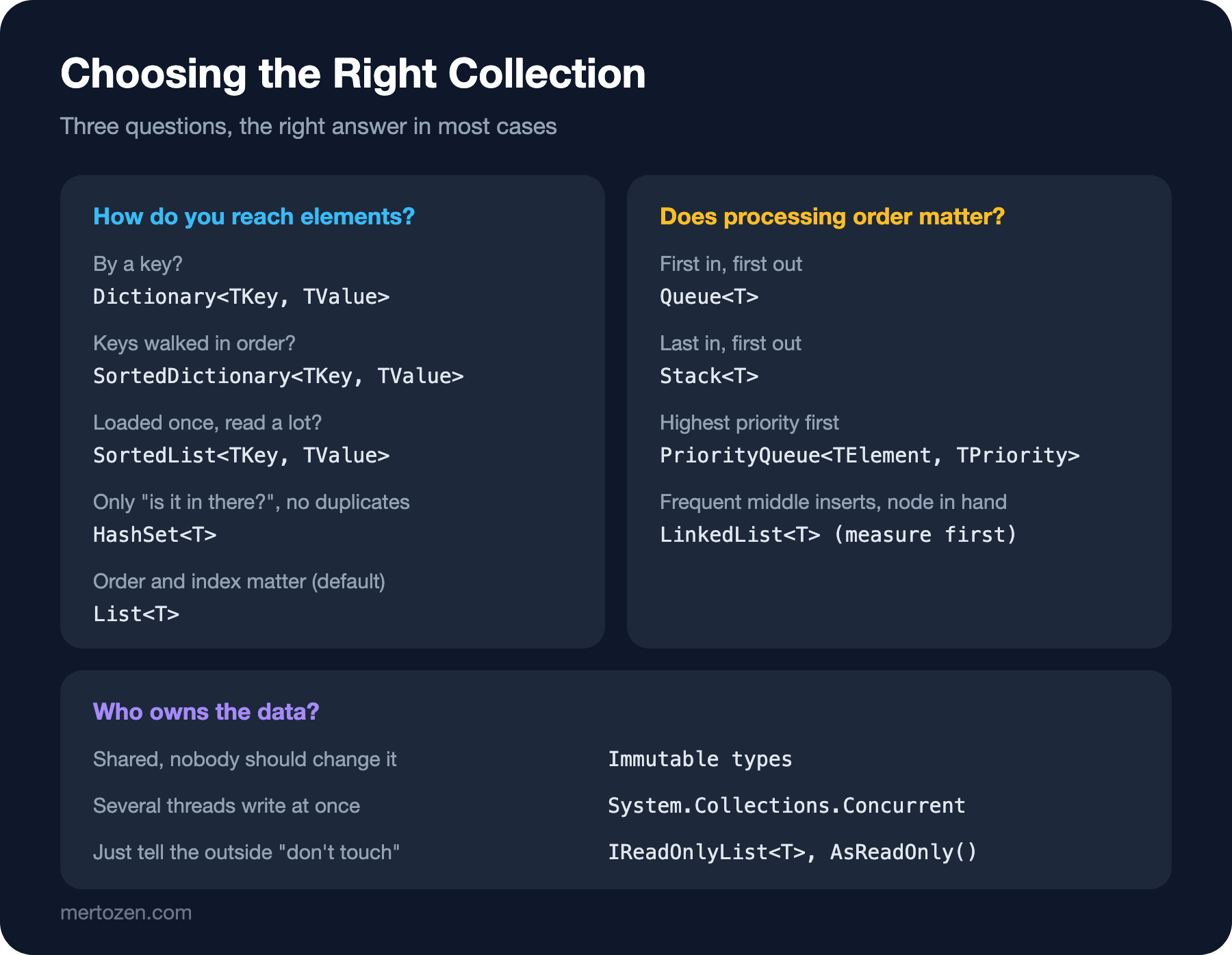
You can reduce the choice to a few questions. Do you reach elements by a key? Dictionary<TKey, TValue>. Must the keys be walked in order? SortedDictionary<TKey, TValue>; if the data is loaded once and read a lot, SortedList<TKey, TValue> uses less memory. Do you only ask "is this in there?" and want no duplicates? HashSet<T>. If order and indexes matter, List<T>; in most cases that is the right default.
If processing order matters, change the question. Does the first one in go out first? Queue<T>. The last one in? Stack<T>. The one with the highest priority? PriorityQueue<TElement, TPriority>. If you often insert in the middle of a list and already hold a node reference, LinkedList<T> is worth considering; but because it is scattered in memory, in practice it is often slower than List<T>, so measure first.
The last question is ownership of the data. Is the data shared in several places, and should nobody change it? Immutable types. Are several threads writing at the same time? System.Collections.Concurrent. Do you only want to tell the outside world "don't touch"? IReadOnlyList<T> and AsReadOnly() are enough. The Frozen collections that came with C# 12/.NET 8, built once and read many times, are covered in the version post of this series.
Common Pitfalls
Throwing away the return value. The mistake from the guessing question is common in real projects too: writing prices.SetItem(isbn, price); without assigning the result does nothing. Assign it back to the variable: prices = prices.SetItem(isbn, price);.
Walking ImmutableList<T> with for. Every index access is O(log n), so the loop becomes O(n log n). Use foreach, or switch to ImmutableArray<T> for read-heavy data.
Building an immutable collection with individual Add calls in a loop. Every step produces a new version; on ImmutableArray<T> that means a full copy at every step. Use a builder or ToImmutableArray().
The default ImmutableArray<T>. An unassigned field or property throws NullReferenceException on first access. Initialize it with Empty.
Thinking the contents of an immutable collection are immutable too. ImmutableList<Book> freezes the list itself; if Book is a class with mutable properties, the books can still change inside. For full immutability the elements must be immutable too; records and init properties make that easier.
A Small Experiment
★☆☆ Build a "recently viewed books" history with ImmutableStack<string>. Do three Push calls, keep each intermediate version in its own variable, and see that the oldest version still has one element.
★★☆ Repeat the measurement program for ImmutableList<int>.Insert(0, 42) and ImmutableArray<int>.Insert(0, 42). How much memory does inserting at the front allocate in each type?
★★★ Rewrite PriceList with Dictionary<string, decimal> and lock; compare what you have to do to give the reading side a consistent copy with the immutable version.
We are done choosing collections, but one question is still open: if we can pass an IEnumerable<EBook> to a method that asks for IEnumerable<Book>, why can't we pass a List<EBook> where a List<Book> is expected? In the next post we look at generic variance, that is covariance and contravariance, and the in/out keywords.