

Enums in C#: Underlying Types, [Flags], Parse and switch
The number under an enum: why (OrderStatus)7 is a valid value, why default is 0, giving values by hand, the surprises of Parse and TryParse, the CS8524 warning in switch expressions, and combinable options with [Flags].
Version note: The code in this post uses C# 10 and the .NET 6 APIs; it was built and run with the .NET 10 SDK.
Guess First
Our Bookstore application has an enum with five values that holds the status of an order. The code below compiles without a single warning. What do the three lines print? Does the first line throw an exception, print nothing, or print something?
OrderStatus status = (OrderStatus)7;
Console.WriteLine(status);

bool ok = Enum.TryParse("3", out OrderStatus parsed);
Console.WriteLine(ok);
Console.WriteLine(parsed);

enum OrderStatus
{
    Pending,
    Paid,
    Shipped,
    Delivered,
    Cancelled
}
An Enum Is a List of Names With a Number Underneath
The output is:
7
True
Delivered
The first line did not throw, because a plain integer sits under every enum. There is no member with the value 7 in OrderStatus, yet a variable of type OrderStatus carries 7 just fine; when ToString() cannot find a matching name, it prints the number itself. On the second line, TryParse read "3" as a number rather than a name and gave back member number 3, which is Delivered.
Think of an enum as the numbered spaces in a parking lot. The signs say "Pending", "Paid" and so on, but only the numbers are painted on the asphalt. You can still park in space 7, which has no sign at all; nobody stops you. What an enum gives you is readable names instead of magic numbers, plus the compiler's type checking. The guarantee it gives is weaker than you might think.
By default the first member is 0 and each following member is one more. You can cast in both directions between a member and a number:
OrderStatus status = OrderStatus.Shipped;

Console.WriteLine(status);                 // Shipped
Console.WriteLine((int)status);            // 2
Console.WriteLine(status.ToString("D"));   // 2
Console.WriteLine(OrderStatus.Paid < OrderStatus.Delivered); // True

foreach (OrderStatus s in Enum.GetValues<OrderStatus>())
{
    Console.Write($"{s}={(int)s} ");
}
// Pending=0 Paid=1 Shipped=2 Delivered=3 Cancelled=4
An enum is a value type: it is copied on assignment, and == compares the numbers. The < comparison works on the numbers too, which is why Paid < Delivered is true. The generic Enum.GetValues<T>() has existed since .NET 5 and walks all members in declaration order; it comes in handy when you fill a drop-down list.
The Underlying Type and Choosing Values Yourself
The type under an enum is called its underlying type, and the default is int. You can pick another integer type such as byte, short or long, and you can also give each value yourself:
Console.WriteLine(Enum.GetUnderlyingType(typeof(Priority))); // System.Byte
Console.WriteLine(sizeof(Priority));                         // 1
Console.WriteLine((int)ShippingMethod.Express);              // 2

enum Priority : byte
{
    Low = 1,
    Normal = 5,
    High = 10
}

enum ShippingMethod
{
    Standard = 1,
    Express = 2,
    SameDay = 3
}
You will rarely need to change the underlying type. Unless you are saving memory inside a struct that is stored millions of times, or matching a file format or a hardware protocol byte for byte, leave it as int.
Writing the values explicitly matters much more in real life. As soon as an enum value goes to a database column, into JSON or to another service as a number, those numbers become a contract. If someone adds a new member in the middle of an enum with automatic numbering, every later member shifts by one; an order saved as Shipped yesterday shows up as Delivered today. For every enum that leaves your process, write the values by hand and always add new members at the end. In the EF Core series we talk separately about storing enums in the database as numbers or as text.
The default Value and Why Zero Matters
Like every value type, an enum has a default value, and that value is always 0, whether or not the enum defines a 0:
OrderStatus emptyStatus = default;
ShippingMethod emptyMethod = default;

Console.WriteLine(emptyStatus); // Pending
Console.WriteLine(emptyMethod); // 0
ShippingMethod has no name for 0, so the screen shows just 0. This is the value you get when you create a new array, when you never assign a field, or when a field is missing from incoming JSON. With OrderStatus it is sneakier: 0 maps to Pending, so a "forgotten" value looks like a real status.
My preference is to give enums without a meaningful starting point an Unknown or None member with the value 0. That way you can catch an unassigned value explicitly in code. Microsoft's design guidelines also recommend that every enum has a member that maps to 0.
From String to Enum: Parse and TryParse
To turn text coming from a user, a file or a query string into an enum, you have Enum.Parse and Enum.TryParse. If you do not know their rules, both can surprise you:
Console.WriteLine(Enum.Parse<OrderStatus>("paid", ignoreCase: true)); // Paid

Console.WriteLine(Enum.TryParse("paid", out OrderStatus a));   // False: case-sensitive
Console.WriteLine(Enum.TryParse(" Paid ", out OrderStatus b)); // True: leading and trailing spaces are trimmed
Console.WriteLine(b);                                          // Paid
Console.WriteLine(Enum.TryParse("42", out OrderStatus c));     // True: numbers are accepted too
Console.WriteLine(c);                                          // 42
Console.WriteLine(Enum.TryParse("Pending, Paid", out OrderStatus d)); // True: a comma-separated list is OR-ed
Console.WriteLine(d);                                          // Paid

Enum.Parse<OrderStatus>("Lost");
// Unhandled exception. System.ArgumentException: Requested value 'Lost' was not found.
The default comparison is case-sensitive; without ignoreCase: true, "paid" is not found. The really dangerous lines are the last ones: TryParse accepts a numeric string without checking whether the enum has such a member. It also OR-s comma-separated names bit by bit into a single value; 0 OR 1 is 1, so "Pending, Paid" silently became Paid. This behavior was designed for the [Flags] enums we will see below, but it works on ordinary enums as well.
When you turn an outside value into an enum, use TryParse together with Enum.IsDefined:
foreach (string raw in new[] { "delivered", "7", "1", "Lost" })
{
    bool ok = Enum.TryParse(raw, ignoreCase: true, out OrderStatus status)
              && Enum.IsDefined(status);
    Console.WriteLine($"{raw,-10} -> {(ok ? status.ToString() : "rejected")}");
}
delivered -> Delivered
7 -> rejected
1 -> Paid
Lost -> rejected7 is rejected now. "1" is still accepted, because 1 is a defined value. If you want to accept names only, you also have to check that the text does not start with a digit. Use Parse only where you are sure the value is valid, for example when reading a configuration file you wrote yourself. For user input, TryParse is preferred over a path that throws; we discussed this distinction in the exception handling post.
Enums and switch
An enum's most natural companion is switch. The switch expression we saw in the post on conditions gathers the value for each case into a single expression:
Console.WriteLine(Describe(OrderStatus.Shipped)); // On the way
Console.WriteLine(CanCancel(OrderStatus.Paid));   // True
Console.WriteLine(Describe((OrderStatus)9));      // ?

static string Describe(OrderStatus status) => status switch
{
    OrderStatus.Pending => "Waiting for payment",
    OrderStatus.Paid => "Preparing your order",
    OrderStatus.Shipped => "On the way",
    OrderStatus.Delivered => "Delivered",
    OrderStatus.Cancelled => "Cancelled",
};

static bool CanCancel(OrderStatus status) => status switch
{
    OrderStatus.Pending or OrderStatus.Paid => true,
    OrderStatus.Shipped => false,
};
When I compiled this code, I got two different warnings:
Program.cs(14,53): warning CS8509: The switch expression does not handle all possible values of its input type (it is not exhaustive). For example, the pattern 'OrderStatus.Delivered' is not covered.
Program.cs(5,54): warning CS8524: The switch expression does not handle some values of its input type (it is not exhaustive) involving an unnamed enum value. For example, the pattern '(OrderStatus)5' is not covered.
CS8509 for CanCancel is fair: we forgot Delivered and Cancelled. CS8524 for Describe looks strange at first, since we wrote all five members. The compiler is reminding you of what we saw at the start of the post: an OrderStatus variable can also carry an unnamed number. If you ignore this warning, the Describe((OrderStatus)9) call on the third line throws a SwitchExpressionException at run time: Non-exhaustive switch expression failed to match its input. Below the message it says Unmatched value was 9.
The right fix is to add a discard arm that explicitly rejects the unexpected value:
static string Describe(OrderStatus status) => status switch
{
    OrderStatus.Pending => "Waiting for payment",
    OrderStatus.Paid => "Preparing your order",
    OrderStatus.Shipped => "On the way",
    OrderStatus.Delivered => "Delivered",
    OrderStatus.Cancelled => "Cancelled",
    _ => throw new ArgumentOutOfRangeException(nameof(status), status, "Unknown order status")
};
Now there is no warning, and when a bad value arrives the message tells you what happened: Unknown order status (Parameter 'status'), followed by Actual value was 9. The subtle point is this: do not use the _ arm as "everything else" for a normal case. Write out every real member, so that the compiler can warn you when a new member is added tomorrow, and leave _ for invalid values only.
[Flags]: Several Values in One Variable
An order cannot be "Paid" and "Shipped" at the same time; the statuses exclude each other. A book, however, can be sold as a paperback and an e-book at once. For options that can be combined, you add the [Flags] attribute to the enum and give each member a power of two, so that each member is a separate bit:
BookFormat formats = BookFormat.Paperback | BookFormat.Ebook;

Console.WriteLine(formats);                                // Paperback, Ebook
Console.WriteLine((int)formats);                           // 5
Console.WriteLine(formats.HasFlag(BookFormat.Ebook));      // True
Console.WriteLine((formats & BookFormat.Hardcover) != 0);  // False

formats |= BookFormat.Audiobook;   // add a flag
Console.WriteLine(formats);        // Paperback, Ebook, Audiobook

formats &= ~BookFormat.Paperback;  // remove a flag
Console.WriteLine(formats);        // Ebook, Audiobook

Console.WriteLine((BookFormat)3);  // Print
Console.WriteLine((BookFormat)16); // 16
Console.WriteLine(Enum.Parse<BookFormat>("Hardcover, Ebook")); // Hardcover, Ebook

[Flags]
enum BookFormat
{
    None = 0,
    Paperback = 1,
    Hardcover = 2,
    Ebook = 4,
    Audiobook = 8,
    Print = Paperback | Hardcover
}
You add a flag with |, remove it with & ~, and query it with HasFlag or &. [Flags] does not set the bits for you; giving the values 1, 2, 4, 8 is your job. The attribute's real effect is on ToString() and Parse: a combined value is written as "Paperback, Ebook" and the same text can be read back. You can also define ready-made combinations such as Print; since 3 matches Print exactly, the output shows "Print" rather than "Paperback, Hardcover".
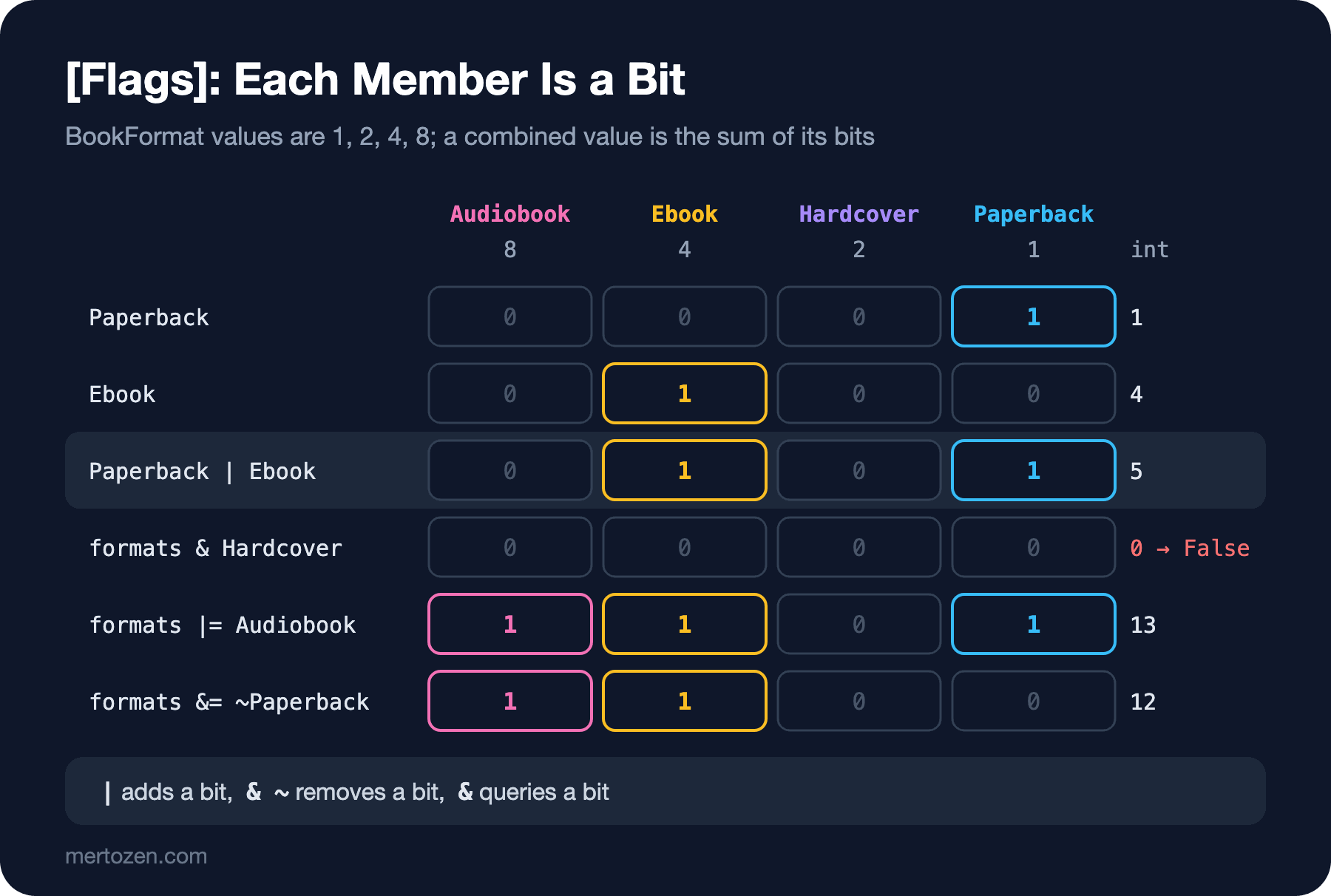
When should you use flags and when a normal enum? Ask "can more than one of these values be true at the same time?" If the answer is yes and the set of options is small and fixed, [Flags] fits. If the values exclude each other, use a normal enum.
Common Pitfalls
Assuming an enum only carries defined values. Casts and TryParse accept any number. Check every outside value with Enum.IsDefined, and give your switch a _ => throw arm. Be careful with [Flags] enums: Enum.IsDefined(BookFormat.Paperback | BookFormat.Ebook) returns false, because there is no single member named 5. To validate combined values you need to check that no bits are left outside the defined ones.
Asking "are there no formats?" with HasFlag(None). HasFlag actually asks (value & flag) == flag; when the flag is 0, that is always true. To check for emptiness, write formats == BookFormat.None.
Giving a [Flags] enum the values 1, 2, 3. Then 3 is both its own member and the combination of 1 and 2. In such an enum, writing A | B prints "C", and the bug can hide for hours.
Writing enum values somewhere permanent as numbers and later adding a member in the middle of the list. The stored data silently changes meaning. Write the values by hand, add new members at the end, and retire old members instead of deleting them.
Showing the output of ToString() to users. "SameDay" is a code name; the screen should say "Same-day delivery", or the matching text in a Turkish interface. Map the enum to display text with a switch expression or a resource file, so that renaming a member does not change your user interface.
A Small Experiment
★☆☆ Add an Unknown = 0 member to OrderStatus, give the other members values starting from 1 by hand, and see what the default value prints now.
★★☆ Write a TryReadStatus(string? input, out OrderStatus status) function that reads an order status from the user and accepts names only: "7" and "1" should be rejected, "shipped" should be accepted.
★★★ For BookFormat, write an IsValidFormat(BookFormat value) function that tells whether the value is made up of defined bits only. Hint: combine all members with | into a mask and look at value & ~mask. (BookFormat)5 should be valid and (BookFormat)16 invalid.
With enums we kept track of which status an order is in. When the order was placed, when the parcel will leave and what time the bookstore opens are a different world. In the next post we open up dates and times: DateTime, DateTimeOffset, DateOnly and TimeOnly that came with .NET 6, TimeSpan, and UTC.