

Producer/Consumer with C# Channels: Backpressure, Bounded Channels and Pipelines
An async queue with System.Threading.Channels: why three orders fit into a channel with a capacity of two, Writer/Reader and Complete, the WaitToReadAsync/TryRead loop, FullMode options and itemDropped on bounded channels, multiple consumers, an order pipeline that passes failures on with Complete(ex), and the cost of forgetting Complete.
Version note: The code in this post uses C# 10 and the .NET 6 APIs; it was built and run with the .NET 10 SDK.
Guess First
One thread produces orders, another packs them. Between them sits a channel that holds at most two orders. The producer prints every order it writes, and the packer spends 100 ms on each order. Where does the "Wrote 1003" line show up: before "Processed 1001" or after it? And "Wrote 1005"?
using System.Threading.Channels;

Channel<int> orders = Channel.CreateBounded<int>(capacity: 2);

Task producer = Task.Run(async () =>
{
    for (int orderId = 1001; orderId <= 1005; orderId++)
    {
        await orders.Writer.WriteAsync(orderId);
        Console.WriteLine($"Wrote     {orderId}");
    }
    orders.Writer.Complete();
});

await Task.Delay(50);
await foreach (int orderId in orders.Reader.ReadAllAsync())
{
    await Task.Delay(100); // packing the order
    Console.WriteLine($"Processed {orderId}");
}
await producer;
Console.WriteLine("All orders processed");
Channels: An Async Queue
I got the same output on all five runs:
Wrote     1001
Wrote     1002
Wrote     1003
Processed 1001
Wrote     1004
Processed 1002
Wrote     1005
Processed 1003
Processed 1004
Processed 1005
All orders processed
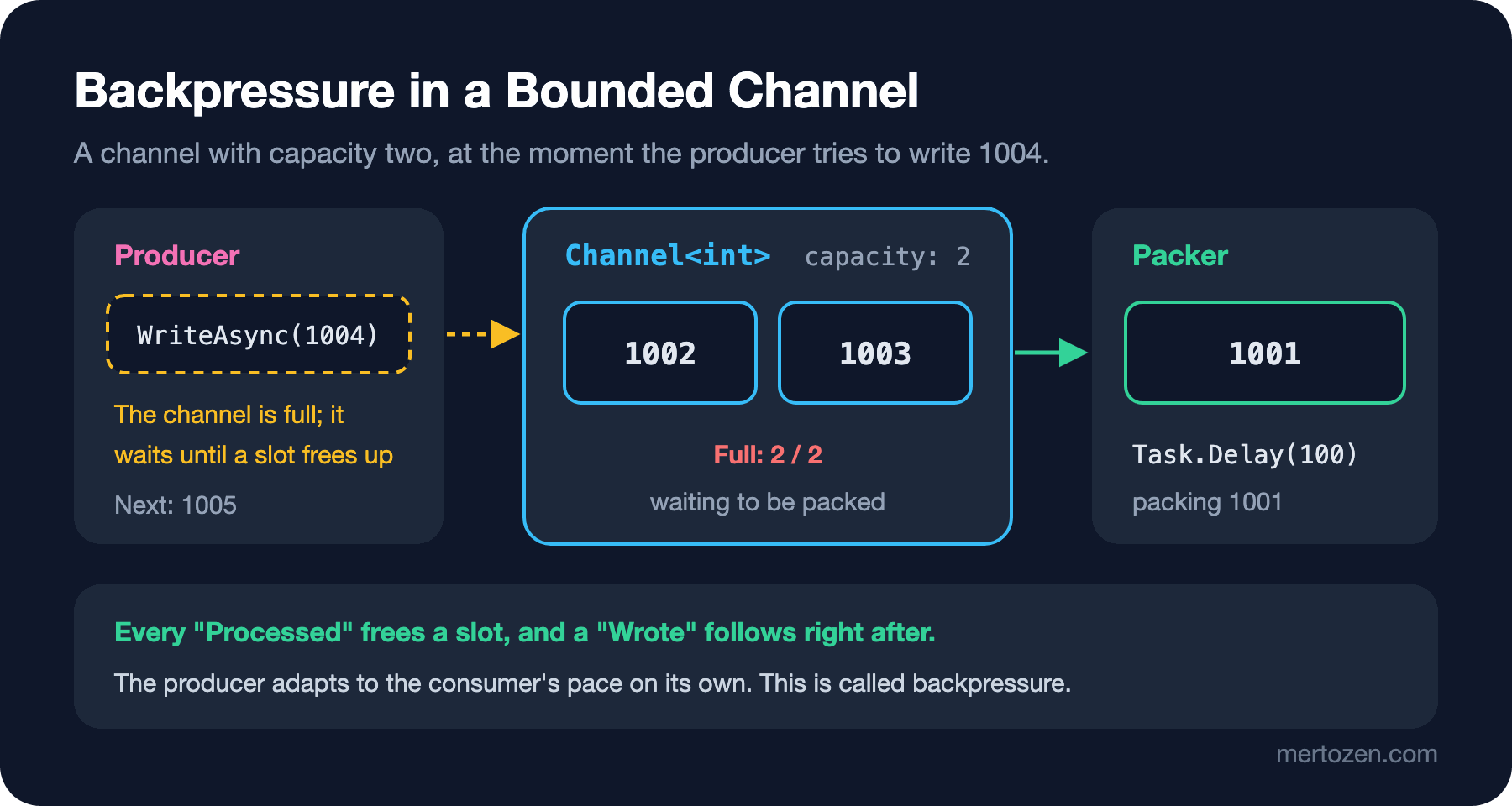
The first three writes went through without waiting. Three orders fit even though the capacity is two, because the packer immediately took 1001 out of the channel and started its 100 ms of work: 1001 is no longer in the channel, it's in the packer's hands. 1002 and 1003 filled the channel, and the WriteAsync for 1004 started waiting. After that the output settles into a rhythm: every "Processed" frees a slot, and a "Wrote" follows right after. The producer adapted to the consumer's pace on its own. This is called backpressure, and it's the most important concept in this post.
System.Threading.Channels has been part of the framework since .NET Core 3.0. Think of a channel as a thread-safe, async queue: writers (ChannelWriter<T>) at one end, readers (ChannelReader<T>) at the other. The difference from the ConcurrentQueue<T> in the previous post is that a reader waits on an empty queue, and a writer waits on a full one, with await and without blocking a thread. BlockingCollection<T> does the same job but blocks the waiting thread; it isn't a good fit for async code.
Writer and Reader
The simplest form is an unbounded channel. Picture an email sending queue:
using System.Threading.Channels;

Channel<string> emails = Channel.CreateUnbounded<string>();

// writer side: TryWrite never fails on an unbounded channel that is still open
emails.Writer.TryWrite("order-confirmation:1001");
emails.Writer.TryWrite("order-confirmation:1002");
emails.Writer.TryWrite("shipping-notice:1001");
emails.Writer.Complete();

Console.WriteLine($"Waiting in channel: {emails.Reader.Count}");

// reader side, the low-level loop that ReadAllAsync wraps
while (await emails.Reader.WaitToReadAsync())
{
    while (emails.Reader.TryRead(out string? email))
        Console.WriteLine($"Sending {email}");
}

await emails.Reader.Completion;
Console.WriteLine($"Completed: {emails.Reader.Completion.IsCompleted}, can write: {emails.Writer.TryWrite("late")}");
Waiting in channel: 3
Sending order-confirmation:1001
Sending order-confirmation:1002
Sending shipping-notice:1001
Completed: True, can write: FalseThe writing side says two things: "take this" (TryWrite or WriteAsync) and "that's it, nothing else is coming" (Complete). The second is at least as important as the first; it decides when the reader leaves its loop. On the reading side, WaitToReadAsync waits until there's something to read or the channel completes; when it returns false, the queue is empty and the writing side has finished. The inner TryRead loop drains everything that piled up in the queue in one go per wake-up. ReadAllAsync() wraps exactly this loop as an IAsyncEnumerable<T>, read with the await foreach from the previous post in the series. In everyday code ReadAllAsync is enough; you drop down to the low-level loop when you want control over each read. Reader.Completion is a task that finishes once the channel has been fully drained and closed.
Bounded Channels and Backpressure
An unbounded channel carries a risk: if the producer is faster than the consumer, the queue grows without limit, and what tells you is not an exception but rising memory usage. In a bounded channel, FullMode decides what happens when the queue is full. Let's write five updates with TryWrite into a channel of stock updates with a capacity of three:
using System.Threading.Channels;

foreach (BoundedChannelFullMode mode in new[] { BoundedChannelFullMode.DropOldest, BoundedChannelFullMode.DropNewest, BoundedChannelFullMode.DropWrite, BoundedChannelFullMode.Wait })
{
    var dropped = new List<int>();
    Channel<int> stockUpdates = Channel.CreateBounded<int>(
        new BoundedChannelOptions(3) { FullMode = mode },
        item => dropped.Add(item));

    var accepted = new List<bool>();
    for (int update = 1; update <= 5; update++)
        accepted.Add(stockUpdates.Writer.TryWrite(update));
    stockUpdates.Writer.Complete();

    var kept = new List<int>();
    await foreach (int update in stockUpdates.Reader.ReadAllAsync())
        kept.Add(update);

    Console.WriteLine($"{mode,-10} kept [{string.Join(", ", kept)}]  dropped [{string.Join(", ", dropped)}]  TryWrite: {string.Join(" ", accepted)}");
}
DropOldest kept [3, 4, 5] dropped [1, 2] TryWrite: True True True True True
DropNewest kept [1, 2, 5] dropped [3, 4] TryWrite: True True True True True
DropWrite kept [1, 2, 3] dropped [4, 5] TryWrite: True True True True True
Wait kept [1, 2, 3] dropped [] TryWrite: True True True False FalseThe default mode is Wait: while the queue is full, TryWrite returns false and WriteAsync waits until a slot frees up. That was the rhythm in the guessing question. The other three modes drop something instead of waiting: DropOldest drops the oldest element, DropNewest the newest element in the queue, and DropWrite the one being written. You can find out which element was dropped with the itemDropped callback; that overload arrived in .NET 6. The choice depends on the nature of the work. Orders can't be lost, so you use Wait. In a stream of stock levels or temperatures, where only the latest value matters, DropOldest makes sense: if the queue is full, the old updates are stale anyway.
Multiple Consumers
If packing is slow, you add packers. Several consumers can read from the same reader; each element goes to exactly one of them:
using System.Collections.Concurrent;
using System.Threading.Channels;

Channel<int> orders = Channel.CreateBounded<int>(new BoundedChannelOptions(10)
{
    SingleWriter = true,
    SingleReader = false,
});

var processedBy = new ConcurrentDictionary<string, int>();

Task[] packers = Enumerable.Range(1, 3)
    .Select(packerNo => Task.Run(async () =>
    {
        await foreach (int orderId in orders.Reader.ReadAllAsync())
        {
            await Task.Delay(orderId % 3 == 0 ? 30 : 10); // some orders take longer to pack
            processedBy.AddOrUpdate($"packer-{packerNo}", 1, (_, count) => count + 1);
        }
    }))
    .ToArray();

for (int orderId = 1; orderId <= 60; orderId++)
    await orders.Writer.WriteAsync(orderId);
orders.Writer.Complete();

await Task.WhenAll(packers);

foreach (KeyValuePair<string, int> pair in processedBy.OrderBy(p => p.Key))
    Console.WriteLine($"{pair.Key}: {pair.Value} orders");
Console.WriteLine($"Total: {processedBy.Values.Sum()}");
packer-1: 21 orders
packer-2: 17 orders
packer-3: 22 orders
Total: 60The work spread out on its own according to who was free; the packer that happened to get the slow orders took fewer of them. We didn't write any distribution logic by hand. The SingleWriter and SingleReader options are a promise you make to the channel: "only one place will write to this channel", "only one place will read from it". The implementation may rely on those promises to pick a faster path; if you break the promise, the behavior is undefined. If you're not sure, leave them at their default of false.
There's a price: with multiple consumers, the order in which jobs finish isn't guaranteed. Order 1002 may be packed before 1001. If order matters, use a single consumer or rebuild the order in the next stage.
Building a Pipeline and Passing Errors On
Chain channels end to end and you get a pipeline. Orders come in, stock gets reserved, invoices get issued; each stage runs at its own pace, and the bounded channels between them stop a fast stage from overwhelming a slow one:
using System.Globalization;
using System.Threading.Channels;

CultureInfo.CurrentCulture = CultureInfo.InvariantCulture;

var stock = new Dictionary<string, int> { ["978-0132350884"] = 2, ["978-0135957059"] = 5 };
Order[] incoming =
{
    new(1001, "978-0132350884", 1, 37.90m),
    new(1002, "978-0135957059", 2, 42.50m),
    new(1003, "978-0132350884", 2, 37.90m),
    new(1004, "978-0000000000", 1, 10.00m),
};

Channel<Order> placed = Channel.CreateBounded<Order>(5);
Channel<Order> reserved = Channel.CreateBounded<Order>(5);

Task intake = Task.Run(async () =>
{
    foreach (Order order in incoming)
        await placed.Writer.WriteAsync(order);
    placed.Writer.Complete();
});

Task reservation = Task.Run(async () =>
{
    try
    {
        await foreach (Order order in placed.Reader.ReadAllAsync())
        {
            if (!stock.TryGetValue(order.Isbn, out int available))
                throw new InvalidOperationException($"Unknown ISBN {order.Isbn} in order {order.Id}");
            if (available < order.Quantity)
            {
                Console.WriteLine($"Order {order.Id}: out of stock");
                continue;
            }
            stock[order.Isbn] = available - order.Quantity;
            await reserved.Writer.WriteAsync(order);
        }
        reserved.Writer.Complete();
    }
    catch (Exception ex)
    {
        reserved.Writer.Complete(ex); // pass the failure downstream
    }
});

try
{
    await foreach (Order order in reserved.Reader.ReadAllAsync())
        Console.WriteLine($"Invoice for order {order.Id}: {order.Quantity * order.UnitPrice:F2}");
}
catch (InvalidOperationException ex)
{
    Console.WriteLine($"Pipeline stopped: {ex.Message}");
}

await Task.WhenAll(intake, reservation);

record Order(int Id, string Isbn, int Quantity, decimal UnitPrice);
Order 1003: out of stock
Invoice for order 1001: 37.90
Invoice for order 1002: 85.00
Pipeline stopped: Unknown ISBN 978-0000000000 in order 1004Note three things. First, only the reservation stage touches the stock dictionary; state owned by a single task needs no lock. That's one of the nice things about pipelines: instead of shared state, each stage has its own state, and only messages flow between stages. Second, each stage completes its output channel when it's done; completion flows down the pipeline like water. Third, errors. The unknown ISBN stopped the reservation stage; instead of swallowing the exception, the stage passed it downstream with Complete(ex). The invoicing stage first processed 1001 and 1002, which were already waiting in the queue, and then ReadAllAsync threw the same exception. If a stage doesn't call Complete on every way out, the stages below it wait forever.
A Channel or Something Else
If you already have a list in hand and want to process each element with bounded concurrency, you don't need a channel; Parallel.ForEachAsync is shorter. Channels shine where production and consumption are spread over time and flow at different speeds: an email sender running in the background, a worker that queues incoming webhooks, a log or metrics collector. In ASP.NET Core the typical shape is a queue that a controller writes to and a BackgroundService running in the background reads from. Choose one thing deliberately: a channel lives in memory. If the application crashes or restarts, whatever is inside is gone. Work that must not be lost needs a durable queue such as RabbitMQ or Azure Service Bus, or a database table; a channel doesn't replace them.
Common Pitfalls
Forgetting Complete. The program doesn't fail, it just never finishes:
using System.Threading.Channels;

Channel<int> orders = Channel.CreateUnbounded<int>();
orders.Writer.TryWrite(1001);
orders.Writer.TryWrite(1002);
// forgot: orders.Writer.Complete();

Task consumer = Task.Run(async () =>
{
    await foreach (int orderId in orders.Reader.ReadAllAsync())
        Console.WriteLine($"Processed {orderId}");
    Console.WriteLine("Consumer finished");
});

try
{
    await consumer.WaitAsync(TimeSpan.FromSeconds(1));
}
catch (TimeoutException)
{
    Console.WriteLine("Consumer is still waiting after 1 second");
}

orders.Writer.Complete();
await consumer;

Console.WriteLine($"TryComplete again: {orders.Writer.TryComplete()}");
try
{
    orders.Writer.Complete();
}
catch (ChannelClosedException ex)
{
    Console.WriteLine($"Complete again: {ex.GetType().Name}: {ex.Message}");
}
Processed 1001
Processed 1002
Consumer is still waiting after 1 second
Consumer finished
TryComplete again: False
Complete again: ChannelClosedException: The channel has been closed.The consumer processed two orders and then kept waiting in case something else arrived. Often the only way you notice is that the application won't shut down. Calling Complete in a finally block in the producer is a good habit. The last two lines of the output are a separate pitfall: calling Complete a second time throws a ChannelClosedException. On a channel that might be closed from several places, use TryComplete. Writing to a closed channel with WriteAsync throws the same exception.
Trusting the result of TryWrite with DropWrite and DropNewest. Look at the output above: TryWrite returned true even when an element was dropped. If you want to know about losses, use the itemDropped callback.
Using unbounded channels everywhere. It's easy, but nobody stops the queue from growing. If the producer is a source you don't control (HTTP requests, events from an external system), choose a bounded channel and a deliberate FullMode.
Not catching exceptions in the consumer. If a consumer inside Task.Run throws, the task faults, reading stops and, if nobody awaits it, the error disappears silently; the producer then waits forever once the queue fills up. Always await your consumer tasks somewhere, and decide deliberately whether a failure on one element should kill the whole consumer.
A Small Experiment
★☆☆ Change the capacity in the guessing question to 1, then to 10. How does the position of the "Wrote" lines change? Does the total time change?
★★☆ Add a failure to the packers in p14d: order 37 should throw. Write two versions, one that logs just that order and keeps going, and one that spreads the error to the whole pipeline. How many orders have been processed by the end of the program in each?
★★★ Add a fourth stage to the pipeline in p14e: send the issued invoices as "bulk emails" in groups of five. What should happen if the last group has fewer than five? Hint: use the WaitToReadAsync and TryRead loop.
Throughout this post we faked one thing with Task.Delay: "pretend to work for 100 ms". In the next post we look at waiting and timing themselves: how Task.Delay works, the differences between .NET's three timers, the PeriodicTimer that arrived in .NET 6, and WaitAsync, which adds a timeout to any task.