

How C# async/await Works: The State Machine and Continuations
await does not always wait: on a finished task the code continues on the same thread. What the async keyword actually does, the GetAwaiter/IsCompleted/OnCompleted steps, a working hand-written state machine, looking at the compiler-generated type with reflection (a class in Debug, a struct in Release), which thread runs the continuation, and the awaitable pattern.
Version note: The code in this post uses C# 10 and the .NET 6 APIs; it was built and run with the .NET 10 SDK.
Guess First
A method that loads the catalog awaits twice: first a task that has already finished, then a 100 ms delay. Every line prints the thread it is running on at that moment. The program starts on the main thread, number 1. Which of the five lines print 1, and which print another number?
Console.WriteLine($"Main before:     thread {Environment.CurrentManagedThreadId}");
await LoadCatalogAsync();
Console.WriteLine($"Main after:      thread {Environment.CurrentManagedThreadId}");

static async Task LoadCatalogAsync()
{
    Console.WriteLine($"Start:           thread {Environment.CurrentManagedThreadId}");
    await Task.CompletedTask;
    Console.WriteLine($"After completed: thread {Environment.CurrentManagedThreadId}");
    await Task.Delay(100);
    Console.WriteLine($"After delay:     thread {Environment.CurrentManagedThreadId}");
}
The Answer: await Does Not Always Wait
Main before:     thread 1
Start:           thread 1
After completed: thread 1
After delay:     thread 5
Main after:      thread 5
The first three lines are on thread 1. When a method is called, its body starts on the caller's thread; we saw that in the previous post. The new part is the third line: await Task.CompletedTask did not wait for anything. Because the task was already finished, the code carried on, on the same thread, without interruption. Only when it reached Task.Delay(100) did the method really pause; thread 1 was released, and the code that resumed 100 ms later ran on a pool thread. Since the main code was awaiting the task of LoadCatalogAsync, it continued on the same thread when that task finished. On your machine the number may not be 5, but it will not be 1.
await does not mean "stop and wait". It means something closer to "is this work done? If so, carry on; if not, make a note of the rest of me for later and leave for now". In this post we look at how that note is taken, in other words what the compiler turns your method into.
What the async Keyword Does
Surprisingly, the async keyword does nothing at runtime. It does not open a new thread or push the method into the background. It changes only two things: it lets you use await inside the method, and it tells the compiler "turn this method's body into a state machine and wrap the return value in a Task".
Console.WriteLine($"Caller: thread {Environment.CurrentManagedThreadId}");
Task<int> countTask = CountBooksAsync();
Console.WriteLine($"Completed before await: {countTask.IsCompleted}");
Console.WriteLine($"Count: {await countTask}");

static async Task<int> CountBooksAsync()
{
    Console.WriteLine($"Method: thread {Environment.CurrentManagedThreadId}");
    return 3;
}
Caller: thread 1
Method: thread 1
Completed before await: True
Count: 3Even though the method is async, it ran synchronously from start to finish on the caller's thread and handed us a task that was already complete. That is what an async method with no await inside is: an ordinary synchronous method with extra overhead. The .NET 8 SDK's compiler gives warning CS1998 for this code ("This async method lacks 'await' operators and will run synchronously"); the .NET 10 SDK I tried (10.0.402) did not give this warning. Warning or not, the rule is the same: do not make a method with no await inside async; if the result is ready, return Task.FromResult.
The Three Questions Behind await
When the compiler sees an await, it turns it roughly into three steps. We can write the same steps by hand:
using System.Globalization;
using System.Runtime.CompilerServices;

CultureInfo.CurrentCulture = CultureInfo.InvariantCulture;
TaskCompletionSource done = new TaskCompletionSource();

Task<decimal> priceTask = GetPriceAsync();
TaskAwaiter<decimal> awaiter = priceTask.GetAwaiter(); // 1. get the awaiter
if (awaiter.IsCompleted) // 2. is it done?
{
    Console.WriteLine($"Already done: {awaiter.GetResult()}");
    done.SetResult();
}
else
{
    awaiter.OnCompleted(() => // 3. run this when it is done
    {
        Console.WriteLine($"Continuation on thread {Environment.CurrentManagedThreadId}: {awaiter.GetResult()}");
        done.SetResult();
    });
    Console.WriteLine($"Not done yet, returning from thread {Environment.CurrentManagedThreadId}");
}

await done.Task;

static async Task<decimal> GetPriceAsync()
{
    await Task.Delay(200);
    return 12.99m;
}
Not done yet, returning from thread 1
Continuation on thread 5: 12.99First an awaiter is obtained with GetAwaiter(). Then IsCompleted is asked; if the task has finished, the result is taken immediately with GetResult() and the code carries on on the same thread. If not, OnCompleted is told "run this when you are done" and the method returns. The piece of code passed to OnCompleted is called the continuation: all of the code after the await. Finally, GetResult() gives the result, or throws the exception if the task ended with an error.
In our hand-written version we passed the continuation as a lambda. But if a method has five awaits, writing five nested lambdas would take us straight back to APM's callback hell. The compiler does something smarter instead.
The State Machine the Compiler Writes
The compiler turns your async method into a state machine: a type that holds the method's local variables as fields, plus a single method called MoveNext(). Every await is a stopping point; the state field remembers which stop the machine is at. The continuation is not a separate lambda each time; the same MoveNext() is called every time, and it looks at the state and resumes where it left off.
Take this method:
static async Task<decimal> GetTotalAsync(string isbn, int quantity)
{
    Console.WriteLine("Fetching price");
    decimal price = await GetPriceAsync(isbn);
    Console.WriteLine("Price arrived");
    return price * quantity;
}
Let's write by hand a simplified version that resembles what the compiler generates and that really works:
using System.Globalization;
using System.Runtime.CompilerServices;

CultureInfo.CurrentCulture = CultureInfo.InvariantCulture;

decimal total = await OrderService.GetTotalManual("978-0441172719", 3);
Console.WriteLine($"Total: {total}");

static class OrderService
{
    public static Task<decimal> GetTotalManual(string isbn, int quantity)
    {
        GetTotalStateMachine machine = new GetTotalStateMachine();
        machine.Builder = AsyncTaskMethodBuilder<decimal>.Create();
        machine.Isbn = isbn;
        machine.Quantity = quantity;
        machine.State = -1;
        machine.Builder.Start(ref machine); // the first MoveNext runs on the caller's thread
        return machine.Builder.Task;
    }

    public static async Task<decimal> GetPriceAsync(string isbn)
    {
        await Task.Delay(200);
        return 12.99m;
    }
}

struct GetTotalStateMachine : IAsyncStateMachine
{
    public int State;
    public AsyncTaskMethodBuilder<decimal> Builder;
    public string Isbn;
    public int Quantity;
    private TaskAwaiter<decimal> awaiter;

    public void MoveNext()
    {
        decimal result;
        try
        {
            TaskAwaiter<decimal> current;
            if (State != 0)
            {
                // first entry: the code up to the await
                Console.WriteLine($"Fetching price on thread {Environment.CurrentManagedThreadId}");
                current = OrderService.GetPriceAsync(Isbn).GetAwaiter();
                if (!current.IsCompleted)
                {
                    State = 0;
                    awaiter = current;
                    Builder.AwaitUnsafeOnCompleted(ref current, ref this); // call MoveNext again when it is done
                    return;
                }
            }
            else
            {
                // second entry: the task is done, resume where we left off
                current = awaiter;
                awaiter = default;
                State = -1;
            }
            decimal price = current.GetResult();
            Console.WriteLine($"Price arrived on thread {Environment.CurrentManagedThreadId}");
            result = price * Quantity;
        }
        catch (Exception ex)
        {
            State = -2;
            Builder.SetException(ex); // the exception is put inside the task
            return;
        }
        State = -2;
        Builder.SetResult(result);
    }

    public void SetStateMachine(IAsyncStateMachine stateMachine) => Builder.SetStateMachine(stateMachine);
}
Fetching price on thread 1
Price arrived on thread 5
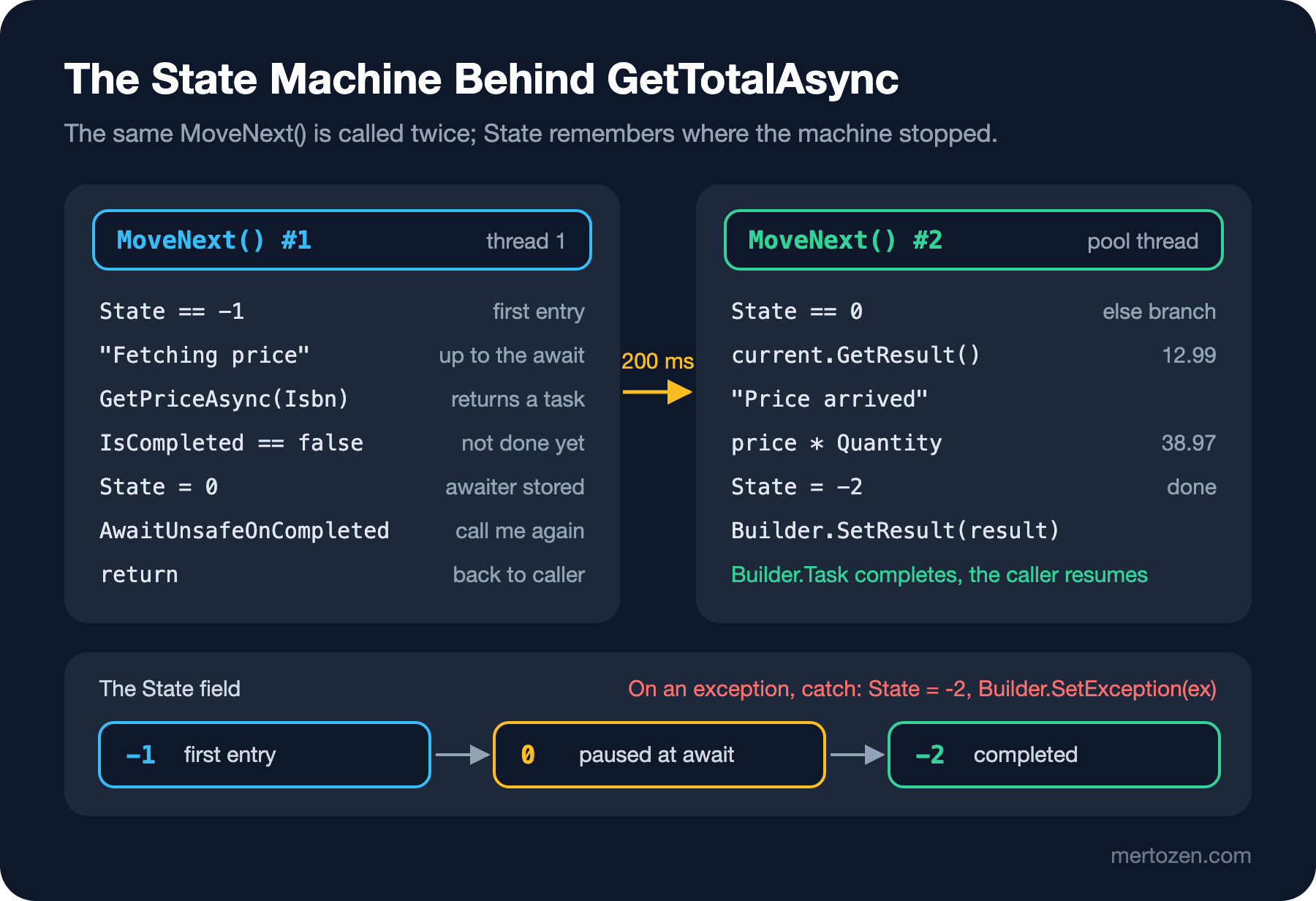
Total: 38.97Follow the flow step by step. GetTotalManual sets up the machine, copies the parameters into fields and calls the first MoveNext() through Builder.Start. That call happens on the caller's thread; this is the answer to why the first part of an async method runs synchronously. MoveNext() runs the code up to the await, sees that the task is not finished, sets the state to 0, stores the awaiter and tells the builder "call me again when this is done". Then it returns. GetTotalManual hands the builder's task, still unfinished, to the caller.
When the price task finishes 200 ms later, the builder calls MoveNext() again on a pool thread. Since the state is 0, the code goes into the else branch this time, takes the result from the stored awaiter, does the remaining work and completes the outgoing task with SetResult. If something goes wrong, the catch puts it into the task with SetException; in the next post we will start from this line to talk about why the exception does not "throw" to the caller but waits in the task.
Looking at the Real State Machine with Reflection
The type we wrote by hand is an imitation. We can see what the compiler really generates through reflection:
using System.Globalization;
using System.Reflection;
using System.Runtime.CompilerServices;

CultureInfo.CurrentCulture = CultureInfo.InvariantCulture;

Type machine = typeof(OrderService)
    .GetNestedTypes(BindingFlags.NonPublic)
    .Single(t => typeof(IAsyncStateMachine).IsAssignableFrom(t) && t.Name.Contains("GetTotalAsync"));

Console.WriteLine($"{machine.Name}, value type: {machine.IsValueType}");
foreach (FieldInfo field in machine.GetFields(BindingFlags.Instance | BindingFlags.Public | BindingFlags.NonPublic))
{
    Console.WriteLine($"  {field.FieldType.Name,-26} {field.Name}");
}
Console.WriteLine(await OrderService.GetTotalAsync("978-0441172719", 3));

static class OrderService
{
    public static async Task<decimal> GetTotalAsync(string isbn, int quantity)
    {
        decimal price = await GetPriceAsync(isbn);
        return price * quantity;
    }

    private static async Task<decimal> GetPriceAsync(string isbn)
    {
        await Task.Delay(200);
        return 12.99m;
    }
}
<GetTotalAsync>d__0, value type: False
Int32 <>1__state
AsyncTaskMethodBuilder`1 <>t__builder
String isbn
Int32 quantity
Decimal <price>5__1
Decimal <>s__2
TaskAwaiter`1 <>u__1
38.97Does it look familiar? <>1__state is our State, <>t__builder is the builder, <>u__1 is the stored awaiter. The parameters isbn and quantity became fields, and so did the local variable price; <>s__2 is a helper field that temporarily holds the await's result before it is assigned to price. Because the method can pause and resume on another thread, local variables cannot live on the stack; they are moved into the machine's fields. The angle brackets in the names were chosen because they are not valid in a C# identifier; they can never clash with your code.
This output is from a Debug build. Build the same project with dotnet build -c Release and run it, and the picture changes:
<GetTotalAsync>d__0, value type: True
  Int32                      <>1__state
  AsyncTaskMethodBuilder`1   <>t__builder
  String                     isbn
  Int32                      quantity
  TaskAwaiter`1              <>u__1
38.97
In Release the machine is a struct, and price is no longer a field. Being a struct means this: if the method finishes without ever really waiting, the machine never goes to the heap; only at the first real wait does the builder copy it to the heap. As for price, it is assigned after the await and used right away, so it does not live across a stopping point; the optimizing compiler left it as an ordinary local. A Debug build turns every local into a field so that the debugger can see every variable.
Which Thread Runs the Continuation
When the builder registers a continuation, it looks at the current SynchronizationContext. If there is a context, it hands the continuation to it; if not, to the thread pool. A console application has no context:
Console.WriteLine($"Context: {SynchronizationContext.Current?.GetType().Name ?? "none"}");
await Task.Delay(100);
Console.WriteLine($"After await: thread {Environment.CurrentManagedThreadId}, pool thread: {Thread.CurrentThread.IsThreadPoolThread}");
Context: none
After await: thread 5, pool thread: TrueThat is why, in all our examples, we continued on a pool thread after the await. In WinForms and WPF the UI thread has a context that sends the continuation back to the UI thread; that is what makes it safe to update a label after an await. ASP.NET Core, like the console, has no context. We will talk about how this context leads to deadlocks and what ConfigureAwait(false) is for in the deadlock post of this series.
Everything You Can await
await is not specific to Task. The compiler looks for a pattern: a type with a GetAwaiter() method, whose returned awaiter has IsCompleted, GetResult() and OnCompleted from the INotifyCompletion interface. Anything that fits this pattern can be awaited; GetAwaiter can even be an extension method:
using System.Diagnostics;
using System.Runtime.CompilerServices;

Stopwatch watch = Stopwatch.StartNew();
await TimeSpan.FromMilliseconds(300);
Console.WriteLine($"Waited {watch.ElapsedMilliseconds} ms");

static class TimeSpanAwaiterExtensions
{
    public static TaskAwaiter GetAwaiter(this TimeSpan delay) => Task.Delay(delay).GetAwaiter();
}
Waited 303 msI would not recommend writing this in production, but it shows the mechanism well: await is a language feature, and Task is the most common type that uses it. ValueTask, which we will see later in the series, the type returned by ConfigureAwait, and Task.Yield() all work through the same pattern.
Common Pitfalls
Doing heavy work before the first await. The part of an async method up to the first await runs synchronously on the caller's thread. If that part contains a one-second calculation, the caller is blocked for a second; the method being async does not change that.
Assuming every await switches threads. If the task has already finished, the code continues on the same thread, as we saw with Task.CompletedTask in the first example. Assumptions tied to a thread (thread-specific variables, decisions based on thread identity) are unreliable in async code.
Forgetting the limits of the state machine. Because local variables are moved into fields, some constructs are not allowed in an async method. ref, out and in parameters cannot be used, and you cannot write await inside a lock block:
object stockLock = new object();
int stock = 5;

await ReserveAsync(ref stock);

async Task ReserveAsync(ref int available)
{
    lock (stockLock)
    {
        await Task.Delay(10);
        available--;
    }
}
Program.cs(10,9): error CS1996: Cannot await in the body of a lock statement
Program.cs(6,33): error CS1988: Async methods cannot have ref, in or out parametersThe reason for the lock ban runs deep: a lock belongs to the thread that took it, while after an await you may continue on a different thread, and no thread other than the one that took the lock can release it. When you need a lock in async code, you use SemaphoreSlim's WaitAsync; we will see it in the synchronization post.
A Small Experiment
★☆☆ In the program at the top, add the line await Task.Yield(); right below await Task.CompletedTask;. Did the thread of the "After completed" line change? Work out from the output what Task.Yield is for.
★★☆ In our hand-written state machine, add throw new InvalidOperationException("Price service is down"); inside GetPriceAsync (before the await). Wrap the await line at the top of the program in a try/catch, catch the exception and find the line that put it into the task.
★★★ Add a second await to the reflection example: after the price, int stock = await GetStockAsync(isbn);. How many awaiter fields do you see in the Debug and Release output? What changes if the two awaits wait on tasks of different types?
We have seen that await is not magic but a state machine the compiler writes. In that machine we also glanced at how the catch block puts the exception into the task. The next post picks up right there: where exceptions go in async code, why AggregateException exists, and how Task.WhenAll carries more than one error.