

Refactoring Catalog 1: Extract/Inline Function, Extract/Inline Variable, Change Function Declaration, Rename and Replace Magic Literal
The most frequently used refactorings are about naming, gathering back and splitting again: Rename, Inline, Extract and Change Function Declaration for signatures. The post opens Bookstore's CheckoutService with these nine refactorings in 13 green commits, showing with real output how Math.Round changes an invoice at half a kuruş and how renaming a parameter breaks a build with CS1739.
Version note: The code in this post was built and run with C# 14 and .NET 10 (SDK 10.0.404); the tests use xUnit.net v3 4.0.3 and Verify.XunitV3 32.0.0.
Guess First: Does Switching to Math.Round Change Behavior?
In Bookstore, the online bookstore used as the shared example across this site's series, CheckoutService.Calculate computes the cart totals at checkout: subtotal, per-line VAT, shipping fee and grand total. The code has worked for years and has no tests:
public class CheckoutService
{
    public CheckoutTotals Calculate(List<CartLine> lines, bool exp)
    {
        decimal t = 0;
        decimal v = 0;
        bool p = false;
        foreach (CartLine l in lines)
        {
            decimal lt = l.UnitPrice * l.Quantity;
            t += lt;
            if (l.IsEbook)
            {
                v += Math.Floor(lt * 0.20m * 100 + 0.5m) / 100;
            }
            else
            {
                v += Math.Floor(lt * 0.10m * 100 + 0.5m) / 100;
                p = true;
            }
        }

        decimal s = 0;
        if (p)
        {
            s = GetShippingBase(t);
            s = AddExpress(s, exp);
        }

        CheckoutTotals result = new(t, v, s, t + v + s);
        return result;
    }

    private decimal GetShippingBase(decimal t)
    {
        if (t >= 300)
            return 0;
        return 49.90m;
    }

    private decimal AddExpress(decimal s, bool exp)
    {
        if (exp)
            return s + 35;
        return s;
    }
}
The expression Math.Floor(x * 100 + 0.5m) / 100 on the VAT lines is a hand-written rounding. Someone on the team wants to replace it with Math.Round(x, 2): "same thing, just more readable." Is this change a refactoring, or will a customer's invoice change? The rates in the example were picked for the example only; they are not current tax rates.
The Catalog Block: What We Cover and How
The first nine posts of the series treated refactoring as a journey: a safety net, small steps, breaking dependencies in legacy code, planning large changes and prioritizing technical debt. Names like Extract Function, Rename and Introduce Parameter Object came up inside a case, but none of them got its own section. The block that starts with this post walks through the catalog from the second edition of Martin Fowler's Refactoring (2018), family by family. The names of the catalog's 66 refactorings are listed on refactoring.com/catalog; we use the names as they appear there, while the explanations and examples are our own, all on Bookstore.
For each refactoring we ask the same questions: which code smell does it answer (smell names match the Clean Code series post "A Code Smell Catalog: Recognizing Smells in C# Code"), what are its mechanical steps, how does it look before and after in C#, can the IDE do it automatically, and which refactoring is its inverse. The last question matters; many refactorings in the catalog have an inverse, and the right direction depends on the code:
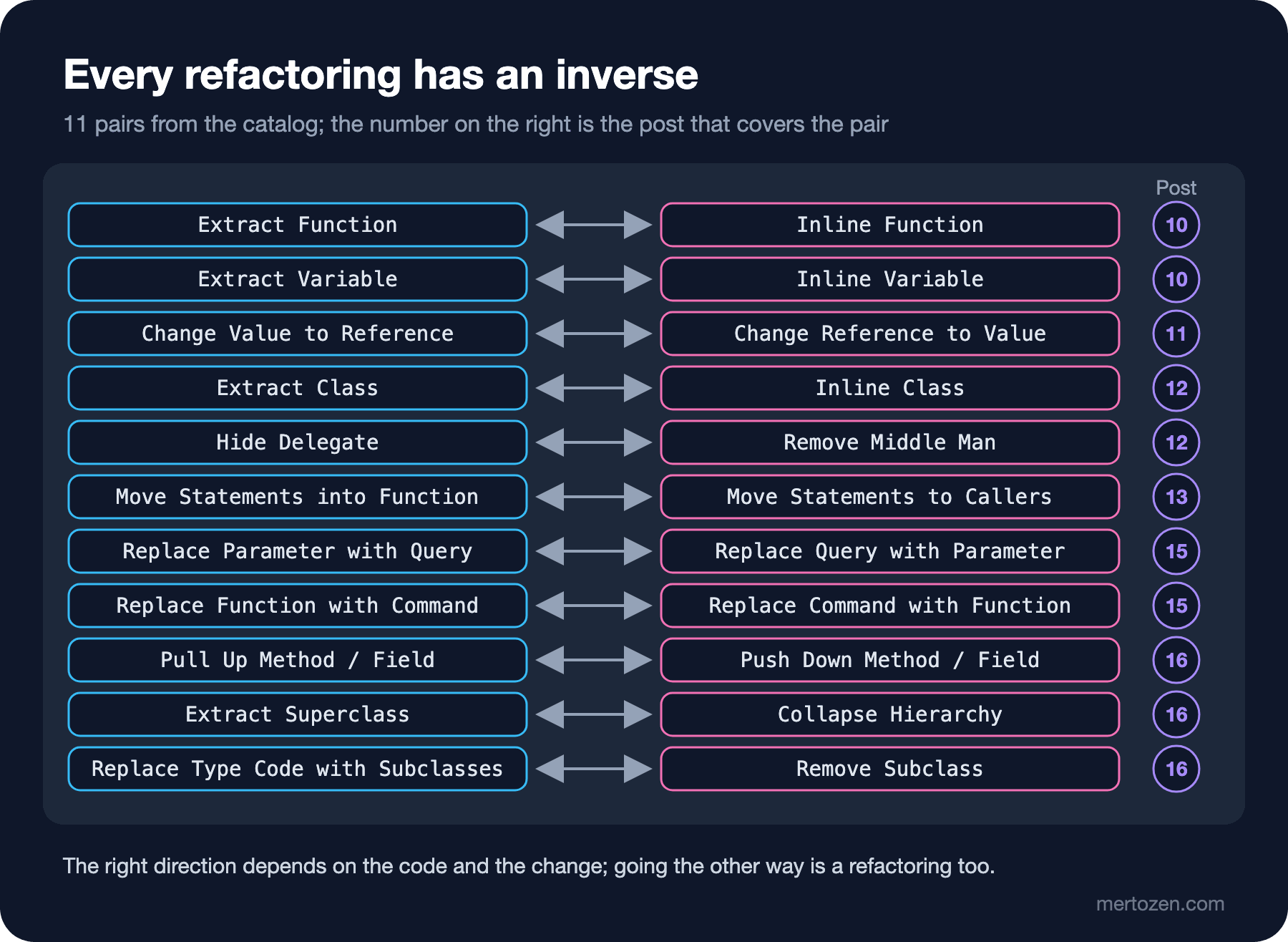
This post covers the most frequently used group: Rename Variable and Rename Field, Inline Variable, Inline Function, Replace Magic Literal, Replace Inline Code with Function Call, Extract Function, Extract Variable and Change Function Declaration. We apply all of them to the Calculate above with the rhythm from the third post: one step, build, test, commit if green.
As in the second post, we start with a safety net. The input of Calculate is a cart and an express shipping flag; five carts and both values of the flag fit into one Verify snapshot. I picked one of the carts on purpose: the VAT of a 12.45 TL book lands exactly on half a kuruş.
private static readonly Dictionary<string, List<CartLine>> Carts = new()
{
    ["empty"] = [],
    ["one paperback"] = [new("9780441013593", "Dune", 12.45m, 1, false)],
    ["two hardcovers"] = [new("9780261103344", "The Hobbit", 149.90m, 2, false)],
    ["ebook only"] = [new("9780141439587", "Emma", 59.90m, 1, true)],
    ["mixed"] = [new("9780261103344", "The Hobbit", 189.50m, 1, false), new("9780141439549", "Middlemarch", 129.90m, 1, true)]
};

[Fact]
public Task Calculate_for_all_carts() =>
    Combination()
        .Verify(
            (string cart, bool isExpress) => new CheckoutService().Calculate(Carts[cart], isExpress),
            Carts.Keys,
            [false, true]);
one paperback , False: {
Subtotal: 12.45,
Vat: 1.25,
Shipping: 49.90,
Total: 63.60
},Once the snapshot is approved, the first commit contains only this test. Every step after that runs it in under a second.
Rename Variable and Rename Field: Names First
Rename Variable is the first answer to the Mysterious Name smell. t, v, p, s, l and lt become subtotal, vat, hasPrintedBooks, shipping, line and lineTotal. The mechanics are simple: find every use of the variable, change them all together, build. The narrower the variable's scope, the safer the step; the IDE renames a local inside one method in one move and without mistakes.
The new name for p took a little thought. The variable holds the answer to "is there at least one printed book"; physical would have worked too, but hasPrintedBooks says better why shipping is calculated at all. Finding a good name is the first sign that you understand the code; if you can't find one, the variable probably does more than one job (Split Variable, in the next post).
Rename Field is the same work at class level. For a private field the risk is the same as for a local. A public field or property is a different story: its name may have become a JSON field, an Entity Framework Core column or an asp-for expression in a Razor view. In the third post we saw a rename silently break a JSON contract, and in the seventh how to separate the in-code name from the external contract; we won't repeat that here. The rule is the same: if a public name changes, first find where that name lives outside the code.
Inline Variable and Inline Function: Gathering Back First
Starting with Extract feels natural, but this method needs a step in the opposite direction first. The result variable says nothing: it is created and returned on the next line. Inline Variable removes a variable whose expression is already as clear as its name: make sure it is assigned once, replace its uses with the expression itself, delete the declaration.
The shipping calculation is more interesting. The logic is split into two small methods: GetShippingBase checks the threshold and AddExpress adds the express fee. Neither means anything alone; they only make sense when read together, and the reader jumps between three places to see the shipping rule. Inline Function puts functions whose body is clearer than their name, or that are badly split, back where they are called. The mechanics: check that the method is not polymorphic (not overridden), replace each call site with the body, test after each replacement, finally delete the declaration.
         decimal shipping = 0;
         if (hasPrintedBooks)
         {
-            shipping = GetShippingBase(subtotal);
-            shipping = AddExpress(shipping, exp);
+            if (subtotal >= 300)
+                shipping = 0;
+            else
+                shipping = 49.90m;
+            if (exp)
+                shipping = shipping + 35;
         }
The goal of this step is not to make the code pretty; it is to see the shipping rule in one place and in full. We'll extract it again shortly with the right boundaries. The shortest way to fix badly split code is often exactly this: inline everything first, then extract again.
Replace Magic Literal and Replace Inline Code with Function Call
There are five bare numbers in the body: 0.20m, 0.10m, 300, 49.90m and 35. Replace Magic Literal gives each a name: EbookVatRate, PrintedBookVatRate, FreeShippingThreshold, StandardShippingFee, ExpressSurcharge. A private const is enough here. Two warnings: naming numbers whose meaning is obvious, like the 2 in Math.Round(x, 2) or * 100, makes the code longer without explaining anything. And in C#, a public const is copied into the assemblies that use it at compile time; when you change the value, callers that are not recompiled keep running with the old one. If it is a business rule that is likely to change, such as a tax rate, static readonly or configuration is the better home.
Then comes the step from the opening question. Replace Inline Code with Function Call replaces hand-written code with a call to a function that already does the same job; most of the time that function exists in .NET itself. The hand-written rounding looks like it does what Math.Round does. We switch and run the test:
6c6
<     Vat: 1.25,
---
>     Vat: 1.24,
8c8
<     Total: 63.60
---
>     Total: 63.59
The Answer: Half a Kuruş and MidpointRounding
Two combinations of the one-book cart are red in the snapshot; the diff above is the one without express, and the express one has the same one-kuruş difference. Ten percent of 12.45 TL is 1.245. The hand-written code rounds away from zero and gives 1.25. Math.Round(decimal, int), however, uses MidpointRounding.ToEven by default: it rounds the exact midpoint to the even digit, 1.24. A customer's invoice would have changed by one kuruş; that would not have been a refactoring but a behavior change.
The right call is the overload that states the old rule explicitly:
vat += Math.Round(lineTotal * PrintedBookVatRate, 2, MidpointRounding.AwayFromZero);The test turns green. The lesson is about Replace Inline Code with Function Call itself: you decide that a function does the same job from its behavior, not its name. Without a price that lands exactly on half a kuruş in the snapshot, this difference would have shown up in production, with a customer complaint. As we saw in the second post, the value of the net is measured by how well it covers the edges.
Extract Function and Extract Variable
Now the code is gathered back and its names and constants are in place. Extract Function is the main answer to the Long Function and Duplicated Code smells: give a piece of code a name that states its intent and move it into its own function. The mechanics: name the new function after its intent, not how it works, copy the code, turn the locals the piece reads into parameters, turn the variable it changes into the return value, replace the original with the call, test.
Three functions came out: LineTotal computes the line amount, VatFor returns the line's VAT and ShippingFee gathers the shipping rule in one place. I simplified the two-branch if inside VatFor with Extract Variable: once the rate moved into its own variable, the two rounding lines became one. In the same way the threshold comparison in ShippingFee got the name qualifiesForFreeShipping. Extract Variable names part of a complex expression and answers the reader's "what does this mean" question; if the expression is meaningful elsewhere in the class too, a method or property may be better than a variable (Replace Temp with Query, in the next post).
public CheckoutTotals CalculateTotals(IReadOnlyList<CartLine> lines, bool isExpress)
{
    decimal subtotal = 0;
    decimal vat = 0;
    bool hasPrintedBooks = false;
    foreach (CartLine line in lines)
    {
        subtotal += LineTotal(line);
        vat += VatFor(line);
        if (!line.IsEbook)
            hasPrintedBooks = true;
    }

    decimal shipping = hasPrintedBooks ? ShippingFee(subtotal, isExpress) : 0;

    return new CheckoutTotals(subtotal, vat, shipping, subtotal + vat + shipping);
}

private static decimal ShippingFee(decimal subtotal, bool isExpress)
{
    bool qualifiesForFreeShipping = subtotal >= FreeShippingThreshold;
    decimal fee = qualifiesForFreeShipping ? 0 : StandardShippingFee;
    return isExpress ? fee + ExpressSurcharge : fee;
}

private static decimal LineTotal(CartLine line) => line.UnitPrice * line.Quantity;

private static decimal VatFor(CartLine line)
{
    decimal rate = line.IsEbook ? EbookVatRate : PrintedBookVatRate;
    return Math.Round(LineTotal(line) * rate, 2, MidpointRounding.AwayFromZero);
}
The loop still does three jobs: it sums amounts, sums VAT and looks for printed books. I left it on purpose; splitting the loop and turning it into LINQ is the topic of the thirteenth post. How much to extract is a decision too: moving every line into a method makes the reader travel between methods instead. The Clean Code series post "The Clean Code Debate: Ousterhout, Muratori and the Limits of the Rules" covers that debate in detail; the practical test is whether the name of the function you extracted says more than its body.
Change Function Declaration: A Signature Is a Contract
The last step is the signature: Calculate(List<CartLine> lines, bool exp) becomes CalculateTotals(IReadOnlyList<CartLine> lines, bool isExpress). Change Function Declaration in the catalog groups renaming a method and adding, removing or changing parameters under one heading and describes two paths: the simple path, changing every caller at once, and the migration path: add the new signature, forward the old one to it, move the callers, delete the old one.
To see where the simple path breaks, I changed only the parameter name, isExpress instead of exp. It sounds like the most harmless change possible. But a test in the test project that checks express shipping called the method with a named argument:
$ dotnet build
tests/Bookstore.Ordering.Tests/CheckoutServiceTests.cs(27,81): error CS1739: The best overload for 'Calculate' does not have a parameter named 'exp' [tests/Bookstore.Ordering.Tests/Bookstore.Ordering.Tests.csproj]
Inside the same solution the IDE's rename updates this call too. But if the method lives in a NuGet package or is called from another team's repo, the parameter name is part of the public contract, and changing it breaks those callers' builds. That's why we use the migration path for public methods; it is the same parallel change we covered in detail in the third post:
[Obsolete("Use CalculateTotals(IReadOnlyList<CartLine>, bool) instead.")]
public CheckoutTotals Calculate(List<CartLine> lines, bool exp) => CalculateTotals(lines, exp);

public CheckoutTotals CalculateTotals(IReadOnlyList<CartLine> lines, bool isExpress)
{
    // ... body
$ dotnet build --no-incremental
tests/Bookstore.Ordering.Tests/CheckoutServiceTests.cs(20,50): warning CS0618: 'CheckoutService.Calculate(List<CartLine>, bool)' is obsolete: 'Use CalculateTotals(IReadOnlyList<CartLine>, bool) instead.' [tests/Bookstore.Ordering.Tests/Bookstore.Ordering.Tests.csproj]
tests/Bookstore.Ordering.Tests/CheckoutServiceTests.cs(27,33): warning CS0618: 'CheckoutService.Calculate(List<CartLine>, bool)' is obsolete: 'Use CalculateTotals(IReadOnlyList<CartLine>, bool) instead.' [tests/Bookstore.Ordering.Tests/Bookstore.Ordering.Tests.csproj]Widening the parameter type from List to IReadOnlyList is deliberate too: the method doesn't change the list, it only reads it. Accepting a wider type doesn't break callers; the opposite, asking for a narrower type, does. All the steps were made in these commits; none of them was committed red:
$ git log --oneline
40ca750 refactor: remove obsolete Calculate (contract)
9055a06 refactor: tests call CalculateTotals (migrate)
6b56c2a refactor: introduce CalculateTotals, obsolete Calculate (expand)
3d2acde test: express surcharge above free shipping threshold
bee2752 refactor: extract ShippingFee and variable qualifiesForFreeShipping
5aae24e refactor: extract variable rate in VatFor
aad204b refactor: extract LineTotal and VatFor
69e44e3 refactor: replace hand-written rounding with Math.Round(AwayFromZero)
b9a85af refactor: replace magic literals with named constants
43b2616 refactor: inline GetShippingBase and AddExpress
c25ad02 refactor: inline variable result
6ed7c6f refactor: rename locals in Calculate
15558c4 test: characterize CheckoutService.Calculate (10 combinations)
What the IDE Can and Can't Do
The table below summarizes the IDE counterparts of the nine refactorings in this post. The IDE columns are based on the official help pages from Microsoft Learn and JetBrains; for this post I ran only the command line, not the IDEs. In Visual Studio every menu starts from Ctrl+. (Quick Actions and Refactorings); the docs list Ctrl+R, Ctrl+R for Rename, Ctrl+R, Ctrl+M for Extract Method and Ctrl+R, Ctrl+V for Change Signature. In Rider they are all in the "Refactor This" menu, and the shortcuts depend on the selected keymap. In Visual Studio Code, C# Dev Kit offers the same Roslyn refactorings through Ctrl+. and Ctrl+Shift+R; its official page lists names such as Inline method, Inline temporary variable and Introduce local variable. The Visual Studio docs describe only a local variable option for a literal, while Rider's Introduce Field can produce a const directly with its "Introduce constant" option.
| Refactoring | Smell | Visual Studio | Rider | Inverse |
|---|---|---|---|---|
| Rename Variable / Field | Mysterious Name | Rename | Rename | itself |
| Inline Variable | none, usually a first step | Inline temporary variable | Inline Variable | Extract Variable |
| Inline Function | Lazy Element | Inline method | Inline Method | Extract Function |
| Replace Magic Literal | Mysterious Name | Introduce local variable | Introduce Field, "Introduce constant" | none |
| Replace Inline Code with Function Call | Duplicated Code | by hand | by hand | none |
| Extract Function | Long Function, Duplicated Code | Extract Method | Extract Method | Inline Function |
| Extract Variable | Long Function | Introduce local variable | Introduce Variable | Inline Variable |
| Change Function Declaration | Mysterious Name, Long Parameter List | Change Signature | Change Signature | itself |
The IDE does these refactorings safely because of Roslyn's semantic model: Extract Method works out which variables the piece reads and writes, and Inline method puts the arguments at the call site in the right places. What it can't see is the same as in the third post: methods found by string through reflection, names that sit as strings in Razor tag helpers like asp-action="Calculate", and callers outside the solution. Replace Inline Code with Function Call has no general counterpart in any IDE, because deciding that two pieces of code do the same job is a behavioral decision, not a semantic one; only tests can tell you.
Common Pitfalls
Turning Extract Function into a goal. Work that starts with "no method will be longer than 10 lines" ends with methods of two lines each whose names say nothing more than their bodies. Inlining two small methods first in this post was exactly the fix for that problem.
Assuming a similar-looking function is the same. Math.Round and hand-written rounding, string.Equals and == with their culture and case differences, DateTime.Now and DateTime.UtcNow. Before Replace Inline Code with Function Call, put the edge values, the exact midpoint, the empty string and null, into the net.
Changing a public signature in one commit. The method name, the parameter types, even the parameter names for callers that use named arguments are part of the public contract. Inside the solution the IDE fixes them all; outside it, expand with [Obsolete], migrate and contract.
Moving a magic literal to the wrong place. A public const is copied into callers; making business rules that can change a const produces two different behaviors when the value changes.
Skipping the plain-text search after a rename. If you renamed a public field or property rather than a local, search the solution for the old name as text: JSON, CSV headers, log fields and views.
A Small Experiment
★☆☆ Find a hand-written rounding, range check or string concatenation in your own code. Is there a method in .NET that does the same job? If so, write a small test that compares the two with a midpoint or boundary value.
★★☆ Set up this post's old Calculate in your own project and approve the snapshot. Try starting directly with Extract Function without inlining GetShippingBase and AddExpress. Could you gather the shipping rule in one place, and how many steps did it take?
★★★ Imagine you need to change a parameter name in a public method of your team's NuGet package. What search would you run to find callers that use named arguments? Write in an issue over how many releases you would spread the migration path: new signature, [Obsolete], migration, deletion.
CalculateTotals reads well now, but the cart lines are still a List anyone can change, the ISBN is still a string, and you can't tell without reading the code whether totals are computed on every call or stored in a field. In the next post we move on to the refactorings that encapsulate data: Encapsulate Variable, Encapsulate Record and Encapsulate Collection, Replace Primitive with Object, Replace Temp with Query and the move between value and reference.