

Format Strings in C#: Standard and Custom Number/Date Formats, Alignment and Composite Formatting
A format string turns a value into a string using the culture's rules: N, C, d and D change with the culture, while o, s and InvariantCulture keep machine output fixed. Using Bookstore's invoice line we show standard and custom number and date formats, alignment, taking the currency from the data, N writing three decimals with ICU, and making an Isbn type printable with ISpanFormattable, all with real output.
Version note: The code in this post was built and run with .NET 10; the hex floating-point example was run with the .NET 11 SDK.
Guess First
The order service of Bookstore, the online bookstore used as the shared example across this site's series, has a three-line logging snippet. The same program runs first under the tr-TR culture, then under en-US. What gets printed?
decimal price = 1234.5m;
DateTime placed = new(2026, 11, 14, 9, 5, 0);

Console.WriteLine(price.ToString("C"));
Console.WriteLine(placed.ToString("yyyy-mm-dd"));
Console.WriteLine(placed.ToString("dd/MM/yyyy"));
dotnet run --project samples/Bookstore.Bcl.Samples -- format-guess --culture tr-TR
₺1.234,50
2026-05-14
14.11.2026
dotnet run --project samples/Bookstore.Bcl.Samples -- format-guess --culture en-US
$1,234.50
2026-05-14
14/11/2026There are three surprises. The amount we stored in Turkish lira was written with a dollar sign under en-US; "C" takes the currency from the culture, not from the data. Because mm means minutes rather than month, the November order became "month 05". And the / inside "dd/MM/yyyy" is not a literal character but a placeholder for the culture's date separator; under tr-TR it turned into a dot.
In the first post of the series we searched and split strings. In this post we look at the rules for turning values into strings: standard and custom number formats, date formats, alignment, composite formatting, culture-independent output and making our own type printable with format strings. The parsing side, from string back to value, is in the C# Fundamentals post "Type Conversions in C#: Cast, Parse, TryParse and Convert"; the advanced part of date parsing is in the sixth post of this series.
Standard Number Formats
A standard format string is a letter plus an optional number: in N2 the letter picks the format and the number is the precision (for most formats, the number of decimal places). An example running under tr-TR:
decimal price = 1234.5m;
Row("C", price.ToString("C"));
Row("C0", price.ToString("C0"));
Row("N", price.ToString("N"));
Row("N0", price.ToString("N0"));
Row("F3", price.ToString("F3"));
Row("E2", price.ToString("E2"));
Row("G", price.ToString("G"));
Row("P1 (0.125)", 0.125m.ToString("P1"));
Row("D6 (42)", 42.ToString("D6"));
Row("X4 (255)", 255.ToString("X4"));
Row("x (255)", 255.ToString("x"));
Row("B8 (5)", 5.ToString("B8"));
Row("N2 (-1234.5)", (-1234.5m).ToString("N2"));

double sum = 0.1 + 0.2;
Row("double default", sum.ToString());
Row("double R", sum.ToString("R"));
Row("double G17", sum.ToString("G17"));
Row("double F2", sum.ToString("F2"));
C ₺1.234,50
C0 ₺1.235
N 1.234,500
N0 1.235
F3 1234,500
E2 1,23E+003
G 1234,5
P1 (0.125) %12,5
D6 (42) 000042
X4 (255) 00FF
x (255) ff
B8 (5) 00000101
N2 (-1234.5) -1.234,50
double default 0,30000000000000004
double R 0,30000000000000004
double G17 0,30000000000000004
double F2 0,30In short: C is currency, N a number with group separators, F fixed-point without group separators, P percent (it multiplies the value by 100), E scientific notation, G the shortest representation. D (zero padding), X (hex) and B (binary, added in .NET 8) work only on integers; the case of X decides the case of the letters in the output. Note that in Turkish the percent sign comes before the number (%12,5); that also comes from culture data.
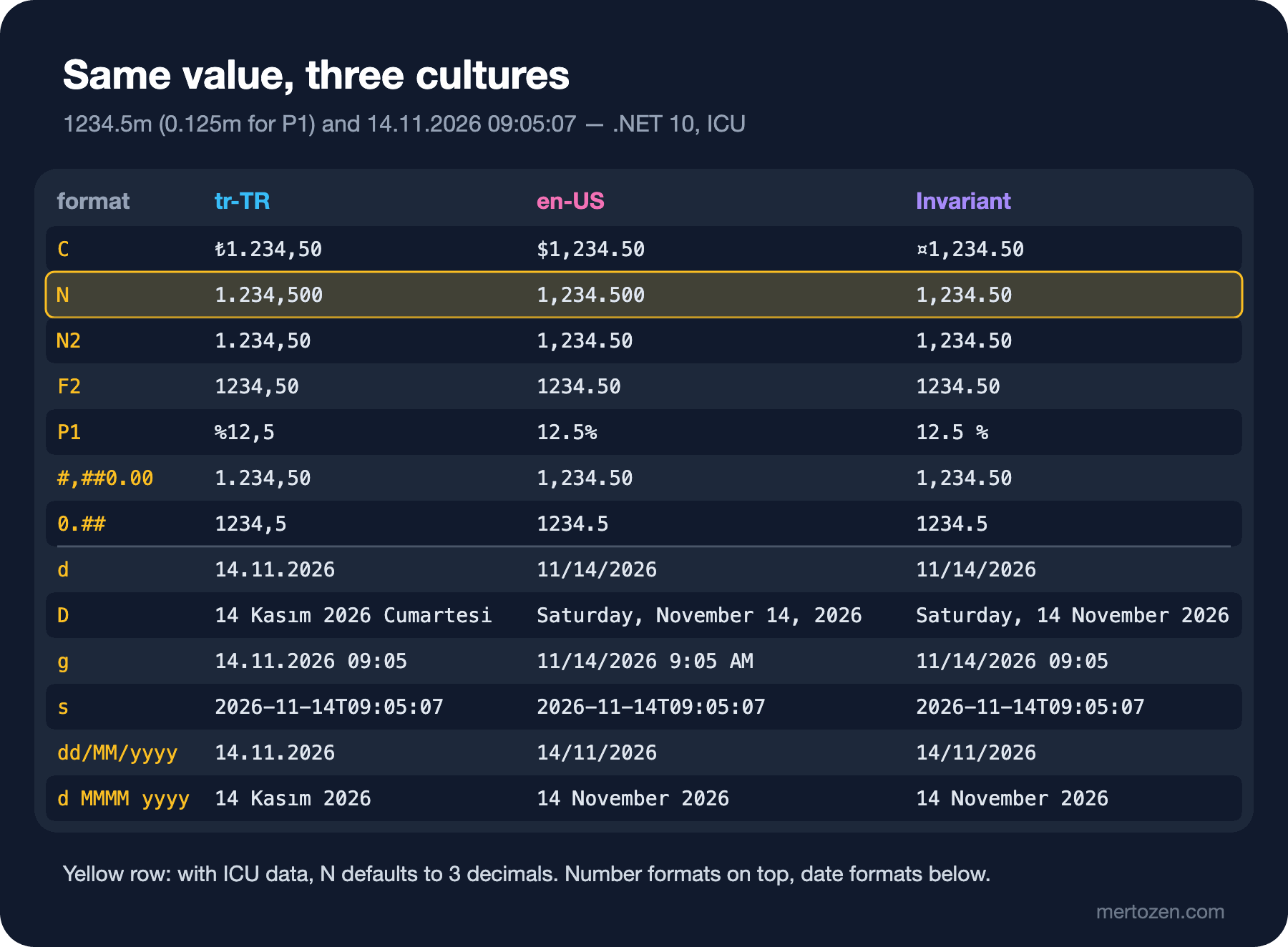
The most important line is N. Without a precision, the number of decimals comes from NumberFormatInfo.NumberDecimalDigits, and in ICU's culture data that value is 3 for both tr-TR and en-US, while the invariant culture has 2. In the .NET runtime's source code this value is read from the maximum fraction digits of ICU's decimal number pattern (#,##0.###). In older documentation and in applications switched to NLS mode you'll see 2. The takeaway: never leave the precision to the default; write N2, F2, C2.
The R (round-trip) format has been practically unnecessary since .NET Core 3.0: double.ToString() now produces the shortest string that parses back to the same number, which is why the three lines are identical. Microsoft's documentation recommends R only for BigInteger and says to use G17 when you need to keep every bit of a double. Also remember that precision doesn't round the value, it only shortens the display: the F2 output is 0,30, but the variable still holds 0.30000000000000004.
.NET 11: hex format for double
In .NET 10, passing "X" to a double gives you FormatException: Format specifier was invalid. .NET 11 added the hexadecimal form from IEEE 754 for double, float and Half; that form preserves every bit. In the repo's Bookstore.Bcl.Net11 project:
string hex = price.ToString("X", invariant);
double back = double.Parse(hex, System.Globalization.NumberStyles.HexFloat, invariant);

Console.WriteLine($"G17 (invariant): {price.ToString("G17", invariant)}");
Console.WriteLine($"X (invariant)  : {hex}");
Console.WriteLine($"X (tr-TR)      : {price.ToString("X", tr)}");
Console.WriteLine($"Round-trip equal: {back == price}");
G17 (invariant): 0.30000000000000004
X (invariant) : 0X1.3333333333334P-2
X (tr-TR) : 0X1,3333333333334P-2
Round-trip equal: TrueThe hex form uses the culture's decimal separator as well; passing the invariant culture when writing to a file or a test is required here too.
Custom Number Formats
When the standard formats aren't enough, you describe the format character by character. I printed the same four values with eight custom formats under tr-TR (under en-US only the separators swap):
decimal[] values = [1234.5m, -1234.5m, 0m, 0.075m];
string[] formats = ["0000.00", "#,##0.00", "#.##", "0.##", "#,##0,K", "0.0%", "#,##0.00;(#,##0.00);-", "\\#0"];

foreach (string format in formats)
{
    string cells = string.Join(" | ", values.Select(v => v.ToString(format, culture).PadLeft(12)));
    Console.WriteLine($"{format,-24}{cells}");
}
0000.00 1234,50 | -1234,50 | 0000,00 | 0000,08
#,##0.00 1.234,50 | -1.234,50 | 0,00 | 0,08
#.## 1234,5 | -1234,5 | | ,08
0.## 1234,5 | -1234,5 | 0 | 0,08
#,##0,K 1K | -1K | 0K | 0K
0.0% 123450,0% | -123450,0% | 0,0% | 7,5%
#,##0.00;(#,##0.00);- 1.234,50 | (1.234,50) | - | 0,08
\#0 #1235 | -#1235 | #0 | #00 always writes a digit in that position, falling back to zero; # writes a digit only if there is a significant one. That's why "#.##" wrote zero as an empty string and turned 0.075 into ,08 without a leading zero. On screen you may not notice the gap; on a PDF invoice it shows up as an empty cell. Keeping at least one 0 to the left of the point is the safe choice.
The comma does two jobs: between digit placeholders it is the group separator, and immediately to the left of the decimal point it divides the number by 1000 (scaling). "#,##0,K" turned 1234.5 into 1K, handy for a "thousands" column in reports. In the format string the point and comma always have their invariant meaning; the character in the output comes from the culture. % multiplies the value by 100. The semicolon splits the format into sections: positive, negative and zero; that's how accounting reports get negatives in parentheses. To write a special character literally, put a backslash in front of it or wrap it in quotes.
Look at the last line: 1234,5 became #1235. Custom formats and the standard formats of decimal round the midpoint away from zero, while Math.Round rounds to even by default (Math.Round(2.5m) returns 2). If you round invoice lines through formatting and the total with Math.Round, you can end up a cent off; we cover rounding modes in detail in the fourth post of the series.
Date Formats: Standard and Custom
We keep the order time as a DateTimeOffset: 14 November 2026, 09:05:07, +03:00. Standard date formats are a single letter, custom ones are patterns:
string[] formats = ["d", "D", "f", "g", "M", "Y", "o", "s", "u", "R", "yyyy-MM-dd", "dd.MM.yyyy HH:mm", "d MMMM yyyy, dddd", "hh:mm tt", "HH:mm:ss zzz"];
foreach (string format in formats)
    Console.WriteLine($"{format,-20}{OrderPlaced.ToString(format)}");
d 14.11.2026
D 14 Kasım 2026 Cumartesi
f 14 Kasım 2026 Cumartesi 09:05
g 14.11.2026 09:05
M 14 Kasım
Y Kasım 2026
o 2026-11-14T09:05:07.0000000+03:00
s 2026-11-14T09:05:07
u 2026-11-14 06:05:07Z
R Sat, 14 Nov 2026 06:05:07 GMT
yyyy-MM-dd 2026-11-14
dd.MM.yyyy HH:mm 14.11.2026 09:05
d MMMM yyyy, dddd 14 Kasım 2026, Cumartesi
hh:mm tt 09:05 ÖÖ
HH:mm:ss zzz 09:05:07 +03:00It's important to see that the standard formats fall into two groups. d, D, f, g, M and Y change with the culture and are meant for text shown to users. o, s, u and R are the same in every culture and are meant for machines. o (round-trip) writes ISO 8601 with the offset and seven digits of fractional seconds; that's the right choice for dates going to APIs and logs. u and R converted the DateTimeOffset to UTC first (06:05:07); on a DateTime they don't convert, they assume the value is already UTC. R is the form used in HTTP headers, defined in RFC 1123.
On the custom side, the letters people mix up most: MM is month, mm minute; HH is the 24-hour clock, hh the 12-hour clock; tt is ÖÖ/ÖS or AM/PM; zzz is the offset. I collected the pitfalls in one program:
DateTime placed = new(2026, 11, 14, 9, 5, 0);
CultureInfo tr = CultureInfo.GetCultureInfo("tr-TR");

Console.WriteLine($"yyyy-mm-dd          {placed.ToString("yyyy-mm-dd", tr)}");
Console.WriteLine($"yyyy-MM-dd          {placed.ToString("yyyy-MM-dd", tr)}");
Console.WriteLine($"dd/MM/yyyy          {placed.ToString("dd/MM/yyyy", tr)}");
Console.WriteLine($"dd'/'MM'/'yyyy      {placed.ToString("dd'/'MM'/'yyyy", tr)}");
Console.WriteLine($"hh:mm (21:35)       {placed.AddHours(12.5).ToString("hh:mm", tr)}");
Console.WriteLine($"HH:mm (21:35)       {placed.AddHours(12.5).ToString("HH:mm", tr)}");
Console.WriteLine($"o (Kind={placed.Kind})  {placed.ToString("o")}");
Console.WriteLine($"o (Kind=Utc)          {DateTime.SpecifyKind(placed, DateTimeKind.Utc).ToString("o")}");
yyyy-mm-dd 2026-05-14
yyyy-MM-dd 2026-11-14
dd/MM/yyyy 14.11.2026
dd'/'MM'/'yyyy 14/11/2026
hh:mm (21:35) 09:35
HH:mm (21:35) 21:35
o (Kind=Unspecified) 2026-11-14T09:05:00.0000000
o (Kind=Utc) 2026-11-14T09:05:00.0000000Z/ and : stand for the culture's date and time separators; if you want them literally, wrap them in single quotes. hh makes nine in the evening indistinguishable from nine in the morning. The last two lines show how a DateTime's Kind shows up in the o output: an Unspecified date is written without an offset, and the receiving side may take it for its own local time. Time zones and Kind are the topic of the sixth post of the series.
I put the output of the same decimal and date values under three cultures into one table. You can follow how the formats meant for users change with the culture and how the machine formats (s) stay fixed:
Alignment and Composite Formatting
Composite formatting is the shared syntax of string.Format and interpolation: {index[,alignment][:format]}. Alignment says how many characters wide the field is at minimum; positive values right-align, negative values left-align. The order summary Bookstore prints to the console:
(string Title, int Quantity, decimal Price)[] lines = [("Dune", 2, 349.90m), ("Middlemarch", 1, 1249.50m), ("The Hobbit", 12, 89m)];

Console.WriteLine($"{"Title",-14}{"Qty",4}{"Price",12}{"Total",12}");
foreach (var (title, quantity, price) in lines)
    Console.WriteLine($"{title,-14}{quantity,4}{price,12:N2}{quantity * price,12:N2}");
Console.WriteLine($"{"",-14}{"",4}{"",12}{lines.Sum(l => l.Quantity * l.Price),12:N2}");

Console.WriteLine(string.Format("[{0,8}] [{0,-8}] [{1,8:P0}]", "Dune", 0.1));
Console.WriteLine($"[{"Middlemarch",6}]");
Title Qty Price Total
Dune 2 349,90 699,80
Middlemarch 1 1.249,50 1.249,50
The Hobbit 12 89,00 1.068,00
3.017,30
[ Dune] [Dune ] [ %10]
[Middlemarch]Left-aligning text columns and right-aligning numbers makes a table readable. Alignment is not an upper bound: a longer value isn't truncated, the table shifts (on the last line we asked for 6 and got 11 characters). You can use the same index more than once in a format ({0,8} and {0,-8}). If you need a brace in the text, double it: {{ and }}. If you reuse a format string over and over, the CompositeFormat from the previous post parses it once.
Bookstore: Invoice Lines and Currency
In Bookstore, amounts are decimal and the currency is a field of the order (TRY, and EUR when needed). First let's see what "C" does, then the right way:
// The currency comes from the order; only the number layout comes from the culture.
public static string FormatMoney(decimal amount, string currencyCode, CultureInfo culture, bool symbolAfter = false)
{
    var numberFormat = (NumberFormatInfo)culture.NumberFormat.Clone();
    if (symbolAfter)
    {
        numberFormat.CurrencyPositivePattern = 3; // "n $"
        numberFormat.CurrencyNegativePattern = 8; // "-n $"
    }
    numberFormat.CurrencySymbol = currencyCode switch
    {
        "TRY" => "₺",
        "EUR" => "€",
        _ => currencyCode,
    };
    return amount.ToString("C2", numberFormat);
}

public static string FormatWithCode(decimal amount, string currencyCode, CultureInfo culture) =>
    string.Create(culture, $"{currencyCode} {amount:N2}");
tr-TR C : ₺1.234,50
en-US C : $1,234.50
de-DE C : 1.234,50 €
tr-TR invoice : ₺1.234,50
en-US invoice : ₺1,234.50
en-US code : TRY 1,234.50
de-DE EUR : 1.234,50 €
tr-TR EUR : €1.234,50
tr-TR n $ : 1.234,50 ₺
tr-TR -n $ : -1.234,50 ₺
RegionInfo TR : TRY ₺ Turkish LiraThe first three lines are the problem itself: the same 1,234.50 lira is written with three different currencies on three servers. FormatMoney copies the culture's NumberFormatInfo and takes only the currency symbol from the order's currency, so the English UI also shows ₺1,234.50. A NumberFormatInfo that comes from a culture is read-only, so Clone is required before changing it. If you prefer the code to the symbol in an email to an international customer, FormatWithCode produces TRY 1,234.50.
ICU's tr-TR data puts the symbol before the number (₺1.234,50). If the usual form on your invoice is 1.234,50 ₺, you set that order yourself with CurrencyPositivePattern = 3 and CurrencyNegativePattern = 8. These numbers come from the pattern table in the NumberFormatInfo documentation; since the default pattern can differ between Windows' NLS data and ICU, don't rely on the default on an invoice, set it explicitly. RegionInfo gives a country's ISO 4217 currency code and symbol; but the user's country and the order's currency are not the same thing, so the currency must always live in the data. Modeling money as a Money value object is covered in the "Money and Rounding" post of the Solution Patterns series.
Culture-Independent Output: Invariant
Every number and date written to a log, a file, another system or a URL will be read by a machine. These must not be affected by the server's culture:
decimal price = 1234.5m;
DateTime placed = new(2026, 11, 14, 9, 5, 0);
CultureInfo.CurrentCulture = CultureInfo.GetCultureInfo("tr-TR");

string line = $"{placed:d};{price}";
Console.WriteLine($"Current (tr-TR)            : {line}");
Console.WriteLine($"FormattableString.Invariant: {FormattableString.Invariant($"{placed:yyyy-MM-dd};{price}")}");
Console.WriteLine($"string.Create(Invariant)   : {string.Create(CultureInfo.InvariantCulture, $"{placed:yyyy-MM-dd};{price}")}");

string written = price.ToString();
decimal readBack = decimal.Parse(written, CultureInfo.GetCultureInfo("en-US"));
Console.WriteLine($"Written by tr-TR \"{written}\", read by en-US: {readBack}");
Current (tr-TR) : 14.11.2026;1234,5
FormattableString.Invariant: 2026-11-14;1234.5
string.Create(Invariant) : 2026-11-14;1234.5
Written by tr-TR "1234,5", read by en-US: 12345The last line is a real data bug: the English server read the 1234,5 written by the Turkish server as 12345 without throwing, because under en-US the comma is the group separator. A tenfold price difference leaves no error in the logs.
Both solutions give the same result, but they differ. FormattableString.Invariant is older and readable; it first turns the interpolation into a FormattableString object and then formats it. string.Create(IFormatProvider, ref DefaultInterpolatedStringHandler) arrived in .NET 6 and runs the interpolated string handler directly with the given culture, with no intermediate object and no boxing of the arguments. Prefer the second in new code. For a single value, price.ToString(CultureInfo.InvariantCulture) is enough. On the analyzer side, rule CA1305 catches ToString, Parse and string.Format calls that take no culture.
Making Your Own Type Formattable: IFormattable and ISpanFormattable
In the previous post we wrote an IsbnNormalizer that reduces ISBN input to 13 digits. Now we turn it into a type and make it printable with formats such as {isbn:P}. IFormattable defines the ToString overload that takes a format string, and ISpanFormattable, added in .NET 6, defines the allocation-free TryFormat:
public readonly struct Isbn : ISpanFormattable, IEquatable<Isbn>
{
    private readonly string _digits;

    private Isbn(string digits) => _digits = digits;

    public static Isbn Parse(string input) =>
        TryParse(input, out Isbn isbn) ? isbn : throw new FormatException($"'{input}' is not a valid ISBN-13.");

    public static bool TryParse([NotNullWhen(true)] string? input, out Isbn isbn)
    {
        bool ok = IsbnNormalizer.TryNormalize(input, out string? digits);
        isbn = ok ? new Isbn(digits!) : default;
        return ok;
    }

    public override string ToString() => ToString(null, null);

    public string ToString(string? format, IFormatProvider? formatProvider) => format switch
    {
        null or "" or "G" => _digits ?? "",
        "P" => "ISBN " + _digits,
        _ => throw new FormatException($"The '{format}' format is not supported. Use G or P."),
    };

    public bool TryFormat(Span<char> destination, out int charsWritten, ReadOnlySpan<char> format, IFormatProvider? provider)
    {
        ReadOnlySpan<char> prefix = format switch
        {
            "" or "G" => "",
            "P" => "ISBN ",
            _ => throw new FormatException($"The '{format}' format is not supported. Use G or P."),
        };

        string digits = _digits ?? "";
        if (destination.Length < prefix.Length + digits.Length)
        {
            charsWritten = 0;
            return false;
        }

        prefix.CopyTo(destination);
        digits.CopyTo(destination[prefix.Length..]);
        charsWritten = prefix.Length + digits.Length;
        return true;
    }

    // Equals, GetHashCode and the == operators compare ordinally.
}
Isbn dune = Isbn.Parse("ISBN 978-0-441-17271-9");
Console.WriteLine($"{dune}");
Console.WriteLine($"{dune:P}");
Console.WriteLine($"[{dune,22:P}]");
Console.WriteLine(string.Format(CultureInfo.InvariantCulture, "{0:G} / {0:P}", dune));
Span<char> buffer = stackalloc char[32];
if (dune.TryFormat(buffer, out int written, "P", null))
Console.WriteLine($"TryFormat wrote {written} chars: {buffer[..written]}");
Span<char> tooSmall = stackalloc char[8];
Console.WriteLine($"TryFormat into 8 chars: {dune.TryFormat(tooSmall, out _, "P", null)}");9780441172719
ISBN 9780441172719
[ ISBN 9780441172719]
9780441172719 / ISBN 9780441172719
TryFormat wrote 18 chars: ISBN 9780441172719
TryFormat into 8 chars: False
FormatException: The 'X' format is not supported. Use G or P.There are a few rules. "G" is the general format and must give the same result as a null or empty format; the parameterless ToString() calls it too. Throwing FormatException for an unsupported format is the .NET convention (the last line comes from a {dune:X} attempt). TryFormat doesn't throw when the buffer is too small, it returns false; the caller tries again with a bigger buffer. When the interpolation handler sees that the type is ISpanFormattable, it calls TryFormat and writes straight into its own buffer, so no separate string is created for $"{dune:P}". Alignment ({dune,22:P}) works without any code of yours; composite formatting does it. Since culture doesn't matter for an ISBN, we didn't use the IFormatProvider; if you wrote a money type, you'd format the number with it. Checking whether an ISBN or a phone number matches a valid pattern with regex is the topic of the Regular Expressions series.
In Production
Separate the formats shown to users from the formats going to machines in your code. Everything on screen is written with the user's culture; everything going to logs, files, APIs and the database is written with CultureInfo.InvariantCulture and a fixed format (o, yyyy-MM-dd, F2). Setting the user's culture per request in ASP.NET Core is covered in the localization post of the ASP.NET Core MVC series; in background jobs CurrentCulture is the server's setting and can differ in every environment.
Changing the container image can change formatting output. In an image with invariant globalization mode on (the default in some small images), asking for tr-TR gives you invariant data: the date becomes 11/14/2026 and the currency symbol ¤. We'll see this and the PredefinedCulturesOnly setting with real output in the next post. That's why pinning the output of invoice and email templates with snapshot tests is a good habit.
Culture data can change when the ICU version changes: the position of the currency symbol, the spelling of month names, the default precision of N. If you write a test that depends on these, set the values explicitly in the test (N2, a custom NumberFormatInfo) so the tests don't break with an operating system update.
Common Pitfalls
Mixing up MM and mm. The date becomes "2026-05-14", and you only notice when the minutes don't happen to match the month. Likewise, writing hh instead of HH makes 21:35 and 09:35 look the same.
Writing numbers to a file with ToString() and no culture. The Turkish server writes 1234,5, another server reads it as 12345, and no exception occurs. Pass CultureInfo.InvariantCulture for every value going to a machine.
Relying on "C" for money. C takes the currency from the culture; a lira amount is written in dollars on an English server. The currency must live in the data and you build the symbol from it.
Leaving the precision to the default. N writes 3 decimals with ICU data and 2 with the invariant culture; N2 is the same everywhere.
Forgetting that / and : change with the culture. If you want a fixed separator, quote it or pass the invariant culture.
A Small Experiment
★☆☆ Add the format "#,##0.00 ₺;-#,##0.00 ₺;Ücretsiz" to the format-custom example and look at the output for the four values. How does a free promotional book look on the invoice?
★★☆ Run the format-dates example with the ja-JP and ar-SA cultures. Look at the calendar differences in the D and yyyy output and write one sentence on why we must send o to APIs.
★★★ Write a readonly record struct Money(decimal Amount, string Currency) type for Bookstore and implement ISpanFormattable: "G" should give culture-dependent output such as 1.234,50 ₺, and "I" invariant output such as TRY 1234.50. Write TryFormat allocation-free with decimal.TryFormat and check that it returns false for a small buffer.
Everything in this post depended on culture: the decimal separator, month names, the currency symbol, even the number of digits N writes. In the next post we look at culture itself: the CultureInfo hierarchy, the difference between CurrentCulture and CurrentUICulture, Turkish sorting and the ı/İ conversion, and how the same code behaves differently in containers with ICU and in invariant mode.